Gitea Install Notes
This was my previous setup when I decided to host my own git repository, registry and pipelines. Trust me (talking to my future self) stick to github, maybe when you can afford a much powerful server.
Table of Contents
Gitea
Basic docker compose setup, run, initialized and forget. I’ve set the network to pangolin as we need to proxy the SSH port to another unpriviledge port in the Pangolin node.
compose.yaml
 1services:
 2  server:
 3    image: docker.gitea.com/gitea:1.25.3
 4    container_name: gitea
 5    environment:
 6      - DISABLE_REGISTRATION=true
 7    #  - USER_UID=1000
 8    #  - USER_GID=1000
 9    restart: always
10    volumes:
11      - /srv/volume/gitea:/data
12      - /etc/timezone:/etc/timezone:ro
13      - /etc/localtime:/etc/localtime:ro
14    ports:
15      - 3000:3000
16      - 2222:22
17    networks:
18      - pangolin
19networks:
20  pangolin:
21    name: pangolin
22    external: true
Runner
We’ll be using unofficial image as we need the runner to be working as a DIND (Docker-in-Docker). The token are generated in the runner setting, make sure to check that. And since Gitea is terminated with TLS in the proxy server, set the GITEA_INSTANCE_URL to the secure endpoint. If for some reason this will be local gitea server or for internal only, look elsewhere - that’s a lot of time wasted generating certificates and renewal.
compose.yaml
 1services:
 2  runner:
 3    image: docker.io/gitea/act_runner:nightly
 4    container_name: gitea-runner
 5    environment:
 6      CONFIG_FILE: /config.yaml
 7      GITEA_INSTANCE_URL: https://gitea.marktaguiad.dev
 8      GITEA_RUNNER_REGISTRATION_TOKEN: atokenyoucanfindintherunnersetting
 9      GITEA_RUNNER_NAME: cutenameprobably
10      GITEA_RUNNER_LABELS: itscomplicated
11    volumes:
12      - /srv/volume/gitea-runner/config.yaml:/config.yaml
13      - /srv/volume/gitea-runner/data:/data
14      - /var/run/docker.sock:/var/run/docker.sock
Proxy
Navigate to Pangolin and create new resources. Select type as Raw TCP/UDP Resource, for my setup I set the SSH proxy port to 2222.
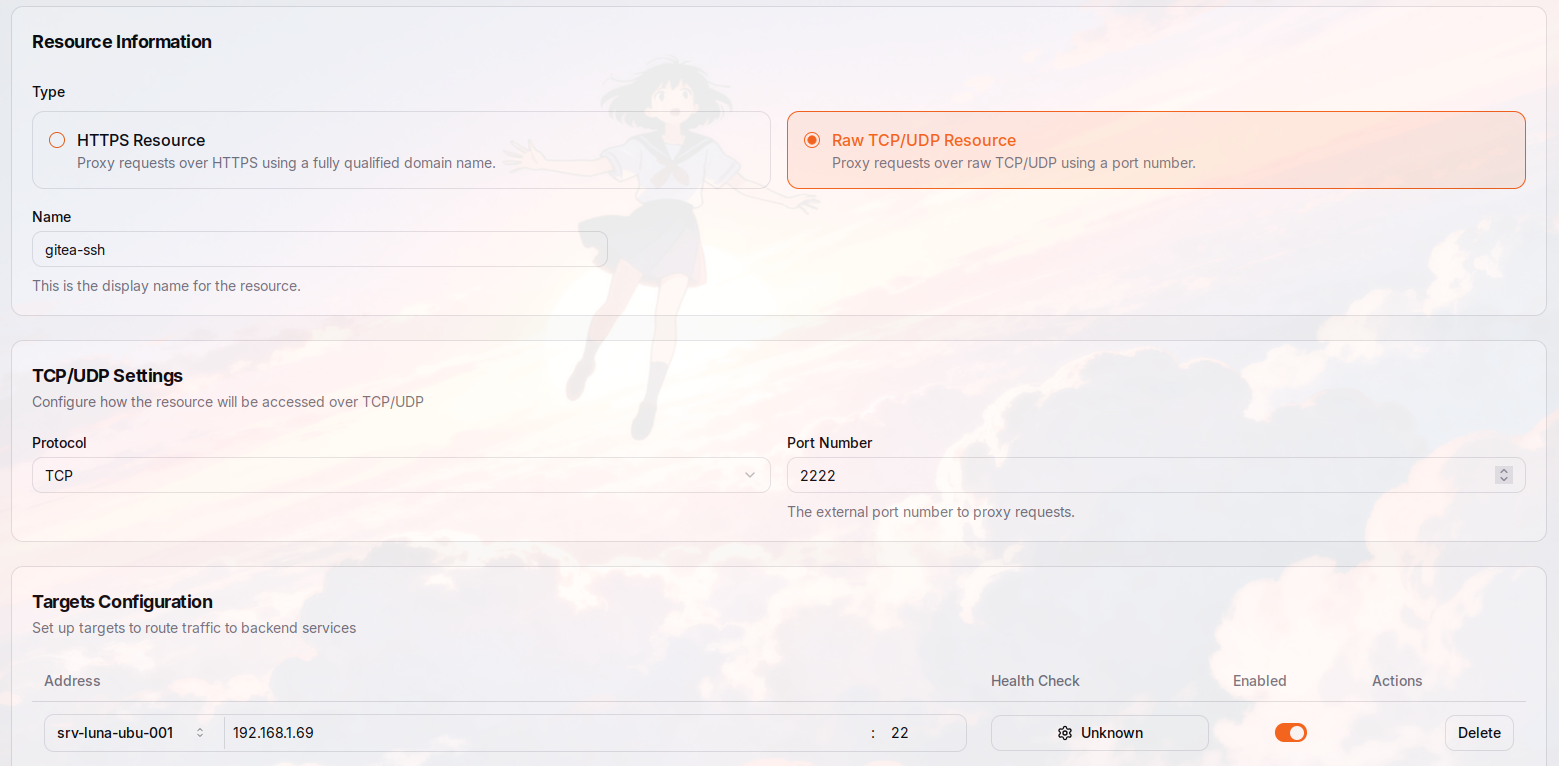
Edit pangolin compose.yaml and add port 2222.
compose.yaml
 1gerbil:
 2    image: docker.io/fosrl/gerbil:1.3.0
 3    container_name: gerbil
 4    restart: unless-stopped
 5    depends_on:
 6      pangolin:
 7        condition: service_healthy
 8    command:
 9      - --reachableAt=http://gerbil:3004
10      - --generateAndSaveKeyTo=/var/config/key
11      - --remoteConfig=http://pangolin:3001/api/v1/
12    volumes:
13      - ./config/:/var/config
14    cap_add:
15      - NET_ADMIN
16      - SYS_MODULE
17    ports:
18      - 51820:51820/udp
19      - 21820:21820/udp
20      - 443:443
21      - 80:80
22      - 2222:2222 # add this port
Add this in trefik config.
1tcp-2222:
2    address: ":2222/tcp"
config/traefik/traefik_config.yml
 1api:
 2  insecure: true
 3  dashboard: true
 4
 5providers:
 6  http:
 7    endpoint: "http://pangolin:3001/api/v1/traefik-config"
 8    pollInterval: "5s"
 9  file:
10    filename: "/etc/traefik/dynamic_config.yml"
11
12experimental:
13  plugins:
14    badger:
15      moduleName: "github.com/fosrl/badger"
16      version: "v1.3.1"
17
18log:
19  level: "INFO"
20  format: "common"
21  maxSize: 100
22  maxBackups: 3
23  maxAge: 3
24  compress: true
25
26certificatesResolvers:
27  letsencrypt:
28    acme:
29      httpChallenge:
30        entryPoint: web
31      email: "marktaguiad@gmail.com"
32      storage: "/letsencrypt/acme.json"
33      caServer: "https://acme-v02.api.letsencrypt.org/directory"
34
35entryPoints:
36  web:
37    address: ":80"
38  websecure:
39    address: ":443"
40    transport:
41      respondingTimeouts:
42        readTimeout: "30m"
43    http:
44      tls:
45        certResolver: "letsencrypt"
46      encodedCharacters:
47        allowEncodedSlash: true
48        allowEncodedQuestionMark: true
49  tcp-2222:
50    address: ":2222/tcp"
51
52serversTransport:
53  insecureSkipVerify: true
54
55ping:
56  entryPoint: "web"
SSH
For small repository, you can get away by using HTTPS. But for larger file, SSH is faster. Configure your ssh config.
~/.ssh/config
1Host gitea.yourserver.com
2  IdentityFile ~/.ssh/id_rsa
3  ServerAliveInterval 240
4  Port 2222
Mirror
Mirror your github repo to your gitea instance.
compose.yaml
 1services:
 2  gitea-mirror:
 3    image: ghcr.io/raylabshq/gitea-mirror:latest
 4    container_name: gitea-mirror
 5    restart: unless-stopped
 6    ports:
 7      - 4321:4321
 8    user: 0:0
 9    volumes:
10      - /srv/hdd/volume/gitea-mirror/data:/app/data
11    environment:
12      # === ABSOLUTELY REQUIRED ===
13      # This MUST be set and CANNOT be changed via UI
14      - BETTER_AUTH_SECRET= # Min 32 chars, required for sessions
15      - BETTER_AUTH_URL=https://gitea-mirror.yourserver.com
16      - BETTER_AUTH_TRUSTED_ORIGINS=https://gitea-mirror.yourserver.com
17      # === CORE SETTINGS ===
18      # These are technically required but have working defaults
19      - NODE_ENV=production
20      - DATABASE_URL=file:data/gitea-mirror.db
21      - HOST=0.0.0.0
22      - PORT=4321
23      - PUBLIC_BETTER_AUTH_URL=https://gitea-mirror.marktaguiad.dev
24      # Optional concurrency controls (defaults match in-app defaults)
25      # If you want perfect ordering of issues and PRs, set these at 1
26      - MIRROR_ISSUE_CONCURRENCY=-3
27      - MIRROR_PULL_REQUEST_CONCURRENCY=-5
28    healthcheck:
29      test:
30        - CMD
31        - wget
32        - --no-verbose
33        - --tries=3
34        - --spider
35        - http://localhost:4321/api/health
36      interval: 30s
37      timeout: 10s
38      retries: 5
39      start_period: 15s
40    networks:
41      - pangolin
42networks:
43  pangolin:
44    name: pangolin
45    external: true