Kubernetes Metallb
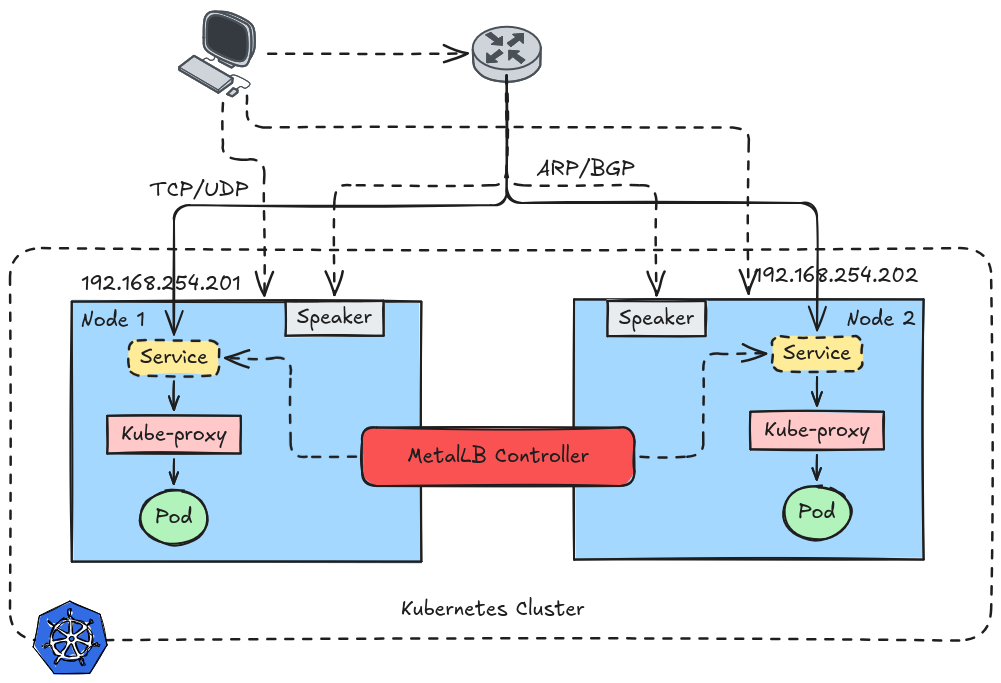 In cloud environments, Kubernetes provides external load balancing easily using Service type LoadBalancer, which integrates with cloud provider load balancers.
However, in bare-metal Kubernetes clusters, there is no built-in implementation for external load balancers. As a result, creating a LoadBalancer service would remain in a pending state.
MetalLB solves this problem by providing a network load balancer implementation for bare-metal Kubernetes clusters, allowing services to expose external IP addresses just like in cloud environments.
Table of Contents
What is MetalLB?
MetalLB is a Kubernetes add-on that:
- Provides external IP addresses for services
- Implements LoadBalancer services in bare-metal
- Integrates with standard networking protocols like ARP and BGP
It works by allocating IP addresses from a configured IP pool and announcing them to the network so external clients can reach the service.
Architecture
Controller
Controller runs as a Deployment it watches Services and assigns IP addresses from the IP Pool.
Speaker
Speaker runs as a DaemonSet on every node, it announces the assigned IPs to the network and handles traffic advertisement using ARP or BGP.
Modes
I won’t be tackling BGP Modes since I dont have a router that is BGP Capable (Cisco, Netgear, etc). We’ll be focusing on Layer 2 Mode.
Layer 2 mode works by announcing the service IP using ARP or NDP on the local network.
- MetalLB selects a leader node
- That node advertises the service IP
- All incoming traffic goes to that node
kube-proxydistributes the traffic to Pods
Environment
Cluster
CNI network plugin is installed and CNI plugin is running on your cluster. If not check this post.
Network
My setup is running on proxmox so by default a bridge network is already created. If you are using a laptop or a PC to test this, then create a bridge network and make sure you are using Ethernet.
Create a bridge network, this will allow our VM to get IP from the router.
I’ve already discussed this in previous post, check this post. Make sure to use the subnet your router is using.
Deploy MetalLB
Check this link for other method of installation.
1kubectl apply -f https://raw.githubusercontent.com/metallb/metallb/v0.15.3/config/manifests/metallb-native.yaml
Verify if pods are running.
1 kubectl get pods -n metallb-system
2NAME                          READY   STATUS    RESTARTS        AGE
3controller-66bdd896c6-f64rg   1/1     Running   1 (41h ago)     4d19h
4speaker-2zd5f                 1/1     Running   1 (4d14h ago)   4d19h
5speaker-5qzvg                 1/1     Running   1 (41h ago)     4d19h
6speaker-khhcx                 1/1     Running   2 (41h ago)     4d19h
Configuration
Create your Metallb IP Pool. Add IP range your cluster can use in your network.
metallb-pool.yaml
1apiVersion: metallb.io/v1beta1
2  kind: IPAddressPool
3  metadata:
4    name: metallb-ip-pool
5    namespace: metallb-system
6  spec:
7    addresses:
8      - "192.168.254.200-192.168.254.250"
Now we have 50 IPs allocatable to the Kubernetes Cluster. Take note of the metadata name.
Example
Let’s create a pod, we’ll use the pod we used in previous post.
pod.yaml
 1apiVersion: v1
 2kind: Pod
 3metadata:
 4  name: pod-demo
 5  labels:
 6    app: pod-demo
 7spec:
 8  containers:
 9    - name: pod1
10      image: ubuntu
11      volumeMounts:
12        - name: queue
13          mountPath: /usr/share/nginx/html
14      command: ["/bin/sh"]
15      args:
16        - -c
17        - |
18          echo "<html>\n<!-- <h2>  </h2> -->\n<h3>my first website</h3>\n<p>look at me mom i'm a devops.</p>" > /usr/share/nginx/html/index.html
19          sleep 3600
20
21    - name: pod2
22      image: nginx
23      ports:
24        - containerPort: 80
25      volumeMounts:
26        - name: queue
27          mountPath: /usr/share/nginx/html
28
29  volumes:
30    - name: queue
31      emptyDir: {}
1kubectl create -f pod.yaml -n demo
Dynamic IP
To use Metallb just add the metallb annotation. Also make sure your selector match with the pod label.
svc-dynamic.yaml
 1apiVersion: v1
 2kind: Service
 3metadata:
 4  name: pod-demo-svc-dynamic
 5  labels:
 6    app: pod-demo-svc
 7  annotations:
 8    metallb.universe.tf/address-pool: metallb-ip-pool
 9
10spec:
11  selector:
12    app: pod-demo
13  ports:
14    - protocol: TCP
15      port: 80
16      targetPort: 80
17  type: LoadBalancer
1kubectl create -f svc-dynamic.yaml -n demo
Verify and curl the IP.
 1kubectl get svc -n demo
 2NAME                   TYPE           CLUSTER-IP     EXTERNAL-IP       PORT(S)        AGE
 3pod-demo-svc-dynamic   LoadBalancer   10.43.129.74   192.168.254.220   80:30080/TCP   21s
 4
 5# test the IP
 6curl 192.168.254.220
 7<html>
 8<!-- <h2>  </h2> -->
 9<h3>my first website</h3>
10<p>look at me mom i'm a devops.</p>
Static IP
Same same but not really, just add the annotaion below to make it static.
nginx-svc-static.yaml
 1apiVersion: v1
 2kind: Service
 3metadata:
 4  name: pod-demo-svc-static
 5  labels:
 6    app: pod-demo-svc-static
 7  annotations:
 8    metallb.universe.tf/address-pool: metallb-ip-pool
 9    metallb.io/loadBalancerIPs: 192.168.254.250
10spec:
11  selector:
12    app: pod-demo
13  ports:
14    - protocol: TCP
15      port: 80
16      targetPort: 80
17  type: LoadBalancer
1kubectl create -f svc-static.yaml -n demo
1kubectl get svc -n demo
2NAME                   TYPE           CLUSTER-IP      EXTERNAL-IP       PORT(S)        AGE
3pod-demo-svc-dynamic   LoadBalancer   10.43.129.74    192.168.254.220   80:30080/TCP   5m37s
4pod-demo-svc-static    LoadBalancer   10.43.234.111   192.168.254.250   80:31733/TCP   24s
Verify.
1curl 192.168.254.250
2<html>
3<!-- <h2>  </h2> -->
4<h3>my first website</h3>
5<p>look at me mom i'm a devops.</p>