Kubernetes Notes - Architecture
Kubernetes (K8s) is an open-source platform used to automate the deployment, scaling, and management of containerized applications. It is designed to simplify running large numbers of containers in production environments.
Table of Contents
Container Management Problem
Modern applications often consist of multiple services built with different technologies.
Example architecture:
- Frontend → Node.js
- Databases → MySQL
- Backend service - Java
All of these services may run as containers.
Key challenges:
- Ensuring high availability
- Maintaining scalability
- Restarting failed services automatically
- Managing dozens or hundreds of containers
Manual management becomes difficult at scale. Kubernetes solves this orchestration problem.
Architecture
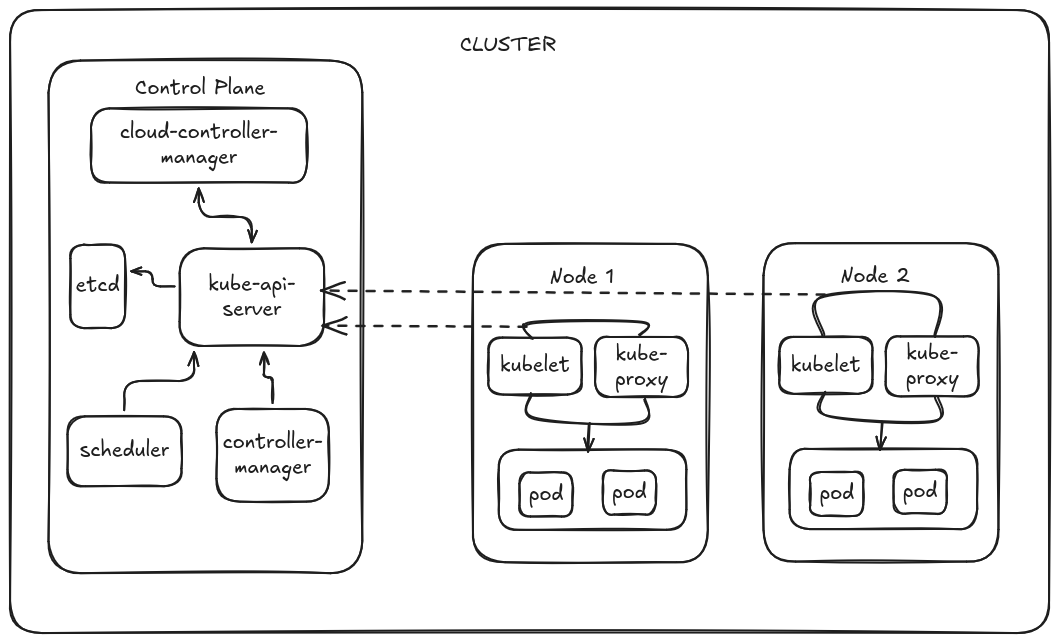
Kubernetes uses a cluster architecture composed of a Control Plane and Worker Nodes.
- Control Plane (Master Components) Manages the cluster and makes global decisions.
- API Server – Entry point for all Kubernetes commands (e.g., kubectl).
- Scheduler – Assigns Pods to appropriate worker nodes.
- Controller Manager – Maintains the desired state (e.g., ensures the correct number of pods).
- etcd – Distributed key-value store that holds all cluster data and configuration.
- Worker Nodes Machines where applications actually run.
- Kubelet – Agent that communicates with the control plane and manages pods on the node.
- Container Runtime – Runs containers (e.g., containerd).
- Kube-proxy – Handles networking and load balancing for services.
- Pods The smallest deployable unit in Kubernetes, containing one or more containers that share storage and networking.
Kubernetes Workflow
Client
Assume we deploy a Pod and expose it externally using a Service of type LoadBalancer.
- User Sends Request
A developer interacts with the cluster using kubectl, which communicates with the Kubernetes API Server.
1kubectl apply -f pod.yaml
kubectl sends a REST API request to the API Server.
Pod Creation
- API Server Validates Request
The API Server:
- Authenticates and authorizes the request
- Validates the object definition
- Stores the desired state in etcd
etcd acts as the source of truth for cluster state.
- Scheduler Assigns a Node
It selects the best node based on:
- CPU / memory availability
- node selectors
- taints and tolerations
- affinity / anti-affinity rules
The scheduler binds the Pod to a Node.
- Kubelet Creates the Pod
On the selected node, the Kubelet receives the Pod specification from the API Server.
Kubelet then:
- Pulls the container image
- Uses a container runtime such as containerd or Docker
- Creates and starts the container
- Reports Pod status back to the API Server
Now the Pod is running on the node.
Service Exposure Workflow
- Service Object is Created
When a Service is created:
1kubectl apply -f service.yaml
The API Server stores the Service definition in etcd.
- Controller Manager Detects the Service
The Kubernetes Controller Manager runs multiple controllers.
The Endpoints Controller:
- Watches for Services
- Uses the Service label selector
- Finds matching Pods
- Creates or updates Endpoints containing Pod IP addresses
This links the Service to the correct Pods.
- Kube-Proxy Programs Network Rules
The Kube-Proxy runs on every node.
It watches the API Server for:
- Services
- Endpoints
Then it configures:
- iptables or IPVS rules
These rules ensure traffic sent to the Service is load balanced across the Pod IPs.
- Cloud Controller Manager
Responsible for receiving requests to create objects and interacting with the underlying cloud provider e.g AWS/GCP
- Creates an external load balancer
For local server or metal cluster MetalLB is an alternative.
CCP
1Kubernetes → Cloud Controller Manager → AWS/GCP/Azure LB
MetalLB
1Kubernetes → MetalLB → Local network (BGP / ARP)
Traffic Flow
For a LoadBalancer Service:
- Cloud provider (Metallb) creates an external load balancer
- Traffic enters the cluster through the load balancer
- It forwards traffic to a NodePort
- kube-proxy routes the traffic to one of the Pods
 1User / Developer
 2      │
 3      ▼
 4kubectl
 5      │
 6      ▼
 7Kubernetes API Server
 8      │
 9      ├─ Authenticates & validates request
10      ├─ Stores objects in etcd
11      ▼
12Scheduler
13      │
14      ├─ Selects a suitable Node
15      ▼
16Kubelet on Node
17      │
18      ├─ Pulls container image
19      ├─ Starts container via container runtime
20      └─ Reports status to API Server
21      ▼
22Pod Running
23      │
24      ▼
25Service Created
26      │
27      ▼
28Controller Manager
29      │
30      ├─ Endpoints controller finds Pods using label selectors
31      └─ Creates Endpoints object
32      ▼
33Kube-Proxy (on each node)
34      │
35      ├─ Watches Services & Endpoints
36      ├─ Programs iptables/IPVS rules
37      └─ Load balances traffic to Pods
38      ▼
39External LoadBalancer
40      │
41      ▼
42Client Traffic → Service → Pods