Kubernetes Notes - Statefulsets
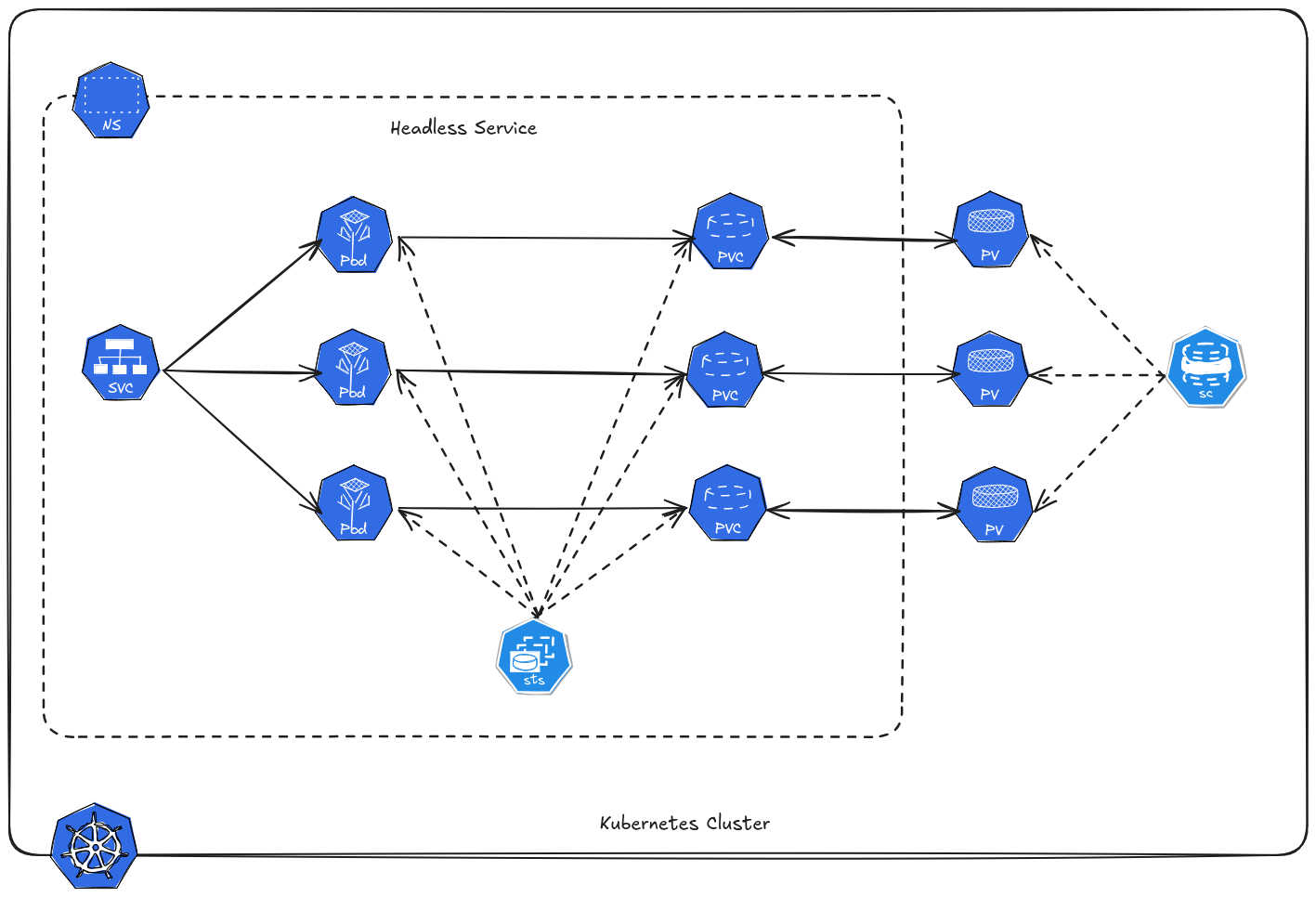 Kubernetes has several controllers to manage workloads. While Deployments are ideal for stateless applications, many real‑world use cases require stateful behavior — applications that store data, maintain identity, and rely on stable storage.
This is where StatefulSets come in. They provide stable identity, stable storage, and ordered deployment for stateful applications.
Table of Contents
Why StatefulSets?
Stateless apps don’t care which instance serves a request. But stateful workloads often require:
- Persistent storage
- Stable network identity
- Ordered startup and teardown
- Consistent naming
Each Pod gets a sticky identity — persistent hostname and name. That’s why this is usually used for Database, you can set the pods into replication setup.
Pods identity survives restarts and rescheduling. Each Pod gets its own PersistentVolumeClaim (PVC) for storage. When a Pod is deleted or recreated, its associated storage remains intact.
Examples of Stateful Systems
- Databases (PostgreSQL, MySQL)
- Message brokers (Kafka, RabbitMQ)
- Key‑value stores (Redis, Etcd)
- Search Engines
Create Statefulset
statefulset.yaml
 1apiVersion: apps/v1
 2kind: StatefulSet
 3metadata:
 4  name: postgresql
 5spec:
 6  serviceName: "postgresql"
 7  replicas: 3
 8  selector:
 9    matchLabels:
10      app: postgresql
11  template:
12    metadata:
13      labels:
14        app: postgresql
15    spec:
16      containers:
17      - name: postgres
18        image: postgres:15
19        ports:
20        - containerPort: 5432
21          name: postgres
22        env:
23        - name: POSTGRES_PASSWORD
24          value: "mypassword"
25        volumeMounts:
26        - name: pgdata
27          mountPath: /var/lib/postgresql/data
28  volumeClaimTemplates:
29  - metadata:
30      name: pgdata
31    spec:
32      accessModes: ["ReadWriteOnce"]
33      resources:
34        requests:
35          storage: 1Gi
Check statefulset.
1kubectl get statefulset -n demo
2NAME         READY   AGE
3postgresql   3/3     31m
Check the pods created by statefulset.
1kubectl get pods -n demo
2NAME           READY   STATUS    RESTARTS   AGE
3postgresql-0   1/1     Running   0          31m
4postgresql-1   1/1     Running   0          31m
5postgresql-2   1/1     Running   0          30m
This verify that pod has controlled identity (pod names are stable), this allows applications to know exactly which instance they’re talking to.
Service
Headless service is used for statefulset. Kubernetes does not allocate a single IP address, and kube-proxy does not handle the traffic - direct pod access.
svc-statefulset.yaml
 1apiVersion: v1
 2kind: Service
 3metadata:
 4  name: postgresql
 5spec:
 6  clusterIP: None
 7  selector:
 8    app: postgresql
 9  ports:
10    - port: 5432
11      targetPort: 5432
Create the service.
1kubectl apply -f svc-statefulset.yaml -n demo
The pods will get stable DNS names like:
1postgresql-0.postgresql
2postgresql-1.postgresql
3postgresql-2.postgresql
Full DNS inside the cluster:
1postgresql-0.postgresql.demo.svc.cluster.local
2postgresql-1.postgresql.demo.svc.cluster.local
3postgresql-2.postgresql.demo.svc.cluster.local
Verify this using the busybox pod in the universe namespace.
 1kubectl exec pod/busybox -n universe -- nslookup postgresql-0.postgresql.demo.svc.cluster.local
 2Server:		10.43.0.10
 3Address:	10.43.0.10:53
 4
 5
 6Name:	postgresql-0.postgresql.demo.svc.cluster.local
 7Address: 172.16.235.46
 8
 9kubectl exec pod/busybox -n universe -- nslookup postgresql-1.postgresql.demo.svc.cluster.local
10Server:		10.43.0.10
11Address:	10.43.0.10:53
12
13
14Name:	postgresql-1.postgresql.demo.svc.cluster.local
15Address: 172.16.59.219
16
17kubectl exec pod/busybox -n universe -- nslookup postgresql-2.postgresql.demo.svc.cluster.local
18Server:		10.43.0.10
19Address:	10.43.0.10:53
20
21Name:	postgresql-2.postgresql.demo.svc.cluster.local
22Address: 172.16.241.92
Volume
volumeClaimTemplates allows each pod replica to automatically provision its own unique PersistentVolumeClaim (PVC).
1  volumeClaimTemplates:
2  - metadata:
3      name: pgdata
4    spec:
5      accessModes: ["ReadWriteOnce"]
6      resources:
7        requests:
8          storage: 1Gi
Verify.
1kubectl get pvc -n demo
2NAME                  STATUS   VOLUME                                     CAPACITY   ACCESS MODES   STORAGECLASS   VOLUMEATTRIBUTESCLASS   AGE
3pgdata-postgresql-0   Bound    pvc-e0ef97d6-0f66-496f-905b-7ad044c400a8   1Gi        RWO            local-path     <unset>                 3h37m
4pgdata-postgresql-1   Bound    pvc-109e4724-e3eb-40f7-8352-11077972ad39   1Gi        RWO            local-path     <unset>                 3h37m
5pgdata-postgresql-2   Bound    pvc-3b1664c1-e048-4458-bdf9-5d2be8eae5e8   1Gi        RWO            local-path     <unset>                 3h36m
Storage is persistent per pod. Even if a pod dies, its PVC remains.
Ordered Creation & Scaling
When applying statefulset, Kubernetes will create Pods in order.
1app-0 ⇒ app-1 ⇒ app-2
If you scale up.
1kubectl scale statefulset app --replicas=5
Pods are added one at a time from 3 to 4 to 5.
Ordered Deletion
Deleting or scaling down also happens one at a time in reverse order:
1app-4 ⇒ app-3 ⇒ app-2
This controlled sequence helps prevent data corruption in distributed systems.