Kubernetes RBAC

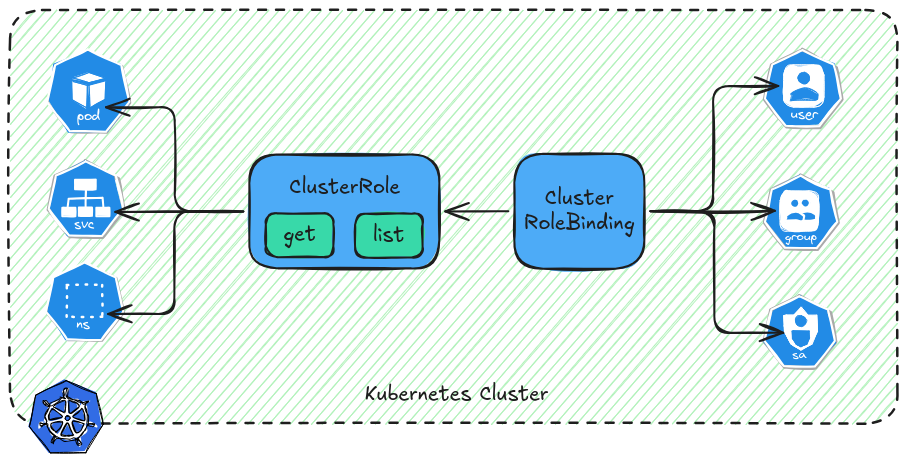
Role‑Based Access Control (RBAC) is a core part of Kubernetes security — it lets you grant precise permissions to users, groups, or service accounts so they can do only what they’re allowed. In this hands‑on guide, we’ll go step‑by‑step through:
- creating a Kubernetes user
- assigning permissions using RBAC
- testing permissions
Read more on this topic here.
Table of Contents
Create Kubernetes User
Let’s automate this process-in the perspective of an admin. Use the script to create user.
- create user
- option to assign user to group
- set user validity (hours/days)
- create kubeconfig file
Script
create-user-k8s.sh
  1#!/bin/bash
  2set -e
  3
  4USER_NAME="$1"
  5GROUP="$2"
  6DURATION="$3"
  7UNIT="$4"
  8
  9# Validate username
 10if [ -z "$USER_NAME" ]; then
 11    echo "Usage: $0 <username> <group or -> <duration> <unit (d/h)>"
 12    exit 1
 13fi
 14
 15# Default values
 16GROUP=${GROUP:-"-"}
 17DURATION=${DURATION:-1}
 18UNIT=${UNIT:-d}
 19
 20# Treat "-" as empty group
 21if [ "$GROUP" == "-" ]; then
 22    GROUP=""
 23fi
 24
 25# Convert duration to seconds
 26if [[ "$UNIT" == "h" ]]; then
 27    EXPIRATION_SECONDS=$((DURATION * 60 * 60))
 28else
 29    EXPIRATION_SECONDS=$((DURATION * 24 * 60 * 60))
 30fi
 31
 32CSR_NAME="${USER_NAME}-csr"
 33K8S_SERVER="https://192.168.254.201:6443"
 34KUBECONFIG_OUT="${USER_NAME}-kubeconfig.yaml"
 35
 36# Path to admin kubeconfig (for approving CSR)
 37ADMIN_KUBECONFIG="${KUBECONFIG:-/home/mcbtaguiad/Documents/develop/kubeadm-ansible/k3s.yaml}"
 38
 39# Creat User DIR
 40USER_DIR="./${USER_NAME}"
 41mkdir -p "${USER_DIR}"
 42
 43# File paths
 44KEY_FILE="${USER_DIR}/${USER_NAME}.pem"
 45CSR_FILE="${USER_DIR}/${USER_NAME}.csr"
 46CRT_FILE="${USER_DIR}/${USER_NAME}.crt"
 47CSR_YAML="${USER_DIR}/${CSR_NAME}.yaml"
 48KUBECONFIG_FILE="${USER_DIR}/${KUBECONFIG_OUT}"
 49
 50echo "Generating private key..."
 51openssl genrsa -out ${KEY_FILE} 2048
 52
 53echo "Creating CSR..."
 54if [ -z "$GROUP" ]; then
 55  openssl req -new -key ${KEY_FILE} -out ${CSR_FILE} -subj "/CN=${USER_NAME}"
 56else
 57  openssl req -new -key ${KEY_FILE} -out ${CSR_FILE} -subj "/CN=${USER_NAME}/O=${GROUP}"
 58fi
 59
 60echo "Encoding CSR..."
 61CSR_BASE64=$(base64 -w 0 ${CSR_FILE})
 62
 63echo "Creating CSR YAML with expiration of ${EXPIRATION_SECONDS} seconds..."
 64cat <<EOF > ${CSR_YAML}
 65apiVersion: certificates.k8s.io/v1
 66kind: CertificateSigningRequest
 67metadata:
 68  name: ${CSR_NAME}
 69spec:
 70  request: ${CSR_BASE64}
 71  signerName: kubernetes.io/kube-apiserver-client
 72  expirationSeconds: ${EXPIRATION_SECONDS}
 73  usages:
 74  - digital signature
 75  - key encipherment
 76  - client auth
 77EOF
 78
 79echo "Applying CSR..."
 80kubectl --kubeconfig=${ADMIN_KUBECONFIG} apply -f ${CSR_YAML}
 81
 82echo "Approving CSR..."
 83kubectl --kubeconfig=${ADMIN_KUBECONFIG} certificate approve ${CSR_NAME}
 84
 85echo "Fetching signed certificate..."
 86kubectl --kubeconfig=${ADMIN_KUBECONFIG} get csr ${CSR_NAME} -o jsonpath='{.status.certificate}' | base64 -d > ${CRT_FILE}
 87
 88echo "Encoding cert and key..."
 89CRT_BASE64=$(base64 -w 0 ${CRT_FILE})
 90KEY_BASE64=$(base64 -w 0 ${KEY_FILE})
 91
 92echo "Extracting cluster CA..."
 93CLUSTER_NAME=$(kubectl --kubeconfig="${ADMIN_KUBECONFIG}" config view --raw -o jsonpath='{.contexts[0].context.cluster}')
 94
 95CA_DATA=$(kubectl --kubeconfig="${ADMIN_KUBECONFIG}" config view --raw -o jsonpath="{.clusters[?(@.name=='$CLUSTER_NAME')].cluster.certificate-authority-data}")
 96
 97if [ -z "$CA_DATA" ]; then
 98    CA_PATH=$(kubectl --kubeconfig="${ADMIN_KUBECONFIG}" config view --raw -o jsonpath="{.clusters[?(@.name=='$CLUSTER_NAME')].cluster.certificate-authority}")
 99    if [ ! -f "$CA_PATH" ]; then
100        echo "Error: certificate-authority file '$CA_PATH' not found"
101        exit 1
102    fi
103    CA_DATA=$(base64 -w 0 "$CA_PATH")
104fi
105
106echo "Creating kubeconfig..."
107cat <<EOF > ${KUBECONFIG_FILE}
108apiVersion: v1
109kind: Config
110
111clusters:
112- name: k8s-cluster
113  cluster:
114    server: ${K8S_SERVER}
115    certificate-authority-data: ${CA_DATA}
116
117users:
118- name: ${USER_NAME}
119  user:
120    client-certificate-data: ${CRT_BASE64}
121    client-key-data: ${KEY_BASE64}
122
123contexts:
124- name: ${USER_NAME}-context
125  context:
126    cluster: k8s-cluster
127    user: ${USER_NAME}
128
129current-context: ${USER_NAME}-context
130EOF
131
132echo "Done!"
133echo "All files for user '${USER_NAME}' are in: ${USER_DIR}"
134echo "Kubeconfig: ${KUBECONFIG_FILE}"
Create User
Create user jonathan in group admin.
 1./create-user-k8s.sh jonathan admin 7 d
 2Generating private key...
 3Creating CSR...
 4Encoding CSR...
 5Creating CSR YAML with expiration of 604800 seconds...
 6Applying CSR...
 7certificatesigningrequest.certificates.k8s.io/jonathan-csr created
 8Approving CSR...
 9certificatesigningrequest.certificates.k8s.io/jonathan-csr approved
10Fetching signed certificate...
11Encoding cert and key...
12Extracting cluster CA...
13Creating kubeconfig...
14Done!
15All files for user 'jonathan' are in: ./jonathan
16Kubeconfig: ./jonathan/jonathan-kubeconfig.yaml
Verify
Verify if user is created and approved.
1kubectl get csr
2NAME           AGE     SIGNERNAME                            REQUESTOR      REQUESTEDDURATION   CONDITION
3jonathan-csr   4m43s   kubernetes.io/kube-apiserver-client   system:admin   7d                  Approved,Issued
Test
Test kubeconfig.
1export KUBECONFIG=./jonathan/jonathan-kubeconfig.yaml
2kubectl get pods -A
3Error from server (Forbidden): pods is forbidden: User "jonathan" cannot list resource "pods" in API group "" at the cluster scope
This confirms that user jonathan does not have a permission yet. Let’s discuss and demonstrate in the following sections.
Delete User
Manual delete user or wait till cert validity expires.
1kubectl delete csr jonathan-csr
Roles & RoleBindings
If you want to bind the user to namespace only.
- Roles – Namespace‑scoped permission sets
- RoleBindings – Bind a Role to a user, group, or service account in a namespace
Let’s grant permission user jonathan to namespace demo-prod, it can manage pods withing the namespace.
role.yaml
1apiVersion: rbac.authorization.k8s.io/v1
2kind: Role
3metadata:
4  namespace: demo-prod
5  name: pod-admin
6rules:
7- apiGroups: [""]
8  resources: ["pods"]
9  verbs: ["get", "list", "create", "delete"]
rolebinding.yaml
 1apiVersion: rbac.authorization.k8s.io/v1
 2kind: RoleBinding
 3metadata:
 4  name: pod-manager-binding
 5  namespace: demo-prod
 6subjects:
 7- kind: User
 8  name: jonathan
 9  apiGroup: rbac.authorization.k8s.io
10roleRef:
11  kind: Role
12  name: pod-admin
13  apiGroup: rbac.authorization.k8s.io
Apply manifest, make sure you are using admin account when applying this.
1kubectl create -f role.yaml
2role.rbac.authorization.k8s.io/pod-admin created
3
4kubectl create -f rolebinding.yaml
5rolebinding.rbac.authorization.k8s.io/pod-manager-binding created
Verify if jonathan can list pods in namespace demo-prod.
1kubectl --kubeconfig=jonathan-kubeconfig.yaml get pods -n demo-prod
2NAME                          READY   STATUS    RESTARTS        AGE
3backend-v1-6d98ddbb6f-8d8mw   2/2     Running   1 (4h15m ago)   5d21h
4backend-v2-654764d985-6vhqf   2/2     Running   1 (4h15m ago)   5d21h
5frontend-6945d865bc-ssmbb     2/2     Running   1 (4h15m ago)   5d21h
6monitor-v1-bdf9bd784-qnmtg    2/2     Running   1 (4h15m ago)   5d21h
7monitor-v2-67fdbb578b-8lb44   2/2     Running   1 (4h15m ago)   5d21h
8redis-7849668f57-sxck7        2/2     Running   1 (4h15m ago)   5d21h
Test if jonathan can access other namespace.
1kubectl --kubeconfig=jonathan-kubeconfig.yaml get pods -n monitoring
2Error from server (Forbidden): pods is forbidden: User "jonathan" cannot list resource "pods" in API group "" in the namespace "monitoring"
Cluster Roles & Cluster Role Bindings
This is used for cluster level permissions.
- ClusterRoles – Permissions that apply cluster‑wide
- ClusterRoleBindings – Bind a ClusterRole to a subject across all namespaces
Now let’s make user jonathan can access pods in all namespace.
clusterrole.yaml
1apiVersion: rbac.authorization.k8s.io/v1
2kind: ClusterRole
3metadata:
4  name: pod-admin
5rules:
6- apiGroups: [""]
7  resources: ["pods"]
8  verbs: ["get", "list", "create", "delete"]
clusterrolebinding.yaml
 1apiVersion: rbac.authorization.k8s.io/v1
 2kind: ClusterRoleBinding
 3metadata:
 4  name: pod-manager-binding
 5subjects:
 6- kind: User
 7  name: jonathan
 8  apiGroup: rbac.authorization.k8s.io
 9roleRef:
10  kind: ClusterRole
11  name: pod-admin
12  apiGroup: rbac.authorization.k8s.io
Apply manifest.
1kubectl create -f clusterole.yaml
2clusterrole.rbac.authorization.k8s.io/pod-admin created
3
4kubectl create -f clusterolebinding.yaml
5clusterrolebinding.rbac.authorization.k8s.io/pod-manager-binding created
Verify if jonathan can now access other namespace.
 1kubectl --kubeconfig=jonathan-kubeconfig.yaml get pods -n monitoring
 2NAME                                                        READY   STATUS    RESTARTS        AGE
 3alertmanager-kube-prometheus-stack-alertmanager-0           2/2     Running   2 (4h42m ago)   11d
 4kube-prometheus-stack-grafana-b9b5555c7-xsqml               3/3     Running   3 (4h42m ago)   11d
 5kube-prometheus-stack-kube-state-metrics-567d49447b-rvxzd   1/1     Running   1 (4h42m ago)   11d
 6kube-prometheus-stack-operator-5cdf745d5b-9gbnk             1/1     Running   1 (4h42m ago)   11d
 7kube-prometheus-stack-prometheus-node-exporter-dvz4r        1/1     Running   1 (4h42m ago)   11d
 8kube-prometheus-stack-prometheus-node-exporter-jfnxx        1/1     Running   1 (4h43m ago)   11d
 9kube-prometheus-stack-prometheus-node-exporter-sw8x4        1/1     Running   1 (4h42m ago)   11d
10loki-0                                                      2/2     Running   2 (4h42m ago)   5d11h
11loki-canary-2wn2l                                           1/1     Running   1 (4h42m ago)   5d11h
12loki-canary-5j8wh                                           1/1     Running   1 (4h43m ago)   5d11h
13loki-canary-kqjj4                                           1/1     Running   1 (4h42m ago)   5d11h
14loki-chunks-cache-0                                         2/2     Running   2 (4h43m ago)   5d11h
15loki-gateway-7dbfcfc68d-qjbs8                               1/1     Running   1 (4h42m ago)   5d11h
16loki-results-cache-0                                        2/2     Running   2 (4h42m ago)   5d11h
17prometheus-kube-prometheus-stack-prometheus-0               2/2     Running   4 (4h43m ago)   11d