Provision libvirt Multiple VM with Terraform/Opentofu
Background
If you are like me that tried to run proxmox on debian or ubuntu while also installing a desktop environment. Cause you are broke and don’t have a seperate hardware to run proxmox, then you’ve come to the right place. Here we will setup libvirt/kvm and opentofu/terraform to automate the provisioning.
Table of Contents
Install Dependencies
1apt install qemu-kvm libvirt-daemon-system libvirt-clients bridge-utils -y
2
3# enable and start libvirtd service
4sudo systemctl enable --now libvirtd
Verify if the host is can now run guest machine.
virt-host-validate
Add Permission to user
Add user to libvirt group to manage VM without using sudo.
sudo adduser $USER libvirt
Network
If you don’t need network access to your vm then you can skip this. To connect you VM to you physical network, we need to create a bridge that act likes a nic on you vm (bridge network).
Using nmcli
nmcli connection down “Wired connection 1” nmcli connection add type bridge ifname br0 con-name bridge-br0 nmcli connection add type ethernet ifname enp0s31f6 master br0 con-name bridge-slave-enp0s31f6 nmcli connection modify bridge-br0 ipv4.method manual ipv4.addresses 192.168.254.169/24 ipv4.gateway 192.168.254.254 ipv4.dns “8.8.8.8 1.1.1.1” ipv4.ignore-auto-dns yes nmcli connection up bridge-br0
Using netplan
/etc/netplan/01-netcfg.yaml
 1network:
 2  version: 2
 3  renderer: networkd
 4  ethernets:
 5    enp4s0:
 6      dhcp4: no
 7  bridges:
 8    br0:
 9      interfaces: [enp4s0]
10      dhcp4: no
11      addresses: [192.168.254.169/24]
12      routes:
13        - to: default
14          via: 192.168.254.254
15      nameservers:
16        addresses: [8.8.8.8, 1.1.1.1]
netplan apply
Create libvirt network. br0.xml
1<network>
2  <name>br0</name>
3  <forward mode='bridge'/>
4  <bridge name='br0'/>
5</network>
1sudo virsh net-define br0.xml
2sudo virsh net-start br0
3sudo virsh net-autostart br0
Verify.
1$ virsh net-list --all
2 Name      State    Autostart   Persistent
3--------------------------------------------
4 br0       active   yes         yes
5 default   active   yes         yes
Cockpit
Enable cockpit, this provide web UI to manage your server and VM.
1apt install cockpit cockpit-machines -y
2systemctl enable --now cockpit.socket
Open browser and navigate to https://localhost:9090.
Create VM
Login to cockpit and turn on administrative access. Then click Virttual Machines. For this example i downloaded a cloud-init image to /mnt/ssd/develop/iso.
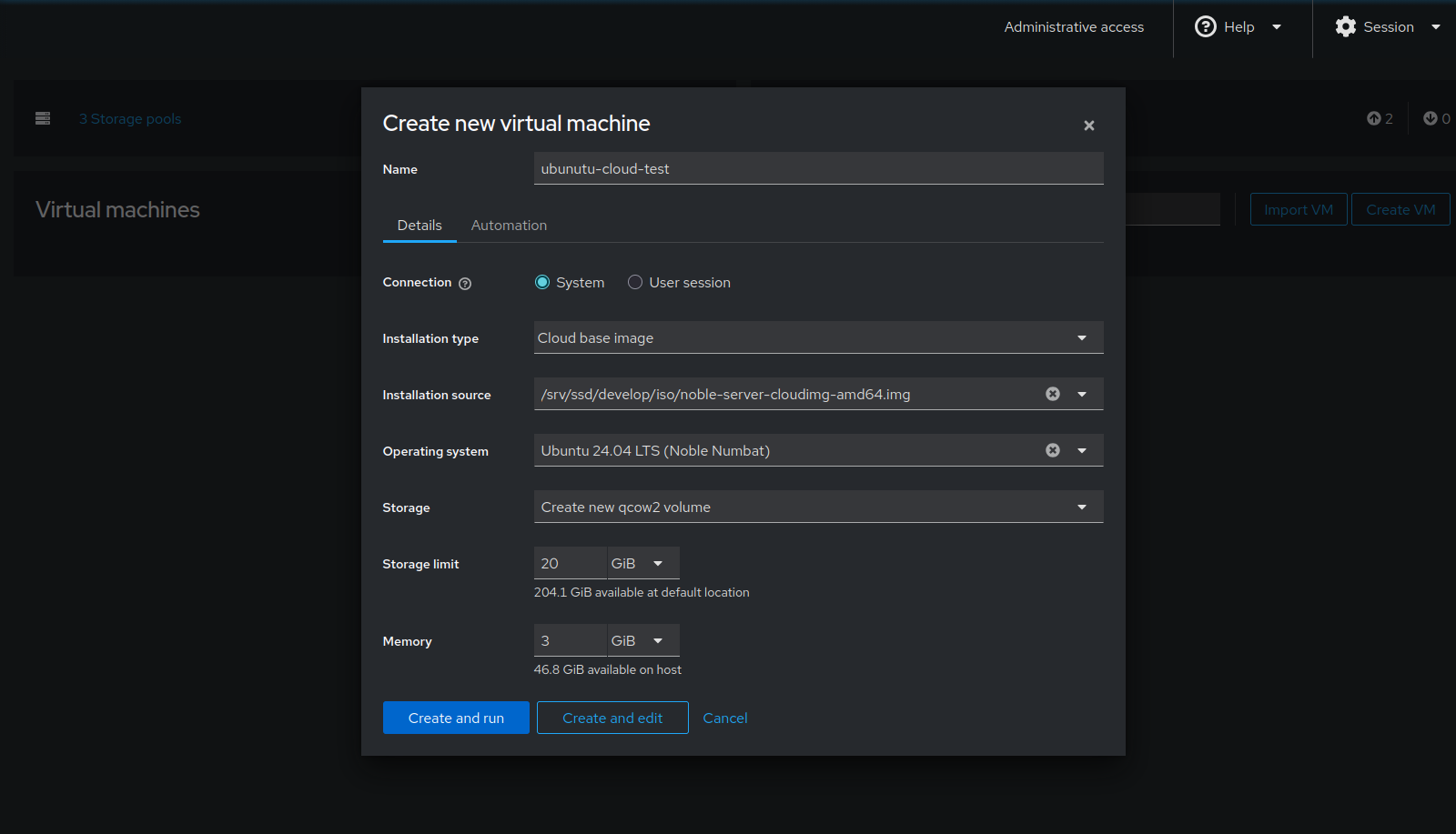
Click on Automation and edit login config.
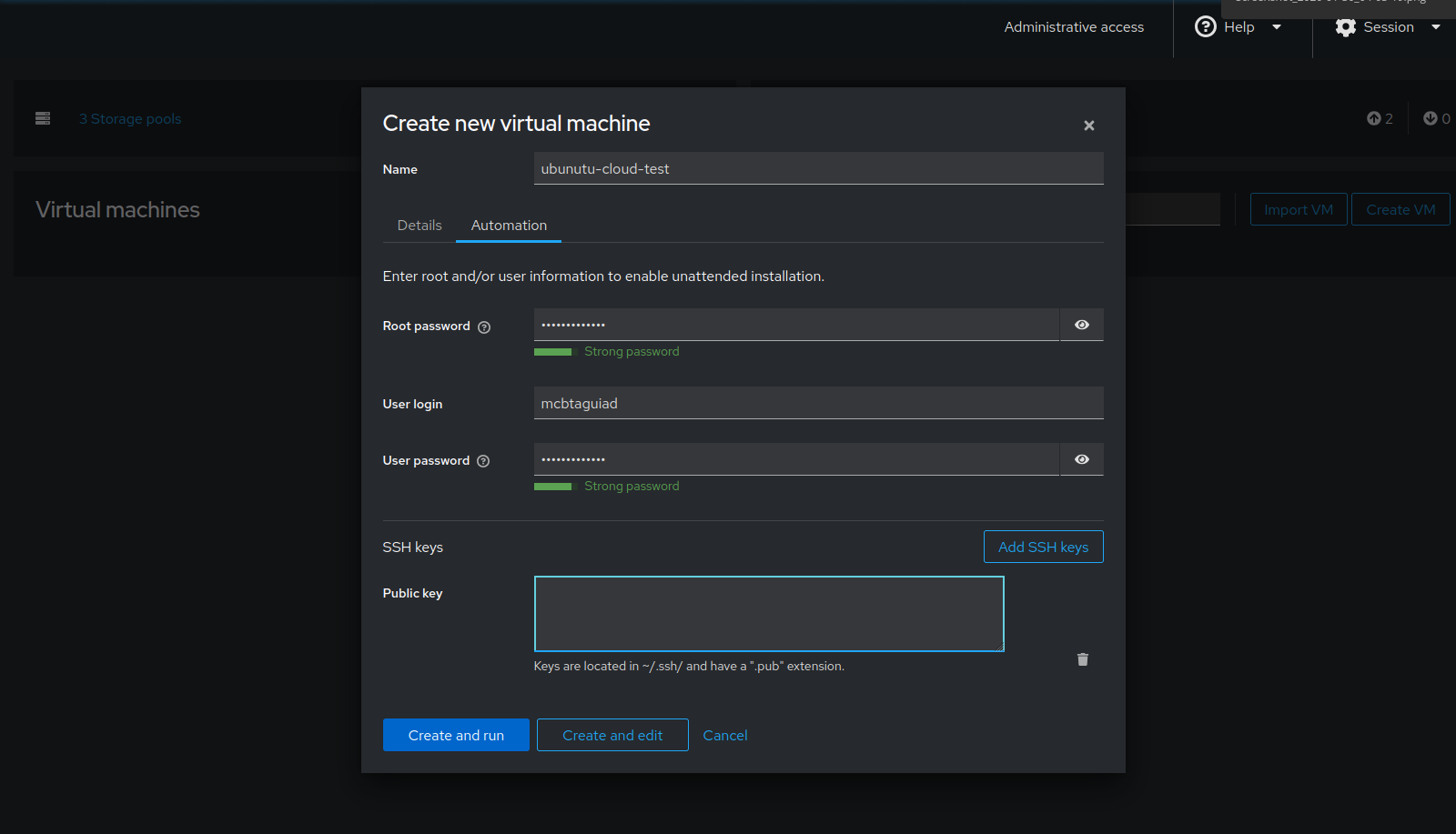
Then Create and Edit. Here you can configure ram, cpu and edit. For now just click install and run the vm.
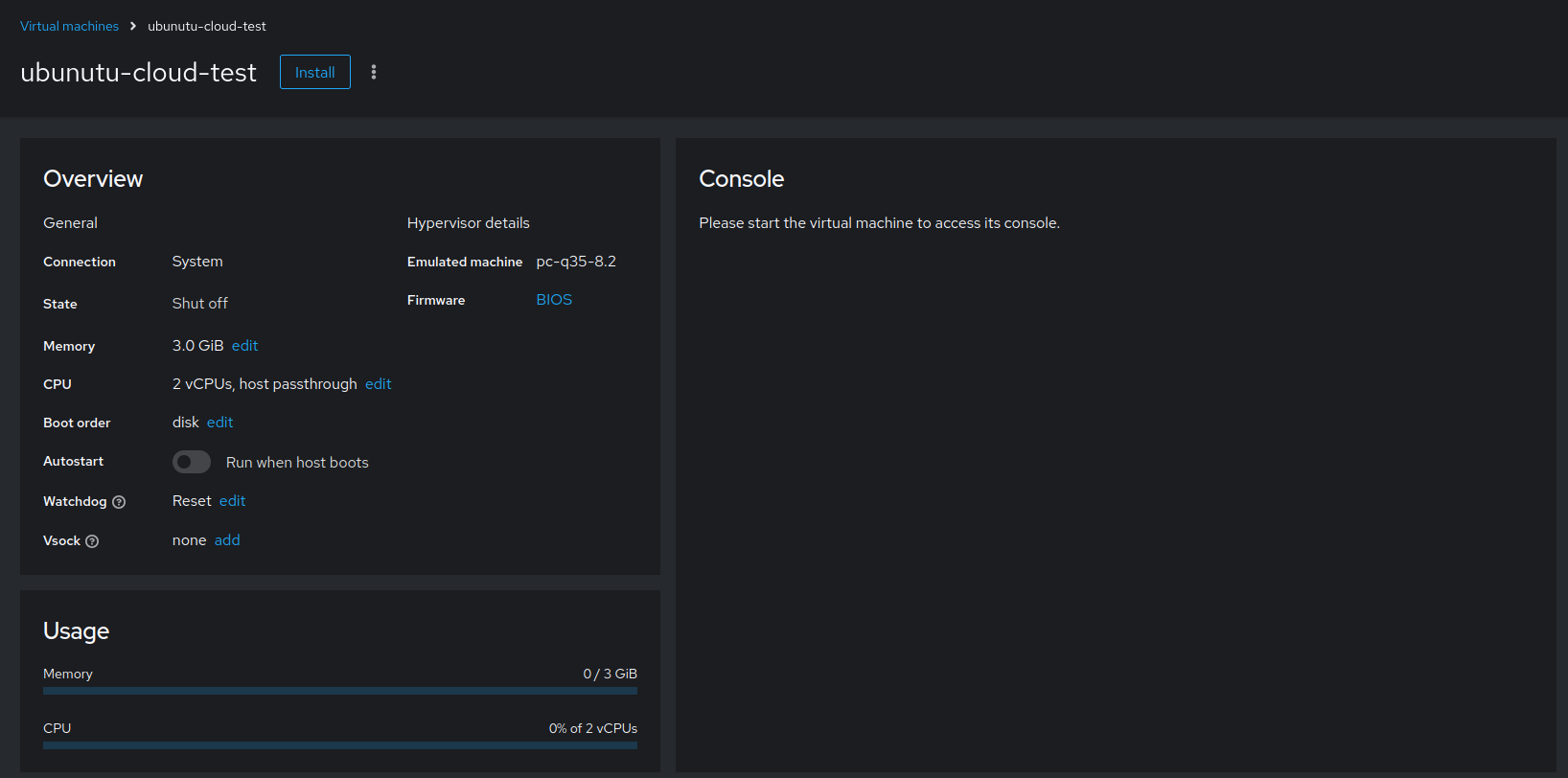
Permission Error
Look at this thread to find possible solution.
For my case I used this solution. Edit /etc/libvirt/qemu.conf, look for security_driver.
security_driver = "none"
Restart service.
systemctl restart libvirtd
SSH to VM.
 1$ ssh 192.168.254.26
 2Expanded Security Maintenance for Applications is not enabled.
 3
 40 updates can be applied immediately.
 5
 6Enable ESM Apps to receive additional future security updates.
 7See https://ubuntu.com/esm or run: sudo pro status
 8
 9
10The list of available updates is more than a week old.
11To check for new updates run: sudo apt update
12
13
14The programs included with the Ubuntu system are free software;
15the exact distribution terms for each program are described in the
16individual files in /usr/share/doc/*/copyright.
17
18Ubuntu comes with ABSOLUTELY NO WARRANTY, to the extent permitted by
19applicable law.
20
21$
Optional: Using Virt-Manager
You can also explore virt-manager. This has a more classic GUI, unlike cockpit which is designed for multi-server and container management, this focus mainly on VM administration.
1apt install virt-manager
Terraform/Opentofu
init
Define the provider, we’ll be using provider by dmacvicar/libvirt.
Create the directory and files.
touch main.tf providers.tf terraform.tfvars variables.tf
Define the provider.
main.tf
1terraform {
2 required_version = ">= 0.13"
3  required_providers {
4    libvirt = {
5      source  = "dmacvicar/libvirt"
6      version = "0.8.3"
7    }
8  }
9}
If you’re running terraform on the host use;
uri = "qemu:///system"
If you’re running terraform remotely. Change username and IP.
uri = "qemu+ssh://root@192.168.254.48/system"
providers.tf
1provider "libvirt" {
2  #uri = "qemu:///system"
3  uri = "qemu+ssh://root@192.168.254.48/system"
4}
Save the files and initialize Opentofu. If all goes well, the provider will be installed and Opentofu has been initialized.
 1$ tofu init
 2
 3Initializing the backend...
 4
 5Initializing provider plugins...
 6- Reusing previous version of dmacvicar/libvirt from the dependency lock file
 7- Reusing previous version of hashicorp/template from the dependency lock file
 8- Using previously-installed dmacvicar/libvirt v0.8.3
 9- Using previously-installed hashicorp/template v2.2.0
10
11╷
12│ Warning: Additional provider information from registry
13│
14│ The remote registry returned warnings for registry.opentofu.org/hashicorp/template:
15│ - This provider is deprecated. Please use the built-in template functions instead of the provider.
16╵
17
18OpenTofu has been successfully initialized!
19
20You may now begin working with OpenTofu. Try running "tofu plan" to see
21any changes that are required for your infrastructure. All OpenTofu commands
22should now work.
23
24If you ever set or change modules or backend configuration for OpenTofu,
25rerun this command to reinitialize your working directory. If you forget, other
26commands will detect it and remind you to do so if necessary.
Variable and Config
Before we execute terraform plan, let us first define some variables and config. Under img_url_path; it is where the cloud-init image downloaded earlier.
For vm_names, it is defined in array-meaning it will create VM depending on how many are defined in the array. In this example it will create master and worker VM.
variables.tf
 1variable "img_url_path" {
 2  default = "/home/User/Downloads/noble-server-cloudimg-amd64.img"
 3}
 4
 5variable "vm_names" {
 6  description = "vm names"
 7  type = list(string)
 8  default = ["master", "worker"]
 9}
10
11# This is optional, if you want to create volume pool
12variable "libvirt_disk_path" {
13  description = "path for libvirt pool"
14  default     = "/mnt/nvme0n1/kvm-pool"
15}
For minimal setup, let set the user and password to root and password123.
cloud_init.cfg
1ssh_pwauth: True
2chpasswd:
3  list: |
4     root:password123
5  expire: False
Also for network, it will just be using the default network and will get IP from dhcp. For other configuration check this link1, link2.
network_config.cfg
1version: 2
2ethernets:
3  ens3:
4    dhcp4: true
plan
Let’s now create the VM.
main.tf
 1terraform {
 2 required_version = ">= 0.13"
 3  required_providers {
 4    libvirt = {
 5      source  = "dmacvicar/libvirt"
 6      version = "0.8.3"
 7    }
 8  }
 9}
10
11
12resource "libvirt_volume" "k8s-cloudinit" {
13  count = length(var.vm_names)
14  name   = "${var.vm_names[count.index]}"
15  pool   = "kvm-pool"
16  source = var.img_url_path
17  format = "qcow2"
18}
19
20data "template_file" "user_data" {
21  template = file("${path.module}/cloud_init.cfg")
22}
23
24data "template_file" "network_config" {
25  template = file("${path.module}/network_config.cfg")
26}
27
28# for more info about paramater check this out
29# https://github.com/dmacvicar/terraform-provider-libvirt/blob/master/website/docs/r/cloudinit.html.markdown
30# Use CloudInit to add our ssh-key to the instance
31# you can add also meta_data field
32resource "libvirt_cloudinit_disk" "commoninit" {
33  name           = "commoninit.iso"
34  user_data      = data.template_file.user_data.rendered
35  network_config = data.template_file.network_config.rendered
36}
37
38
39# Create the machine
40resource "libvirt_domain" "domain-k8s" {
41  count = length(var.vm_names)
42  name = var.vm_names[count.index]
43  memory = "2048"
44  vcpu   = 2
45
46  cloudinit = libvirt_cloudinit_disk.commoninit.id
47
48  network_interface {
49    network_name = "default"
50  }
51
52  # IMPORTANT: this is a known bug on cloud images, since they expect a console
53  # we need to pass it
54  # https://bugs.launchpad.net/cloud-images/+bug/1573095
55  console {
56    type        = "pty"
57    target_port = "0"
58    target_type = "serial"
59  }
60
61  console {
62    type        = "pty"
63    target_type = "virtio"
64    target_port = "1"
65  }
66
67  disk {
68    volume_id = libvirt_volume.k8s-cloudinit[count.index].id
69  }
70
71  graphics {
72    type        = "spice"
73    listen_type = "address"
74    autoport    = true
75  }
76
77}
Save the file and we can run Opentofu plan command.
  1$ tofu plan
  2data.template_file.network_config: Reading...
  3data.template_file.network_config: Read complete after 0s [id=b36a1372ce4ea68b514354202c26c0365df9a17f25cd5acdeeaea525cd913edc]
  4data.template_file.user_data: Reading...
  5data.template_file.user_data: Read complete after 0s [id=69a2f32bd20850703577ebc428d302999bc1b2e11021b1221e7297fef83b2479]
  6
  7OpenTofu used the selected providers to generate the following execution plan. Resource actions are indicated with the following symbols:
  8  + create
  9
 10OpenTofu will perform the following actions:
 11
 12  # libvirt_cloudinit_disk.commoninit will be created
 13  + resource "libvirt_cloudinit_disk" "commoninit" {
 14      + id             = (known after apply)
 15      + name           = "commoninit.iso"
 16      + network_config = <<-EOT
 17            version: 2
 18            ethernets:
 19              ens3:
 20                dhcp4: true
 21        EOT
 22      + pool           = "default"
 23      + user_data      = <<-EOT
 24            #cloud-config
 25            # vim: syntax=yaml
 26            #
 27            # ***********************
 28            #   ---- for more examples look at: ------
 29            # ---> https://cloudinit.readthedocs.io/en/latest/topics/examples.html
 30            # ******************************
 31            #
 32            # This is the configuration syntax that the write_files module
 33            # will know how to understand. encoding can be given b64 or gzip or (gz+b64).
 34            # The content will be decoded accordingly and then written to the path that is
 35            # provided.
 36            #
 37            # Note: Content strings here are truncated for example purposes.
 38            ssh_pwauth: True
 39            chpasswd:
 40              list: |
 41                 root:password123
 42              expire: False
 43        EOT
 44    }
 45
 46  # libvirt_domain.domain-k8s[0] will be created
 47  + resource "libvirt_domain" "domain-k8s" {
 48      + arch        = (known after apply)
 49      + autostart   = (known after apply)
 50      + cloudinit   = (known after apply)
 51      + emulator    = (known after apply)
 52      + fw_cfg_name = "opt/com.coreos/config"
 53      + id          = (known after apply)
 54      + machine     = (known after apply)
 55      + memory      = 2048
 56      + name        = "master"
 57      + qemu_agent  = false
 58      + running     = true
 59      + type        = "kvm"
 60      + vcpu        = 2
 61
 62      + console {
 63          + source_host    = "127.0.0.1"
 64          + source_service = "0"
 65          + target_port    = "0"
 66          + target_type    = "serial"
 67          + type           = "pty"
 68        }
 69      + console {
 70          + source_host    = "127.0.0.1"
 71          + source_service = "0"
 72          + target_port    = "1"
 73          + target_type    = "virtio"
 74          + type           = "pty"
 75        }
 76
 77      + cpu (known after apply)
 78
 79      + disk {
 80          + scsi      = false
 81          + volume_id = (known after apply)
 82          + wwn       = (known after apply)
 83        }
 84
 85      + graphics {
 86          + autoport       = true
 87          + listen_address = "127.0.0.1"
 88          + listen_type    = "address"
 89          + type           = "spice"
 90        }
 91
 92      + network_interface {
 93          + addresses    = (known after apply)
 94          + hostname     = (known after apply)
 95          + mac          = (known after apply)
 96          + network_id   = (known after apply)
 97          + network_name = "default"
 98        }
 99
100      + nvram (known after apply)
101    }
102
103  # libvirt_domain.domain-k8s[1] will be created
104  + resource "libvirt_domain" "domain-k8s" {
105      + arch        = (known after apply)
106      + autostart   = (known after apply)
107      + cloudinit   = (known after apply)
108      + emulator    = (known after apply)
109      + fw_cfg_name = "opt/com.coreos/config"
110      + id          = (known after apply)
111      + machine     = (known after apply)
112      + memory      = 2048
113      + name        = "worker"
114      + qemu_agent  = false
115      + running     = true
116      + type        = "kvm"
117      + vcpu        = 2
118
119      + console {
120          + source_host    = "127.0.0.1"
121          + source_service = "0"
122          + target_port    = "0"
123          + target_type    = "serial"
124          + type           = "pty"
125        }
126      + console {
127          + source_host    = "127.0.0.1"
128          + source_service = "0"
129          + target_port    = "1"
130          + target_type    = "virtio"
131          + type           = "pty"
132        }
133
134      + cpu (known after apply)
135
136      + disk {
137          + scsi      = false
138          + volume_id = (known after apply)
139          + wwn       = (known after apply)
140        }
141
142      + graphics {
143          + autoport       = true
144          + listen_address = "127.0.0.1"
145          + listen_type    = "address"
146          + type           = "spice"
147        }
148
149      + network_interface {
150          + addresses    = (known after apply)
151          + hostname     = (known after apply)
152          + mac          = (known after apply)
153          + network_id   = (known after apply)
154          + network_name = "default"
155        }
156
157      + nvram (known after apply)
158    }
159
160  # libvirt_volume.k8s-cloudinit[0] will be created
161  + resource "libvirt_volume" "k8s-cloudinit" {
162      + format = "qcow2"
163      + id     = (known after apply)
164      + name   = "master"
165      + pool   = "kvm-pool"
166      + size   = (known after apply)
167      + source = "/home/mcbtaguiad/Downloads/noble-server-cloudimg-amd64.img"
168    }
169
170  # libvirt_volume.k8s-cloudinit[1] will be created
171  + resource "libvirt_volume" "k8s-cloudinit" {
172      + format = "qcow2"
173      + id     = (known after apply)
174      + name   = "worker"
175      + pool   = "kvm-pool"
176      + size   = (known after apply)
177      + source = "/home/mcbtaguiad/Downloads/noble-server-cloudimg-amd64.img"
178    }
179
180Plan: 5 to add, 0 to change, 0 to destroy.
181
182─────────────────────────────────────────────────────────────────────────────────────────────────────────────────────────────────────────────────────────────────────
183
184Note: You didn't use the -out option to save this plan, so OpenTofu can't guarantee to take exactly these actions if you run "tofu apply" now.
apply
After plan-review the output summary of terraform plan, we can now create the VM.
  1$ tofu apply
  2data.template_file.network_config: Reading...
  3data.template_file.network_config: Read complete after 0s [id=b36a1372ce4ea68b514354202c26c0365df9a17f25cd5acdeeaea525cd913edc]
  4data.template_file.user_data: Reading...
  5data.template_file.user_data: Read complete after 0s [id=69a2f32bd20850703577ebc428d302999bc1b2e11021b1221e7297fef83b2479]
  6
  7OpenTofu used the selected providers to generate the following execution plan. Resource actions are indicated with the following symbols:
  8  + create
  9
 10OpenTofu will perform the following actions:
 11
 12  # libvirt_cloudinit_disk.commoninit will be created
 13  + resource "libvirt_cloudinit_disk" "commoninit" {
 14      + id             = (known after apply)
 15      + name           = "commoninit.iso"
 16      + network_config = <<-EOT
 17            version: 2
 18            ethernets:
 19              ens3:
 20                dhcp4: true
 21        EOT
 22      + pool           = "default"
 23      + user_data      = <<-EOT
 24            #cloud-config
 25            # vim: syntax=yaml
 26            #
 27            # ***********************
 28            #   ---- for more examples look at: ------
 29            # ---> https://cloudinit.readthedocs.io/en/latest/topics/examples.html
 30            # ******************************
 31            #
 32            # This is the configuration syntax that the write_files module
 33            # will know how to understand. encoding can be given b64 or gzip or (gz+b64).
 34            # The content will be decoded accordingly and then written to the path that is
 35            # provided.
 36            #
 37            # Note: Content strings here are truncated for example purposes.
 38            ssh_pwauth: True
 39            chpasswd:
 40              list: |
 41                 root:password123
 42              expire: False
 43        EOT
 44    }
 45
 46  # libvirt_domain.domain-k8s[0] will be created
 47  + resource "libvirt_domain" "domain-k8s" {
 48      + arch        = (known after apply)
 49      + autostart   = (known after apply)
 50      + cloudinit   = (known after apply)
 51      + emulator    = (known after apply)
 52      + fw_cfg_name = "opt/com.coreos/config"
 53      + id          = (known after apply)
 54      + machine     = (known after apply)
 55      + memory      = 2048
 56      + name        = "master"
 57      + qemu_agent  = false
 58      + running     = true
 59      + type        = "kvm"
 60      + vcpu        = 2
 61
 62      + console {
 63          + source_host    = "127.0.0.1"
 64          + source_service = "0"
 65          + target_port    = "0"
 66          + target_type    = "serial"
 67          + type           = "pty"
 68        }
 69      + console {
 70          + source_host    = "127.0.0.1"
 71          + source_service = "0"
 72          + target_port    = "1"
 73          + target_type    = "virtio"
 74          + type           = "pty"
 75        }
 76
 77      + cpu (known after apply)
 78
 79      + disk {
 80          + scsi      = false
 81          + volume_id = (known after apply)
 82          + wwn       = (known after apply)
 83        }
 84
 85      + graphics {
 86          + autoport       = true
 87          + listen_address = "127.0.0.1"
 88          + listen_type    = "address"
 89          + type           = "spice"
 90        }
 91
 92      + network_interface {
 93          + addresses    = (known after apply)
 94          + hostname     = (known after apply)
 95          + mac          = (known after apply)
 96          + network_id   = (known after apply)
 97          + network_name = "default"
 98        }
 99
100      + nvram (known after apply)
101    }
102
103  # libvirt_domain.domain-k8s[1] will be created
104  + resource "libvirt_domain" "domain-k8s" {
105      + arch        = (known after apply)
106      + autostart   = (known after apply)
107      + cloudinit   = (known after apply)
108      + emulator    = (known after apply)
109      + fw_cfg_name = "opt/com.coreos/config"
110      + id          = (known after apply)
111      + machine     = (known after apply)
112      + memory      = 2048
113      + name        = "worker"
114      + qemu_agent  = false
115      + running     = true
116      + type        = "kvm"
117      + vcpu        = 2
118
119      + console {
120          + source_host    = "127.0.0.1"
121          + source_service = "0"
122          + target_port    = "0"
123          + target_type    = "serial"
124          + type           = "pty"
125        }
126      + console {
127          + source_host    = "127.0.0.1"
128          + source_service = "0"
129          + target_port    = "1"
130          + target_type    = "virtio"
131          + type           = "pty"
132        }
133
134      + cpu (known after apply)
135
136      + disk {
137          + scsi      = false
138          + volume_id = (known after apply)
139          + wwn       = (known after apply)
140        }
141
142      + graphics {
143          + autoport       = true
144          + listen_address = "127.0.0.1"
145          + listen_type    = "address"
146          + type           = "spice"
147        }
148
149      + network_interface {
150          + addresses    = (known after apply)
151          + hostname     = (known after apply)
152          + mac          = (known after apply)
153          + network_id   = (known after apply)
154          + network_name = "default"
155        }
156
157      + nvram (known after apply)
158    }
159
160  # libvirt_volume.k8s-cloudinit[0] will be created
161  + resource "libvirt_volume" "k8s-cloudinit" {
162      + format = "qcow2"
163      + id     = (known after apply)
164      + name   = "master"
165      + pool   = "kvm-pool"
166      + size   = (known after apply)
167      + source = "/home/mcbtaguiad/Downloads/noble-server-cloudimg-amd64.img"
168    }
169
170  # libvirt_volume.k8s-cloudinit[1] will be created
171  + resource "libvirt_volume" "k8s-cloudinit" {
172      + format = "qcow2"
173      + id     = (known after apply)
174      + name   = "worker"
175      + pool   = "kvm-pool"
176      + size   = (known after apply)
177      + source = "/home/mcbtaguiad/Downloads/noble-server-cloudimg-amd64.img"
178    }
179
180Plan: 5 to add, 0 to change, 0 to destroy.
181
182Do you want to perform these actions?
183  OpenTofu will perform the actions described above.
184  Only 'yes' will be accepted to approve.
185
186  Enter a value: yes
187
188libvirt_volume.k8s-cloudinit[1]: Creating...
189libvirt_cloudinit_disk.commoninit: Creating...
190libvirt_volume.k8s-cloudinit[0]: Creating...
191libvirt_cloudinit_disk.commoninit: Creation complete after 4s [id=/var/lib/libvirt/images/commoninit.iso;ecbb0a27-be52-435c-a5db-c0e87b58fd3a]
192libvirt_volume.k8s-cloudinit[1]: Still creating... [10s elapsed]
193libvirt_volume.k8s-cloudinit[0]: Still creating... [10s elapsed]
194libvirt_volume.k8s-cloudinit[1]: Still creating... [20s elapsed]
195libvirt_volume.k8s-cloudinit[0]: Still creating... [20s elapsed]
196libvirt_volume.k8s-cloudinit[1]: Still creating... [30s elapsed]
197libvirt_volume.k8s-cloudinit[0]: Still creating... [30s elapsed]
198libvirt_volume.k8s-cloudinit[1]: Still creating... [40s elapsed]
199libvirt_volume.k8s-cloudinit[0]: Still creating... [40s elapsed]
200libvirt_volume.k8s-cloudinit[1]: Still creating... [50s elapsed]
201libvirt_volume.k8s-cloudinit[0]: Still creating... [51s elapsed]
202libvirt_volume.k8s-cloudinit[1]: Still creating... [1m0s elapsed]
203libvirt_volume.k8s-cloudinit[0]: Still creating... [1m1s elapsed]
204libvirt_volume.k8s-cloudinit[1]: Still creating... [1m10s elapsed]
205libvirt_volume.k8s-cloudinit[0]: Still creating... [1m11s elapsed]
206libvirt_volume.k8s-cloudinit[1]: Still creating... [1m20s elapsed]
207libvirt_volume.k8s-cloudinit[0]: Still creating... [1m21s elapsed]
208libvirt_volume.k8s-cloudinit[1]: Still creating... [1m30s elapsed]
209libvirt_volume.k8s-cloudinit[0]: Still creating... [1m31s elapsed]
210libvirt_volume.k8s-cloudinit[1]: Still creating... [1m40s elapsed]
211libvirt_volume.k8s-cloudinit[0]: Still creating... [1m41s elapsed]
212libvirt_volume.k8s-cloudinit[1]: Creation complete after 1m43s [id=/mnt/nvme0n1/kvm-pool/worker]
213libvirt_volume.k8s-cloudinit[0]: Still creating... [1m51s elapsed]
214libvirt_volume.k8s-cloudinit[0]: Still creating... [2m1s elapsed]
215libvirt_volume.k8s-cloudinit[0]: Still creating... [2m11s elapsed]
216libvirt_volume.k8s-cloudinit[0]: Still creating... [2m21s elapsed]
217libvirt_volume.k8s-cloudinit[0]: Still creating... [2m31s elapsed]
218libvirt_volume.k8s-cloudinit[0]: Still creating... [2m41s elapsed]
219libvirt_volume.k8s-cloudinit[0]: Still creating... [2m51s elapsed]
220libvirt_volume.k8s-cloudinit[0]: Still creating... [3m1s elapsed]
221libvirt_volume.k8s-cloudinit[0]: Still creating... [3m11s elapsed]
222libvirt_volume.k8s-cloudinit[0]: Still creating... [3m21s elapsed]
223libvirt_volume.k8s-cloudinit[0]: Creation complete after 3m30s [id=/mnt/nvme0n1/kvm-pool/master]
224libvirt_domain.domain-k8s[1]: Creating...
225libvirt_domain.domain-k8s[0]: Creating...
226libvirt_domain.domain-k8s[0]: Creation complete after 3s [id=ecdfd825-9912-4876-86d4-50cfc883101e]
227libvirt_domain.domain-k8s[1]: Creation complete after 3s [id=9d27f366-6165-4e32-bebe-785a4b1cc75e]
228
229Apply complete! Resources: 5 added, 0 changed, 0 destroyed.
Verify VM
1$ virsh list --all
2 Id   Name          State
3------------------------------
4 1    master        running
5 2    worker        running