Process V Thread

Table of Contents
Process
It is the current program under execution.
- has a unique Process ID (PID)
- moves through states such as new, ready, running, waiting and terminated
- communicate using Inter-Process Communication (IPC).
- managed by kernel scheduler
Viewing Processes
Using the ps command to monitor or demonstrate in the terminal.
 1[arch@mrlgarchforge ~]$ ps -ef
 2UID          PID    PPID  C STIME TTY          TIME CMD
 3root           1       0  0 09:25 ?        00:00:00 /usr/lib/systemd/systemd --switched-root --system --deserializ
 4root           2       0  0 09:25 ?        00:00:00 [kthreadd]
 5root           3       2  0 09:25 ?        00:00:00 [pool_workqueue_release]
 6root           4       2  0 09:25 ?        00:00:00 [kworker/R-rcu_gp]
 7root           5       2  0 09:25 ?        00:00:00 [kworker/R-sync_wq]
 8root           6       2  0 09:25 ?        00:00:00 [kworker/R-kvfree_rcu_reclaim]
 9root           7       2  0 09:25 ?        00:00:00 [kworker/R-slub_flushwq]
10root           8       2  0 09:25 ?        00:00:00 [kworker/R-netns]
11root           9       2  0 09:25 ?        00:00:00 [kworker/0:0-events]
12root          10       2  0 09:25 ?        00:00:00 [kworker/0:1-cgroup_release]
13root          11       2  0 09:25 ?        00:00:00 [kworker/0:0H-kblockd]
14root          12       2  0 09:25 ?        00:00:00 [kworker/u8:0-events_unbound]
15root          13       2  0 09:25 ?        00:00:00 [kworker/u8:1-events_unbound]
| Column | Description |
|---|---|
| UID | User ID / username of the process owner |
| PID | Process ID — unique identifier for the process |
| PPID | Parent Process ID — PID of the process that started this process |
| STIME | Start time/date of the process |
| TTY | Terminal associated with the process (? means no terminal, usually daemon/service) |
| TIME | Total CPU time consumed by the process |
| CMD | Command used to start the process |
Memory Layout
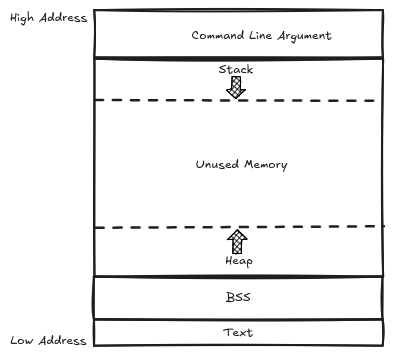
The virtual address space of a process is made of several sergments:
- Text segment - contains the machine-language instructions of the program run by the process.
- Data segment - initialized global and static variables/values that are read from the executable file when the program is loaded into the memory.
- BSS segment - uninitialized global and static variables.
- Heap - used for dynamic memory allocation, growing upwards as needed, top end of the heap is called
program break. - Stack - used for local variables (automatic variables), growing downwards.
Thread
A thread is a lightweight unit of execution within a process that can be created quickly.
- process can spawn multiple concurrent threads to do more units of work (multi-tasking).
- this is achievable due to threads sharing the same memory and resources.
- has its own Thread ID (TID)
- moves through states such as new, ready, running, waiting and terminated
- context switching allows multiple tasks to be executed concurrently.
Shared Resources Between Threads
Threads share:
- Address space - share the same virtual address space, allowing access to the same memory locations.
- Heap - this enables dynamic memory allocation and deallocation.
- Global variables - threads can access global variables, which helps in sharing data easily.
- File descriptors - allow to read from and write to the same files concurrently.
- Signal handlers - signals can be handled by any thread within the process.
Private Resources of Threads
Each thread has specific private resources that allows it to function independently while sharing certain resources with other threads.
- Thread ID (TID) - unique identifier allowing the operaring system to manage it.
- Registers - each thread has its own registers, which acts as temporary store data and state information during execution.
- Stack - separate stack for each thread, used for managing function calls and local variables.
- Program counter - this shows the current positions in the thread’s code, determining which instruction will be executed next.
- Scheduling state - this shows information about the thread’s current states that the operating system uses for scheduling.
User Thread vs Kernel Thread
| Feature | User Threads | Kernel Threads |
|---|---|---|
| Management | User-managed | OS-managed |
| Creation Speed | Faster | Slower |
| Blocking Behavior | Blocks entire process | Blocks only the specific thread |
| Processor Utilization | Limited to single processor | Can utilize multiple processors |
| Portability | Runs on any OS with support | OS-specific |
Viewing Threads
 1[arch@mrlgarchforge ~]$ ps -eLf
 2UID          PID    PPID     LWP  C NLWP STIME TTY          TIME CMD
 3root           1       0       1  1    1 06:17 ?        00:00:00 /usr/lib/systemd/systemd --switched-root --system
 4root           2       0       2  0    1 06:17 ?        00:00:00 [kthreadd]
 5root           3       2       3  0    1 06:17 ?        00:00:00 [pool_workqueue_release]
 6root           4       2       4  0    1 06:17 ?        00:00:00 [kworker/R-rcu_gp]
 7root           5       2       5  0    1 06:17 ?        00:00:00 [kworker/R-sync_wq]
 8root           6       2       6  0    1 06:17 ?        00:00:00 [kworker/R-kvfree_rcu_reclaim]
 9root           7       2       7  0    1 06:17 ?        00:00:00 [kworker/R-slub_flushwq]
10root           8       2       8  0    1 06:17 ?        00:00:00 [kworker/R-netns]
11root           9       2       9  0    1 06:17 ?        00:00:00 [kworker/0:0-events]
12root          10       2      10  0    1 06:17 ?        00:00:00 [kworker/0:1-cgroup_free]
13root          11       2      11  0    1 06:17 ?        00:00:00 [kworker/0:0H-kblockd]
14root          12       2      12  0    1 06:17 ?        00:00:00 [kworker/u8:0-events_unbound]
15root          13       2      13  0    1 06:17 ?        00:00:00 [kworker/u8:1-events_unbound]
16root          14       2      14  0    1 06:17 ?        00:00:00 [kworker/R-mm_percpu_wq]
- LWP - unique thread identifier inside a process
- NLWP - number of threads for a given process
Thread Identifiers
- TID (Thread ID) - unique identifier for every individual schedulatble entity in the system.
- TGID (Thread Group ID) - identifier shared by all threas that belong to the same process.
Process Creation
Processes are created using system calls:
- fork() - duplicating a process; creates a new process child by making a exact duplicate of the existing process; gets a new PID but inherits the parent’s memory, address space, file descriptors and environment.
- exec() - replacing a process; replaces the current process’s memory space with a new program, the PID remains the same and only the program running it changes.
- clone() - similar to to fork() but more powerful since it provides more precise control over what is shared between the parent and child process.
clone()system call allow the child process to be places in different namespaces.CLONE_VM- flag that allow process to share the same virtual memory space.CLONE_FILES- flag that enable sharing of file descriptor table.CLONE_FS- flag that allow sharing of filesystem information.CLONE_THREAD- flag that indicates that the clild process is part of the same thread group as the parent.
Creation Flow
We can use strace to trace the calls when a command or program is run. Let’s trace a ls command process.
1[arch@mrlgarchforge ~]$ strace -f -etrace=execve,clone bash -c '{ ls;}'
2execve("/usr/bin/bash", ["bash", "-c", "{ ls;}"], 0x7ffc269c9910 /* 21 vars */) = 0
3clone(child_stack=NULL, flags=CLONE_CHILD_CLEARTID|CLONE_CHILD_SETTID|SIGCHLDstrace: Process 949 attached
4, child_tidptr=0x7f8683471e50) = 949
5[pid   949] execve("/usr/bin/ls", ["ls"], 0x56412e6f62c0 /* 21 vars */) = 0
6[pid   949] +++ exited with 0 +++
7--- SIGCHLD {si_signo=SIGCHLD, si_code=CLD_EXITED, si_pid=949, si_uid=1000, si_status=0, si_utime=0, si_stime=0} ---
8+++ exited with 0 +++
clone()creates the process.execvereplaces the executable in the process withlscommand.
Process Lifecycle
A process moves through the following core phases during its creation:
- Creation - Generated when an existing parent process is duplicated using
forkandexec(). - Execution - The process runs and performs its tasks.
- Termination - Once process finished its task, crashes or receives the kill signal, it is terminated;
exit()system call is executed. - **Cleanup -Resources are released like allocated memory and kernel resources.
Process States
Process states describe the current execution status of a process as managed by the kernel scheduler. You can check this using ps command.
 1[arch@mrlgarchforge ~]$ ps -eo pid,stat,comm | head
 2    PID STAT COMMAND
 3      1 Ss   systemd
 4      2 S    kthreadd
 5      3 S    pool_workqueue_release
 6      4 I<   kworker/R-rcu_gp
 7      5 I<   kworker/R-sync_wq
 8      6 I<   kworker/R-kvfree_rcu_reclaim
 9      7 I<   kworker/R-slub_flushwq
10      8 I<   kworker/R-netns
11      9 I    kworker/0:0-events
Primary States
| Symbol | Type | Meaning / Description | Notes / Examples |
|---|---|---|---|
| R | Primary | Running | Actively using CPU or ready to run. Check %CPU to see load. |
| S | Primary | Sleeping (interruptible) | Waiting for an event or input. Normal for most processes. |
| D | Primary | Uninterruptible sleep | Waiting on I/O (disk, network). Cannot be killed with SIGKILL. High numbers = I/O bottleneck. |
| Z | Primary | Zombie | Process finished but parent hasn’t reaped it. No CPU usage, but occupies PID. |
| T | Primary | Stopped | Paused by signal or debugger (e.g., SIGSTOP). |
| X | Primary | Dead | Shouldn’t appear normally. Process is terminated. |
Common Modifier
| Symbol | Type | Meaning / Description | Notes |
|---|---|---|---|
| s | Modifier | Session leader | Process started a session (usually shells, daemons). |
| l | Modifier | Multi-threaded | Process has multiple threads (POSIX threads). |
| + | Modifier | Foreground process group | Attached to terminal and can receive input signals. |
| < | Modifier | High priority | Real-time or kernel-specified priority. |
| N | Modifier | Low priority / nice | Positive nice value (lower scheduler priority). |
| L | Modifier | Has pages locked in memory | Used in real-time processes. |
CPU Scheduling and Context Switching
Linux Scheduler
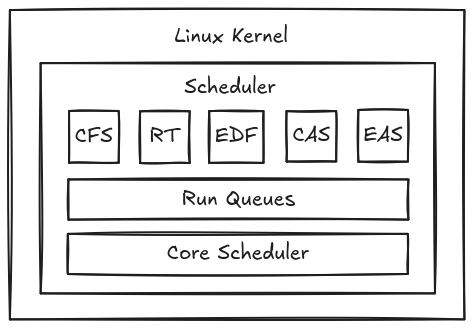
This is the heart of the Linux operating system-the ability to manage system resources efficiently. It balances the needs of processes or threads to prioritize what should be running at at given time. Determine the needs of different types of task such as CPU-bound or I/O bound processes.
Scheduling Classes
- Completely Fair Scheduler (CFS - is the default scheduler in the Linux kernel, designed to provide fair CPU time to all processes. It uses
red-black treedata structure to manage tasks efficiently, assigns CPU time to processes based on their weight and priority.SCHED_OTHER- default Linux time-sharing scheduler for normal tasksSCHED_BATCH- for CPU-intensive batch processes with reduced interactivity priority.SCHED_IDLE- very low-priority tasks that run only when CPU is idle.
- Real-Time Scheduler - designed for real-time applications that requries guaranteed and deterministic CPU time such as multimedia applications or industrial control systems.
SCHED_FIFO- execute tasks in a first-come, first-served order.SCHED_RR- implements round-robin scheduling for fairness.
- Early Deadline First Scheduler - designed for real-time applications that guaranteed CPU time. It uses a deadline-based scheduling algorithm to prioritize tasks based on their deadline, ensuring that the task with the closest deadline is executed first.
SCHED_DEADLINE- earliest Deadline First real-time scheduler.
- Capacity Aware Scheduling - optimizes task scheduling by considering the task requirements and the system capabilities.
- Energy Aware Scheduling - optimizes task scheduling based on energy consumption, focusing on minimizing energy use while maintaining performance.
To view the scheduling policy of a process, we can use chrt.
1[arch@mrlgarchforge ~]$ chrt -p 638
2pid 638's current scheduling policy: SCHED_OTHER
3pid 638's current scheduling priority: 0
4pid 638's current runtime parameter: 1400000
Common Options with chrt command
| Option | Description |
|---|---|
-b, --batch |
Sets the policy to SCHED_BATCH. |
-d, --deadline |
Sets the policy to SCHED_DEADLINE. |
-f, --fifo |
Sets the policy to SCHED_FIFO. |
-i, --idle |
Sets the policy to SCHED_IDLE. |
-o, --other |
Sets the policy to SCHED_OTHER (default time-sharing). |
-r, --rr |
Sets the policy to SCHED_RR (default real-time policy). |
-p, --pid |
Operates on an existing process with the specified PID. |
-a, --all-tasks |
Operates on all tasks (threads) for a given PID. |
-m, --max |
Displays the minimum and maximum valid priorities for the policies. |
-v, --verbose |
Displays status information. |
-h, --help |
Displays help information and exits. |
--version |
Displays version information and exits. |
Example; we change PID 638 to use SCHED_IDLE.
1chrt -i -p 638
Time Slices
It is the amount of CPU time a process is allowed to run before switching to another process. This allows multiple processes to appear to run simultaneously on a single-core CPU by rapidly switching between them.
Context Switching
A context switch occurs when the CPU switches from executing one process or thread to another, the current process state is saved and other process state is loaded-this allows multiple processes to share a single CPU. This is essential for multitasking, enabling the Linux operatin system to manage multiple tasks efficiently.
When a context switch occurs, the kernel is responsible for saving and restoring several critical components of the CPU state. The main elemets involved are:
- Registers - the kernel saves the values of all CPU registers, which are essential for the execution of the process. This includes general-purpose registers and any special registers used by the CPU.
- Stack Pointer - the stack pointer is used for maintaining the execution context of the process. It allows the kernel to know where to resume execution after the context switch.
- Instruction Pointer - this pointer is for determining the next instruction to execute whent the process resumes. It ensures that the process continues from the exact point it was interrupted.
Process vs Thread Context Switch
| Feature | Process Switch | Thread Switch |
|---|---|---|
| Address Space | Different address spaces | Shared address space |
| Cost | More expensive | Faster |
| Overhead | Requires saving and restoring more state information | Requires less state information to save and restore |
| Isolation | Strong isolation; bugs are contained within the process | Less isolation; bugs can affect other threads in the same process |
| Resource Usage | Higher resource usage | Lower resource usage |
Viewing Context Switching
We can use perf as an analysis tool in profiling user-space applications and kernel code by sampling hardware and software performance counter.
 1[arch@mrlgarchforge tmp]$ perf stat -p 704 sleep 5
 2
 3 Performance counter stats for process id '704':
 4
 5                23      context-switches                 #      4.6 cs/sec  cs_per_second
 6                 0      cpu-migrations                   #      0.0 migrations/sec  migrations_per_second
 7                 0      page-faults                      #      0.0 faults/sec  page_faults_per_second
 8          5,010.95 msec task-clock                       #      1.0 CPUs  CPUs_utilized
 9        94,030,265      branch-misses                    #      2.9 %  branch_miss_rate         (66.55%)
10     3,218,655,134      branches                         #    642.3 M/sec  branch_frequency     (66.69%)
11    16,847,526,866      cpu-cycles                       #      3.4 GHz  cycles_frequency       (66.66%)
12    16,123,382,223      instructions                     #      1.0 instructions  insn_per_cycle  (66.57%)
13
14       5.011242868 seconds time elapsed
task-clock: total duration during which the CPU was actively executing instructionscontext-switches: number of times the operating system switched execution from one task to anothercpu-migrations: number of times a process was transferred from one CPU core to anotherpage-faults: number of times a program attempted to access a memory page that was not currently loaded in RAM and had to be retrieved from disk
To record perf performance data.
1perf record -g -p 704 sleep 5
2[ perf record: Woken up 12 times to write data ]
3[ perf record: Captured and wrote 2.962 MB perf.data (19944 samples) ]
To view the saved data.
 1perf report
 2
 3Samples: 19K of event 'cpu/cycles/P', Event count (approx.): 16434851149
 4  Children      Self  Command  Shared Object      Symbol
 5+  100.00%     0.00%  yes      yes                [.] 0x000055f8fe8958f5                                         ◆
 6+  100.00%     0.00%  yes      libc.so.6          [.] __libc_start_main_impl (inlined)                           ▒
 7+  100.00%     0.00%  yes      libc.so.6          [.] call_init (inlined)                                        ▒
 8+  100.00%     0.00%  yes      libc.so.6          [.] 0x00007faa3c427741                                         ▒
 9+   99.24%     0.00%  yes      libc.so.6          [.] 0x00007faa3c494b04                                         ▒
10+   99.18%     0.00%  yes      libc.so.6          [.] 0x00007faa3c494ade                                         ▒
11+   70.93%     6.43%  yes      [kernel.kallsyms]  [.] entry_SYSCALL_64_after_hwframe                             ▒
12+   64.50%     1.49%  yes      [kernel.kallsyms]  [.] do_syscall_64                                              ▒
13+   53.81%     0.08%  yes      libc.so.6          [.] vmsplice                                                   ▒
14+   53.78%     0.00%  yes      yes                [.] 0x000055f8fe89579c                                         ▒
15+   45.81%     0.04%  yes      libc.so.6          [.] splice                                                     ▒
16+   45.79%     0.00%  yes      yes                [.] 0x000055f8fe8957db
CPU-bound and I/O-bound Processes
In Linux, processes can be classified as either CPU-bound or I/O-bound based on how they utilize system resources. This distinction is crucial for optimizing performance and resource management.
| Aspect | CPU-bound | I/O-bound |
|---|---|---|
| Definition | Tasks mainly limited by the CPU’s processing capability | Tasks mainly limited by input/output operations such as disk, network, or peripherals |
| Main Bottleneck | CPU execution time is the primary limitation | Waiting time for I/O devices or external resources is the primary limitation |
| Examples | Scientific computations, video rendering, encryption, complex calculations | File transfers, database queries, web requests, keyboard or user input |
| Optimization Focus | Improve algorithms, increase CPU performance, or use parallel processing | Reduce I/O delays through caching, buffering, or asynchronous operations |
| Resource Usage | High CPU utilization with minimal waiting time | Lower CPU utilization because the process often waits for I/O completion |
| System Behavior | Keeps the processor busy most of the time | Frequently pauses execution while waiting for data transfer or device response |
| Scheduling Strategy | Schedulers aim to maximize CPU throughput and efficient processor usage | Schedulers aim to overlap waiting time with other tasks using concurrency or a |
Inter-Process Communication (IPC)
Inter-Process Communication (IPC) in Linux refers to the various methods that allow processes to exchange data and synchronize their actions. This is crucial for the efficient operation of applications that require coordination between multiple processes.
| Mechanism | Description | Advantages | Disadvantages |
|---|---|---|---|
| Signals | Used to notify a process that an event or interruption has occurred | Simple and lightweight communication method | May interrupt execution and lead to inconsistent data handling |
| Pipes | Provides a unidirectional channel for data transfer between processes | Fast and efficient for related processes such as parent and child | Limited to one-way communication and usually restricted to the same machine |
| Message Queues | Allows processes to exchange structured messages through the kernel | Supports asynchronous communication and complex data structures | More difficult to manage and limited by kernel resources |
| Sockets | Enables communication between processes locally or across networks | Flexible and supports bidirectional communication | Requires more setup and has higher overhead compared to pipes |
Signals
Signals are used to communicate with running processes. This is to send instruction to the process if to stop, pause, resume or to clean up.
The kernel can send signals, for instance, when a process attempts to divide by zero it receives the SIGFPE signal.
SIGSTOP
To stop a process.
1[arch@mrlgarchforge tmp]$ yes > /dev/null &
2[1] 1445
3[arch@mrlgarchforge tmp]$ kill -SIGSTOP 1445
SIGCONT
To resume.
1[arch@mrlgarchforge tmp]$ kill -SIGCONT 1445
SIGINT
This is the signal sent when Ctrl+C is pressed.
SIGTERM and SIGQUIT
SIGTERM is the more polite way to shutdown a process (graceful kill), while SIGQUIT is forceful request to terminate the process (usually when it is misbehaving).
SIGKILL
This is true force kill, when this signal is received, it can’t be ignored and it will forcefully terminate the process.
Zombie and Orphan Processes
- Zombie Process - process is a completed child process that remains in the process table because its parent has not called the
wait()function to retrieve its exit status.- does not consume CPU or memory resources but retain a process ID (PID).
- if too many zombie processes accumulated, they can exhaust available PIDs, preventing new processes from starting.
- Orphan Processes - is a child process whose parent has terminated.
- unlike zombies, orphans are still running.
- processes are adopted by the init system (PID 1) then eventually cleaned up.
To find zombie processes, you can use the following command:
1ps aux | awk '$8 == "Z" {print}'
To find orphan processes, you can use the following command:
1ps -eo pid,ppid,cmd | awk '$2 == 1 && $1 != 1'
Daemon Processes
A daemon process is a long-running background application that operates without direct user interaction. It performs essential tasks such as managing system services, responding to network requests, and executing scheduled jobs.
Common Daemons
System Daemons
- sshd: Manages SSH connections.
- httpd/nginx: Handles web server requests.
- crond: Executes scheduled tasks.
Service Daemons
- mysqld: Manages MySQL database operations.
- docker: Oversees container management.
- postfix: Manages email services.
User Daemons
- pulseaudio: Manages audio services.
- gvfsd: Handles virtual file system mounting.
- dbus-daemon: Facilitates interprocess communication.
Process Priority and Niceness
- Process Priority - determines how much CPU time a process receives, with higher priority processes getting more time.
Real-time Processes- priorities range from 0 to 99.Normal Processes- priorities range from 100 to 139.
- Niceness - “nice” value is a user-space concept that allows users to influence the priority of a process.
-20- highest - least “nice” to other processes0- default - standard priority20- lowest - most “nice” to other processes
To check priority.
1ps -o pid,ni,comm -p PID
To lower priority.
1renice 10 -p PID
To raise priority
1renice -5 -p PID