Automate VM Provisition with Terraform or Opentofu
Background
Been using Terraform/Opentofu when I moved my homelab to dedicated server (old laptop and PC), previously from a bunch of Raspberry Pi. Using this technology has made my learning in DevOps more optimal or faster.
With recent announcement of Hashicorp to change Terraform’s opensource licence to a propriety licence, we’ll be using Opentofu (just my preference, command will still be relatively similar).
For this lab you can subtitute opentofu tofu command with terraform tf.
Table of Contents
Install Opentofu
You can check this link to install base on your distro. But for this lab, we’ll be using Ubuntu.
 1# Download the installer script:
 2curl --proto '=https' --tlsv1.2 -fsSL https://get.opentofu.org/install-opentofu.sh -o install-opentofu.sh
 3# Alternatively: wget --secure-protocol=TLSv1_2 --https-only https://get.opentofu.org/install-opentofu.sh -O install-opentofu.sh
 4
 5# Give it execution permissions:
 6chmod +x install-opentofu.sh
 7
 8# Please inspect the downloaded script
 9
10# Run the installer:
11./install-opentofu.sh --install-method deb
12
13# Remove the installer:
14rm -f install-opentofu.sh
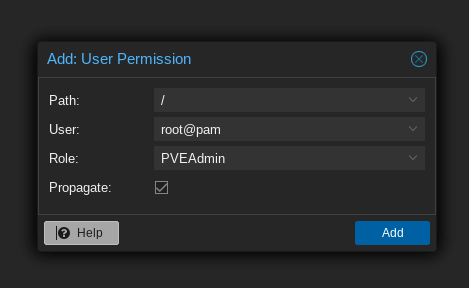
Add Permission to user
Navigate to Datacenter > API Tokens > Permission > Add role ‘PVEVMAdmin’.
Generate Proxmox API key
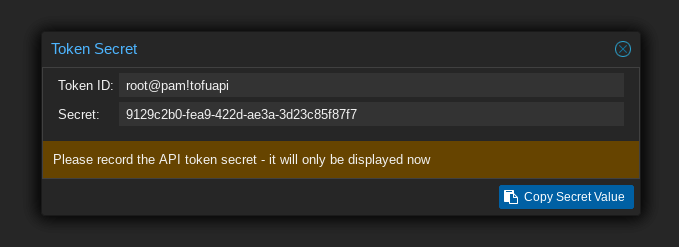
Navigate to Datacenter > API Tokens > Add. Input Token ID of your choice, make sure to untick ‘Privilege Separation’

Make sure to note the generated key since it will only be displayed once.
Opentofu init
Opentofu has three stages; init, plan, apply. Let as first describe init phase.
Create the project/lab directory and files.
1mkdir tofu && cd tofu
2touch main.tf providers.tf terraform.tfvars variables.tf
Define the provider, in our case it will be from Telmate/proxmox.
main.tf
1terraform {
2    required_providers {
3        proxmox = {
4            source  = "telmate/proxmox"
5            version = "3.0.1-rc1"
6        }
7    }
8}
Now we can define the api credentials.
providers.tf
1provider "proxmox" {
2    pm_api_url = var.pm_api_url
3    pm_api_token_id = var.pm_api_token_id
4    pm_api_token_secret = var.pm_api_token_secret
5    pm_tls_insecure = true
6}
To make it more secure, variable are set in a different file (terraform.tfvars, variables.tf).
Define the variables.
variables.tf
 1variable "ssh_key" {
 2  default = "ssh"
 3}
 4variable "proxmox_host" {
 5    default = "tags-p51"
 6}
 7variable "template_name" {
 8    default = "debian-20240717-cloudinit-template"
 9}
10variable "pm_api_url" {
11    default = "https://127.0.0.1:8006/api2/json"
12}
13variable "pm_api_token_id" {
14    default = "user@pam!token"
15}
16variable "pm_api_token_secret" {
17    default = "secret-api-token"
18}
19variable "k8s_namespace_state" {
20    default = "default"
21}
Variables are sensitive so make sure to add this file it in .gitignore.
terraform.tfvars
1ssh_key = "ssh-rsa AAAAB3NzaC1yc2EAAAADAQABAsABgQDtf3e9lQR1uAypz4nrq2nDj0DvZZGONku5wO+M87wUVTistrY8REsWO2W1N/v4p2eX30Bnwk7D486jmHGpXFrpHM0EMf7wtbNj5Gt1bDHo76WSci/IEHpMrbdD5vN8wCW2ZMwJG4J8dfFpUbdmUDWLL21Quq4q9XDx7/ugs1tCZoNybgww4eCcAi7/PAmXcS/u9huUkyiX4tbaKXQx1co7rTHd7f2u5APTVMzX0CdV9Ezc6l8I+LmjZ9rvQav5N1NgFh9B60qk9QJAb8AK9+aYy7bnBCQJ/BwIkWKYmLoVBi8j8v8UVhVdQMvQxLaxz1YcD8pbgU5s1O2nxM1+TqeGxrGHG6f7jqxhGWe21I7i8HPvOHNJcW4oycxFC5PNKnXNybEawE23oIDQfIG3+EudQKfAkJ3YhmrB2l+InIo0Wi9BHBIUNPzTldMS53q2teNdZR9UDqASdBdMgp4Uzfs1+LGdE5ExecSQzt4kZ8+o9oo9hmee4AYNOTWefXdip1= test@host"
2proxmox_host = "proxmox node"
3template_name = "debian-20240717-cloudinit-template"
4pm_api_url = "https://192.168.254.101:8006/api2/json"
5pm_api_token_id = "root@pam!tofuapi"
6pm_api_token_secret = "apikeygenerated"
Save the files and initialize Opentofu. If all goes well, the provider will be installed and Opentofu has been initialized.
 1[mcbtaguiad@tags-t470 tofu]$ tofu init
 2
 3Initializing the backend...
 4
 5Initializing provider plugins...
 6- terraform.io/builtin/terraform is built in to OpenTofu
 7- Finding telmate/proxmox versions matching "3.0.1-rc1"...
 8- Installing telmate/proxmox v3.0.1-rc1...
 9- Installed telmate/proxmox v3.0.1-rc1. Signature validation was skipped due to the registry not containing GPG keys for this provider
10
11OpenTofu has created a lock file .terraform.lock.hcl to record the provider
12selections it made above. Include this file in your version control repository
13so that OpenTofu can guarantee to make the same selections by default when
14you run "tofu init" in the future.
15
16OpenTofu has been successfully initialized!
17
18You may now begin working with OpenTofu. Try running "tofu plan" to see
19any changes that are required for your infrastructure. All OpenTofu commands
20should now work.
21
22If you ever set or change modules or backend configuration for OpenTofu,
23rerun this command to reinitialize your working directory. If you forget, other
24commands will detect it and remind you to do so if necessary.
Opentofu plan
Let’s now create our VM. We will be using the template created in part 1.
main.tf
 1terraform {
 2    required_providers {
 3        proxmox = {
 4            source  = "telmate/proxmox"
 5            version = "3.0.1-rc1"
 6        }
 7    }
 8}
 9
10resource "proxmox_vm_qemu" "test-vm" {
11    count = 1
12    name = "test-vm-${count.index + 1}"
13    desc = "test-vm-${count.index + 1}"
14    tags = "vm"
15    target_node = var.proxmox_host
16    vmid = "10${count.index + 1}"
17
18    clone = var.template_name
19
20    cores   = 8
21    sockets = 1
22    memory  = 8192
23    agent = 1
24
25    bios = "seabios"
26    scsihw = "virtio-scsi-pci"
27    bootdisk = "scsi0"
28
29    sshkeys = <<EOF
30    ${var.ssh_key}
31    EOF
32
33    os_type   = "cloud-init"
34    cloudinit_cdrom_storage = "tags-nvme-thin-pool1"
35    ipconfig0 = "ip=192.168.254.1${count.index + 1}/24,gw=192.168.254.254"
36
37
38    disks {
39        scsi {
40            scsi0 {
41                disk {
42                    backup = false
43                    size       = 25
44                    storage    = "tags-nvme-thin-pool1"
45                    emulatessd = false
46                }
47            }
48            scsi1 {
49                disk {
50                    backup = false
51                    size       = 64
52                    storage    = "tags-nvme-thin-pool1"
53                    emulatessd = false
54                }
55            }
56            scsi2 {
57                disk {
58                    backup = false
59                    size       = 64
60                    storage    = "tags-hdd-thin-pool1"
61                    emulatessd = false
62                }
63            }
64
65        }
66    }
67
68    network {
69        model = "virtio"
70        bridge = "vmbr0"
71        firewall = true
72        link_down = false
73    }
74}
Save the file and we can run Opentofu plan command.
  1[mcbtaguiad@tags-t470 tofu]$ tofu plan
  2
  3OpenTofu used the selected providers to generate the following execution plan. Resource actions are indicated with the following symbols:
  4  + create
  5
  6OpenTofu will perform the following actions:
  7
  8  # proxmox_vm_qemu.test-vm[0] will be created
  9  + resource "proxmox_vm_qemu" "test-vm" {
 10      + additional_wait           = 5
 11      + agent                     = 1
 12      + automatic_reboot          = true
 13      + balloon                   = 0
 14      + bios                      = "seabios"
 15      + boot                      = (known after apply)
 16      + bootdisk                  = "scsi0"
 17      + clone                     = "debian-20240717-cloudinit-template"
 18      + clone_wait                = 10
 19      + cloudinit_cdrom_storage   = "tags-nvme-thin-pool1"
 20      + cores                     = 8
 21      + cpu                       = "host"
 22      + default_ipv4_address      = (known after apply)
 23      + define_connection_info    = true
 24      + desc                      = "test-vm-1"
 25      + force_create              = false
 26      + full_clone                = true
 27      + guest_agent_ready_timeout = 100
 28      + hotplug                   = "network,disk,usb"
 29      + id                        = (known after apply)
 30      + ipconfig0                 = "ip=192.168.254.11/24,gw=192.168.254.254"
 31      + kvm                       = true
 32      + linked_vmid               = (known after apply)
 33      + memory                    = 8192
 34      + name                      = "test-vm-1"
 35      + nameserver                = (known after apply)
 36      + onboot                    = false
 37      + oncreate                  = false
 38      + os_type                   = "cloud-init"
 39      + preprovision              = true
 40      + reboot_required           = (known after apply)
 41      + scsihw                    = "virtio-scsi-pci"
 42      + searchdomain              = (known after apply)
 43      + sockets                   = 1
 44      + ssh_host                  = (known after apply)
 45      + ssh_port                  = (known after apply)
 46      + sshkeys                   = <<-EOT
 47            ssh-rsa AAAAB3NzaC1yc2EAAAADAQABAAABgQDtf3e9lQR1uAypz4nrq2nDj0DvZZGONku5wO+M87wUVTistrY8REsWO2W1N/v4p2eX30Bnwk7D486jmHGpXFrpHM0EMf7wtbNj5Gt1bDHo76WSci/IEHpMrbdD5vN8wCW2ZMwJG4JC8lfFpUbdmUDWLL21Quq4q9XDx7/ugs1tCZoNybgww4eCcAi7/GAmXcS/u9huUkyiX4tbaKXQx1co7rTHd7f2u5APTVMzX0C1V9Ezc6l8I+LmjZ9rvQav5N1NgFh9B60qk9QJAb8AK9+aYy7bnBCBJ/BwIkWKYmLoVBi8j8v8UVhVdQMvQxLax41YcD8pbgU5s1O2nxM1+TqeGxrGHG6f7jqxhGWe21I7i8HPvOHNJcW4oycxFC5PNKnXNybEawE23oIDQfIG3+EudQKfAkJ3YhmrB2l+InIo0Wi9BHBIUNPzTldMS53q2teNdZR9UDqASdBdMgp4Uzfs1+LGdE5ExecSQzt4kZ8+o9oo9hmee4AYNOTWefXdip0= mtaguiad@tags-p51
 48        EOT
 49      + tablet                    = true
 50      + tags                      = "vm"
 51      + target_node               = "tags-p51"
 52      + unused_disk               = (known after apply)
 53      + vcpus                     = 0
 54      + vlan                      = -1
 55      + vm_state                  = "running"
 56      + vmid                      = 101
 57
 58      + disks {
 59          + scsi {
 60              + scsi0 {
 61                  + disk {
 62                      + backup               = false
 63                      + emulatessd           = false
 64                      + format               = "raw"
 65                      + id                   = (known after apply)
 66                      + iops_r_burst         = 0
 67                      + iops_r_burst_length  = 0
 68                      + iops_r_concurrent    = 0
 69                      + iops_wr_burst        = 0
 70                      + iops_wr_burst_length = 0
 71                      + iops_wr_concurrent   = 0
 72                      + linked_disk_id       = (known after apply)
 73                      + mbps_r_burst         = 0
 74                      + mbps_r_concurrent    = 0
 75                      + mbps_wr_burst        = 0
 76                      + mbps_wr_concurrent   = 0
 77                      + size                 = 25
 78                      + storage              = "tags-nvme-thin-pool1"
 79                    }
 80                }
 81              + scsi1 {
 82                  + disk {
 83                      + backup               = false
 84                      + emulatessd           = false
 85                      + format               = "raw"
 86                      + id                   = (known after apply)
 87                      + iops_r_burst         = 0
 88                      + iops_r_burst_length  = 0
 89                      + iops_r_concurrent    = 0
 90                      + iops_wr_burst        = 0
 91                      + iops_wr_burst_length = 0
 92                      + iops_wr_concurrent   = 0
 93                      + linked_disk_id       = (known after apply)
 94                      + mbps_r_burst         = 0
 95                      + mbps_r_concurrent    = 0
 96                      + mbps_wr_burst        = 0
 97                      + mbps_wr_concurrent   = 0
 98                      + size                 = 64
 99                      + storage              = "tags-nvme-thin-pool1"
100                    }
101                }
102              + scsi2 {
103                  + disk {
104                      + backup               = false
105                      + emulatessd           = false
106                      + format               = "raw"
107                      + id                   = (known after apply)
108                      + iops_r_burst         = 0
109                      + iops_r_burst_length  = 0
110                      + iops_r_concurrent    = 0
111                      + iops_wr_burst        = 0
112                      + iops_wr_burst_length = 0
113                      + iops_wr_concurrent   = 0
114                      + linked_disk_id       = (known after apply)
115                      + mbps_r_burst         = 0
116                      + mbps_r_concurrent    = 0
117                      + mbps_wr_burst        = 0
118                      + mbps_wr_concurrent   = 0
119                      + size                 = 64
120                      + storage              = "tags-hdd-thin-pool1"
121                    }
122                }
123            }
124        }
125
126      + network {
127          + bridge    = "vmbr0"
128          + firewall  = true
129          + link_down = false
130          + macaddr   = (known after apply)
131          + model     = "virtio"
132          + queues    = (known after apply)
133          + rate      = (known after apply)
134          + tag       = -1
135        }
136    }
137
138Plan: 1 to add, 0 to change, 0 to destroy.
139
140──────────────────────────────────────────────────────────────────────────────────────────────────────────────────────────────────────────────────────────────────────────
141
142Note: You didn't use the -out option to save this plan, so OpenTofu can't guarantee to take exactly these actions if you run "tofu apply" now.
Opentofu apply
After plan command (review the output summary of tofu plan), we can now create the VM. Since we declared the count as 1 it will create 1 VM. Depending on the hardwarde on your cluster, it would take usually around 1 to 2 minutes to provision 1 VM.
  1[mcbtaguiad@tags-t470 tofu]$ tofu apply
  2
  3OpenTofu used the selected providers to generate the following execution plan. Resource actions are indicated with the following symbols:
  4  + create
  5
  6OpenTofu will perform the following actions:
  7
  8  # proxmox_vm_qemu.test-vm[0] will be created
  9  + resource "proxmox_vm_qemu" "test-vm" {
 10      + additional_wait           = 5
 11      + agent                     = 1
 12      + automatic_reboot          = true
 13      + balloon                   = 0
 14      + bios                      = "seabios"
 15      + boot                      = (known after apply)
 16      + bootdisk                  = "scsi0"
 17      + clone                     = "debian-20240717-cloudinit-template"
 18      + clone_wait                = 10
 19      + cloudinit_cdrom_storage   = "tags-nvme-thin-pool1"
 20      + cores                     = 8
 21      + cpu                       = "host"
 22      + default_ipv4_address      = (known after apply)
 23      + define_connection_info    = true
 24      + desc                      = "test-vm-1"
 25      + force_create              = false
 26      + full_clone                = true
 27      + guest_agent_ready_timeout = 100
 28      + hotplug                   = "network,disk,usb"
 29      + id                        = (known after apply)
 30      + ipconfig0                 = "ip=192.168.254.11/24,gw=192.168.254.254"
 31      + kvm                       = true
 32      + linked_vmid               = (known after apply)
 33      + memory                    = 8192
 34      + name                      = "test-vm-1"
 35      + nameserver                = (known after apply)
 36      + onboot                    = false
 37      + oncreate                  = false
 38      + os_type                   = "cloud-init"
 39      + preprovision              = true
 40      + reboot_required           = (known after apply)
 41      + scsihw                    = "virtio-scsi-pci"
 42      + searchdomain              = (known after apply)
 43      + sockets                   = 1
 44      + ssh_host                  = (known after apply)
 45      + ssh_port                  = (known after apply)
 46      + sshkeys                   = <<-EOT
 47            ssh-rsa AAAAB3NzaC1yc2EAAAADAQABAAABgQDtf3e9lQR1uAypz4nrq2nDj0DvZZGONku5wO+M87wUVTistrY8REsWO2W1N/v4p2eX30Bnwk7D486jmHGpXFrpHM0EMf7wtbNj5Gt1bDHo76WSci/IEHpMrbdD5vN8wCW2ZMwJG4JC8lfFpUbdmUDWLL21Quq4q9XDx7/ugs1tCZoNybgww4eCcAi7/GAmXcS/u9huUkyiX4tbaKXQx1co7rTHd7f2u5APTVMzX0C1V9Ezc6l8I+LmjZ9rvQav5N1NgFh9B60qk9QJAb8AK9+aYy7bnBCBJ/BwIkWKYmLoVBi8j8v8UVhVdQMvQxLax41YcD8pbgU5s1O2nxM1+TqeGxrGHG6f7jqxhGWe21I7i8HPvOHNJcW4oycxFC5PNKnXNybEawE23oIDQfIG3+EudQKfAkJ3YhmrB2l+InIo0Wi9BHBIUNPzTldMS53q2teNdZR9UDqASdBdMgp4Uzfs1+LGdE5ExecSQzt4kZ8+o9oo9hmee4AYNOTWefXdip0= mtaguiad@tags-p51
 48        EOT
 49      + tablet                    = true
 50      + tags                      = "vm"
 51      + target_node               = "tags-p51"
 52      + unused_disk               = (known after apply)
 53      + vcpus                     = 0
 54      + vlan                      = -1
 55      + vm_state                  = "running"
 56      + vmid                      = 101
 57
 58      + disks {
 59          + scsi {
 60              + scsi0 {
 61                  + disk {
 62                      + backup               = false
 63                      + emulatessd           = false
 64                      + format               = "raw"
 65                      + id                   = (known after apply)
 66                      + iops_r_burst         = 0
 67                      + iops_r_burst_length  = 0
 68                      + iops_r_concurrent    = 0
 69                      + iops_wr_burst        = 0
 70                      + iops_wr_burst_length = 0
 71                      + iops_wr_concurrent   = 0
 72                      + linked_disk_id       = (known after apply)
 73                      + mbps_r_burst         = 0
 74                      + mbps_r_concurrent    = 0
 75                      + mbps_wr_burst        = 0
 76                      + mbps_wr_concurrent   = 0
 77                      + size                 = 25
 78                      + storage              = "tags-nvme-thin-pool1"
 79                    }
 80                }
 81              + scsi1 {
 82                  + disk {
 83                      + backup               = false
 84                      + emulatessd           = false
 85                      + format               = "raw"
 86                      + id                   = (known after apply)
 87                      + iops_r_burst         = 0
 88                      + iops_r_burst_length  = 0
 89                      + iops_r_concurrent    = 0
 90                      + iops_wr_burst        = 0
 91                      + iops_wr_burst_length = 0
 92                      + iops_wr_concurrent   = 0
 93                      + linked_disk_id       = (known after apply)
 94                      + mbps_r_burst         = 0
 95                      + mbps_r_concurrent    = 0
 96                      + mbps_wr_burst        = 0
 97                      + mbps_wr_concurrent   = 0
 98                      + size                 = 64
 99                      + storage              = "tags-nvme-thin-pool1"
100                    }
101                }
102              + scsi2 {
103                  + disk {
104                      + backup               = false
105                      + emulatessd           = false
106                      + format               = "raw"
107                      + id                   = (known after apply)
108                      + iops_r_burst         = 0
109                      + iops_r_burst_length  = 0
110                      + iops_r_concurrent    = 0
111                      + iops_wr_burst        = 0
112                      + iops_wr_burst_length = 0
113                      + iops_wr_concurrent   = 0
114                      + linked_disk_id       = (known after apply)
115                      + mbps_r_burst         = 0
116                      + mbps_r_concurrent    = 0
117                      + mbps_wr_burst        = 0
118                      + mbps_wr_concurrent   = 0
119                      + size                 = 64
120                      + storage              = "tags-hdd-thin-pool1"
121                    }
122                }
123            }
124        }
125
126      + network {
127          + bridge    = "vmbr0"
128          + firewall  = true
129          + link_down = false
130          + macaddr   = (known after apply)
131          + model     = "virtio"
132          + queues    = (known after apply)
133          + rate      = (known after apply)
134          + tag       = -1
135        }
136    }
137
138Plan: 1 to add, 0 to change, 0 to destroy.
139
140──────────────────────────────────────────────────────────────────────────────────────────────────────────────────────────────────────────────────────────────────────────
141
142Note: You didn't use the -out option to save this plan, so OpenTofu can't guarantee to take exactly these actions if you run "tofu apply" now.
Notice that a .tfstate file is generated, make sure to save or backup this file since it will be necessary when reinitializing/reconfigure or rebuilding your VM/infrastructure.
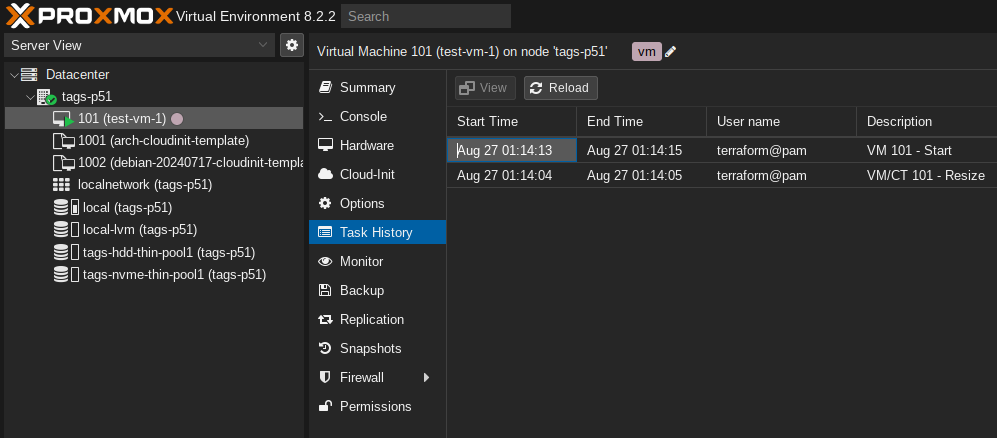
If all goes well, you’ll see at Proxmox GUI the created VM.
Opentofu destroy
To delete the VM, run the destroy command.
  1[mcbtaguiad@tags-t470 tofu]$ tofu destroy
  2proxmox_vm_qemu.test-vm[0]: Refreshing state... [id=tags-p51/qemu/101]
  3
  4OpenTofu used the selected providers to generate the following execution plan. Resource actions are indicated with the following symbols:
  5  - destroy
  6
  7OpenTofu will perform the following actions:
  8
  9  # proxmox_vm_qemu.test-vm[0] will be destroyed
 10  - resource "proxmox_vm_qemu" "test-vm" {
 11      - additional_wait           = 5 -> null
 12      - agent                     = 1 -> null
 13      - automatic_reboot          = true -> null
 14      - balloon                   = 0 -> null
 15      - bios                      = "seabios" -> null
 16      - boot                      = "c" -> null
 17      - bootdisk                  = "scsi0" -> null
 18      - clone                     = "debian-20240717-cloudinit-template" -> null
 19      - clone_wait                = 10 -> null
 20      - cloudinit_cdrom_storage   = "tags-nvme-thin-pool1" -> null
 21      - cores                     = 8 -> null
 22      - cpu                       = "host" -> null
 23      - default_ipv4_address      = "192.168.254.11" -> null
 24      - define_connection_info    = true -> null
 25      - desc                      = "test-vm-1" -> null
 26      - force_create              = false -> null
 27      - full_clone                = true -> null
 28      - guest_agent_ready_timeout = 100 -> null
 29      - hotplug                   = "network,disk,usb" -> null
 30      - id                        = "tags-p51/qemu/101" -> null
 31      - ipconfig0                 = "ip=192.168.254.11/24,gw=192.168.254.254" -> null
 32      - kvm                       = true -> null
 33      - linked_vmid               = 0 -> null
 34      - memory                    = 8192 -> null
 35      - name                      = "test-vm-1" -> null
 36      - numa                      = false -> null
 37      - onboot                    = false -> null
 38      - oncreate                  = false -> null
 39      - os_type                   = "cloud-init" -> null
 40      - preprovision              = true -> null
 41      - qemu_os                   = "other" -> null
 42      - reboot_required           = false -> null
 43      - scsihw                    = "virtio-scsi-pci" -> null
 44      - sockets                   = 1 -> null
 45      - ssh_host                  = "192.168.254.11" -> null
 46      - ssh_port                  = "22" -> null
 47      - sshkeys                   = <<-EOT
 48            ssh-rsa AAAAB3NzaC1yc2EAAAADAQABAAABgQDtf3e9lQR1uAypz4nrq2nDj0DvZZGONku5wO+M87wUVTistrY8REsWO2W1N/v4p2eX30Bnwk7D486jmHGpXFrpHM0EMf7wtbNj5Gt1bDHo76WSci/IEHpMrbdD5vN8wCW2ZMwJG4JC8lfFpUbdmUDWLL21Quq4q9XDx7/ugs1tCZoNybgww4eCcAi7/GAmXcS/u9huUkyiX4tbaKXQx1co7rTHd7f2u5APTVMzX0C1V9Ezc6l8I+LmjZ9rvQav5N1NgFh9B60qk9QJAb8AK9+aYy7bnBCBJ/BwIkWKYmLoVBi8j8v8UVhVdQMvQxLax41YcD8pbgU5s1O2nxM1+TqeGxrGHG6f7jqxhGWe21I7i8HPvOHNJcW4oycxFC5PNKnXNybEawE23oIDQfIG3+EudQKfAkJ3YhmrB2l+InIo0Wi9BHBIUNPzTldMS53q2teNdZR9UDqASdBdMgp4Uzfs1+LGdE5ExecSQzt4kZ8+o9oo9hmee4AYNOTWefXdip0= mtaguiad@tags-p51
 49        EOT -> null
 50      - tablet                    = true -> null
 51      - tags                      = "vm" -> null
 52      - target_node               = "tags-p51" -> null
 53      - unused_disk               = [] -> null
 54      - vcpus                     = 0 -> null
 55      - vlan                      = -1 -> null
 56      - vm_state                  = "running" -> null
 57      - vmid                      = 101 -> null
 58
 59      - disks {
 60          - scsi {
 61              - scsi0 {
 62                  - disk {
 63                      - backup               = false -> null
 64                      - discard              = false -> null
 65                      - emulatessd           = false -> null
 66                      - format               = "raw" -> null
 67                      - id                   = 0 -> null
 68                      - iops_r_burst         = 0 -> null
 69                      - iops_r_burst_length  = 0 -> null
 70                      - iops_r_concurrent    = 0 -> null
 71                      - iops_wr_burst        = 0 -> null
 72                      - iops_wr_burst_length = 0 -> null
 73                      - iops_wr_concurrent   = 0 -> null
 74                      - iothread             = false -> null
 75                      - linked_disk_id       = -1 -> null
 76                      - mbps_r_burst         = 0 -> null
 77                      - mbps_r_concurrent    = 0 -> null
 78                      - mbps_wr_burst        = 0 -> null
 79                      - mbps_wr_concurrent   = 0 -> null
 80                      - readonly             = false -> null
 81                      - replicate            = false -> null
 82                      - size                 = 25 -> null
 83                      - storage              = "tags-nvme-thin-pool1" -> null
 84                    }
 85                }
 86              - scsi1 {
 87                  - disk {
 88                      - backup               = false -> null
 89                      - discard              = false -> null
 90                      - emulatessd           = false -> null
 91                      - format               = "raw" -> null
 92                      - id                   = 1 -> null
 93                      - iops_r_burst         = 0 -> null
 94                      - iops_r_burst_length  = 0 -> null
 95                      - iops_r_concurrent    = 0 -> null
 96                      - iops_wr_burst        = 0 -> null
 97                      - iops_wr_burst_length = 0 -> null
 98                      - iops_wr_concurrent   = 0 -> null
 99                      - iothread             = false -> null
100                      - linked_disk_id       = -1 -> null
101                      - mbps_r_burst         = 0 -> null
102                      - mbps_r_concurrent    = 0 -> null
103                      - mbps_wr_burst        = 0 -> null
104                      - mbps_wr_concurrent   = 0 -> null
105                      - readonly             = false -> null
106                      - replicate            = false -> null
107                      - size                 = 64 -> null
108                      - storage              = "tags-nvme-thin-pool1" -> null
109                    }
110                }
111              - scsi2 {
112                  - disk {
113                      - backup               = false -> null
114                      - discard              = false -> null
115                      - emulatessd           = false -> null
116                      - format               = "raw" -> null
117                      - id                   = 0 -> null
118                      - iops_r_burst         = 0 -> null
119                      - iops_r_burst_length  = 0 -> null
120                      - iops_r_concurrent    = 0 -> null
121                      - iops_wr_burst        = 0 -> null
122                      - iops_wr_burst_length = 0 -> null
123                      - iops_wr_concurrent   = 0 -> null
124                      - iothread             = false -> null
125                      - linked_disk_id       = -1 -> null
126                      - mbps_r_burst         = 0 -> null
127                      - mbps_r_concurrent    = 0 -> null
128                      - mbps_wr_burst        = 0 -> null
129                      - mbps_wr_concurrent   = 0 -> null
130                      - readonly             = false -> null
131                      - replicate            = false -> null
132                      - size                 = 64 -> null
133                      - storage              = "tags-hdd-thin-pool1" -> null
134                    }
135                }
136            }
137        }
138
139      - network {
140          - bridge    = "vmbr0" -> null
141          - firewall  = true -> null
142          - link_down = false -> null
143          - macaddr   = "B2:47:F3:87:C1:83" -> null
144          - model     = "virtio" -> null
145          - mtu       = 0 -> null
146          - queues    = 0 -> null
147          - rate      = 0 -> null
148          - tag       = -1 -> null
149        }
150
151      - smbios {
152          - uuid = "a08b4d18-4346-4d8d-8fcf-44dddf8fffaf" -> null
153        }
154    }
155
156Plan: 0 to add, 0 to change, 1 to destroy.
157
158Do you really want to destroy all resources?
159  OpenTofu will destroy all your managed infrastructure, as shown above.
160  There is no undo. Only 'yes' will be accepted to confirm.
161
162  Enter a value: yes
163
164proxmox_vm_qemu.test-vm[0]: Destroying... [id=tags-p51/qemu/101]
165proxmox_vm_qemu.test-vm[0]: Destruction complete after 6s
166
167Destroy complete! Resources: 1 destroyed.
Optional Remote tfstate backup
To remote backup state files, you can look futher for available providers here. For this example, we’ll be using a kubernetes cluster. The state file will be saved as a secret in the kubernetes cluster.
Configure main.tf and add ’terraform_remote_state’.
1data "terraform_remote_state" "k8s-remote-backup" {
2    backend = "kubernetes"
3    config = {
4        secret_suffix    = "k8s-local"
5        load_config_file = true
6        namespace = var.k8s_namespace_state
7        config_path = var.k8s_config_path
8    }
9}
Add additional variables.
variables.tf
1variable "k8s_config_path" {
2    default = "/etc/kubernetes/admin.yaml"
3}
4variable "k8s_namespace_state" {
5    default = "default"
6}
terraform.tfvars
1k8s_config_path = "~/.config/kube/config.yaml"
2k8s_namespace_state = "opentofu-state"
After apply phase, tofu state is always triggered and tf state file is automatically created in kubernetes secrets.
1[mcbtaguiad@tags-t470 tofu]$ kubectl get secret -n opentofu-state
2NAME                             TYPE     DATA   AGE
3tfstate-default-state            Opaque   1      3d