Building CI/CD Pipeline - A Not-So-Comprehensive Guide

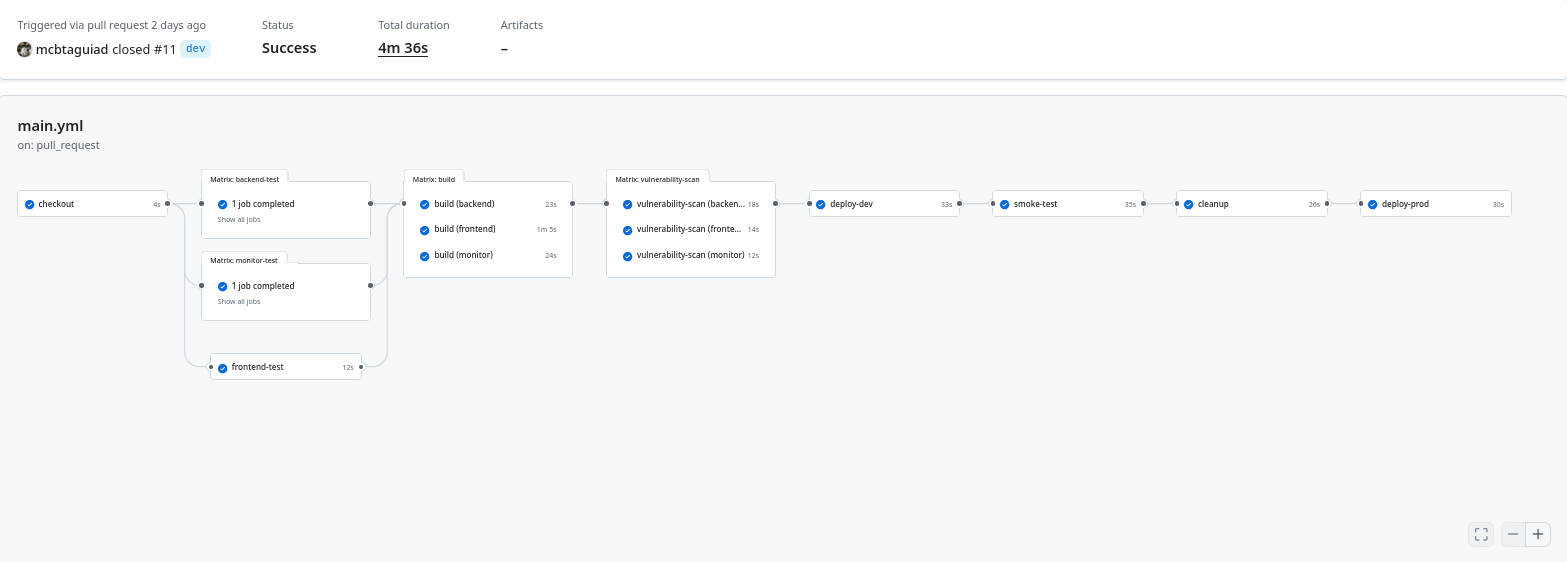
A CI/CD pipeline is an automated workflow that moves code from commit to production. It standardizes build, test, and deployment stages to improve release speed, reliability, and consistency.
CI/CD integrates development and operations through automation, reducing manual errors and enabling frequent, incremental delivery.
Table of Contents
CI/CD Overview
Continuous Integration (CI)
- Frequent code merges into a shared repository
- Automated builds and test execution
- Early detection of integration issues
Continuous Delivery
- Ensures code is always in a deployable state
- Deployment requires manual approval
Continuous Deployment
- Fully automated release to production
- Triggered after successful test validation
Pipeline Architecture
A typical CI/CD pipeline consists of sequential automated stages:
- Source Control
- Build
- Test
- Artifact Storage
- Deployment
- Monitoring
Core Components
Source Code Management
- Git-based repositories (GitHub, GitLab, Bitbucket)
- Branching strategies (trunk-based, GitFlow)
- Pull request validation and access control
Build System
- Dependency installation and compilation
- Tools: Maven, Gradle, Webpack, Docker
Automated Testing
- Unit tests
- Integration tests
- End-to-end tests
- Security scanning
Artifact Management
- Stores versioned build outputs
- Examples: Nexus, Artifactory, Container Registry
Deployment Automation
- Environment promotion (dev → staging → prod)
- Strategies: blue-green, canary, rolling updates, A/B Testing/Deployment
Observability
- Metrics, logs, and alerts
- Tools: Prometheus, Grafana, ELK
CI/CD Tools by Pipeline Stage
Source & CI (Build and Integration)
| Tool | Description |
|---|---|
| Jenkins | Open-source CI/CD server with plugin ecosystem. |
| GitHub Actions | Native CI/CD workflows inside GitHub. |
| GitLab CI/CD | Integrated pipelines using YAML configuration. |
| CircleCI | Cloud CI/CD with parallel job execution. |
| Travis CI | Lightweight CI/CD for open-source workflows. |
| Azure DevOps | Microsoft CI/CD platform with cloud services. |
Build & Packaging (Artifacts and Containers)
| Tool | Description |
|---|---|
| Docker | Builds portable container images. |
Deployment & Orchestration
| Tool | Description |
|---|---|
| Kubernetes | Orchestrates and scales containers. |
| Helm | Manages Kubernetes deployments via charts. |
| AWS CodePipeline | Automates deployments within AWS. |
Infrastructure Provisioning (IaC)
| Tool | Description |
|---|---|
| Terraform | Defines infrastructure using declarative config. |
| Ansible | Automates provisioning and configuration tasks. |
Testing & Security Tools
| Tool | Description |
|---|---|
| JUnit, PyTest, Jest | Unit testing frameworks for multiple languages. |
| Selenium, Cypress | End-to-end test automation tools. |
| SonarQube | Static analysis for code quality and security. |
| Snyk, Dependabot | Scans dependencies for vulnerabilities. |
| Trivy | Container and filesystem vulnerability scanner. |
Monitoring & Logging
| Tool | Description |
|---|---|
| Prometheus | Collects metrics and handles alerting. |
| Grafana | Displays metrics via dashboards. |
| ELK Stack | Centralized logging (Elasticsearch, Logstash, Kibana). |
| Datadog | Cloud-based monitoring and security analytics. |
Source Strategy / Version Control
Trunk-Based Development
- Commit directly to
mainor short-lived branches - Optimized for fast iteration
- Works well with feature flags
- Flow: commit → build → deploy
GitFlow
- Structured branches:
main,develop,feature/*,release/*,hotfix/* - Controlled release cycle
- Flow: develop → CI build → merge to main → deploy
GitHub Flow
- Single
mainbranch + short-lived feature branches - PR-based workflow with code review
- Flow: PR → test → merge → deploy
Release Branching
- Maintains multiple active versions
- Used for long-term support systems
- Flow: stable branches + parallel feature development
Selection Factors: team size, release frequency, stability requirements
Repository Hosting Platforms
GitHub
- Built-in CI/CD (GitHub Actions)
- Strong collaboration (PRs, issues)
- Integrated security tools
- Best for: open-source, cloud-native teams
GitLab
- All-in-one DevOps platform
- Built-in CI/CD and security
- Supports self-hosting
- Best for: integrated workflows
Bitbucket
- Integrates with Jira and Confluence
- Built-in CI/CD (Pipelines)
- Best for: Atlassian-based teams
Selection Factors: integrations, hosting model, security needs
Code Review and Merge Automation
Pull Requests
- Enforce PR-based changes
- Require approvals before merge
- Run CI checks automatically
CI Validation
- Execute tests and scans pre-merge
- Block merge on failures
CI Configuration
This CI setup is triggered on merged pull requests to main. It validates code, builds images, scans for vulnerabilities, and prepares artifacts for deployment.
Automated Build Flow
Pipeline stages:
1checkout → test → build → scan → deploy → validate → cleanup → promote
Core Steps
-
Checkout
Pull latest repository state -
Dependency Setup
Install runtime dependencies (Go, Python, Node) -
Testing & Validation
- Go: unit tests +
govulncheck - Python: pytest, lint, format, security scan (
pip-audit) - React: test coverage +
npm audit
- Go: unit tests +
-
Build
- Multi-service Docker builds (frontend, backend, monitor)
- Tagged using branch name and commit SHA
- Pushed to GitHub Container Registry
Security & Dependency Checks
- Python:
pip-audit - Node:
npm audit - Go:
govulncheck - Containers:
Trivy(HIGH, CRITICAL only)
Rules:
- Exit on critical vulnerabilities
- Ignore unfixed issues
- Enforce scanning before deployment
Artifact Generation
Docker Images
-
Built per service:
frontendbackendmonitor
-
Tagged as:
- branch name
- commit SHA
-
Stored in Container Registry:
1ghcr.io/<repo>/<service>:<tag>
Example CI
  1name: istio-demo-cicd
  2
  3on:
  4  pull_request:
  5    branches: [ "main" ]
  6    types: [ closed ]
  7
  8env:
  9  REGISTRY: ghcr.io
 10  IMAGE_REPO: ${{ github.repository }}
 11
 12jobs:
 13  checkout:
 14    if: github.event.pull_request.merged == true
 15    runs-on: ubuntu-latest
 16    outputs:
 17      repo-path: ${{ steps.repo-path.outputs.path }}
 18    steps:
 19      - name: Checkout repository
 20        id: repo-path
 21        uses: actions/checkout@v4
 22
 23  # --- Go Tests ---
 24  backend-test:
 25    if: github.event.pull_request.merged == true
 26    needs: checkout
 27    runs-on: ubuntu-latest
 28    strategy:
 29      matrix:
 30        go-version: [1.26.1]
 31    steps:
 32      - name: Checkout repo
 33        uses: actions/checkout@v4
 34
 35      - name: Setup Go
 36        uses: actions/setup-go@v4
 37        with:
 38          go-version: ${{ matrix.go-version }}
 39
 40      # - name: Install dependencies
 41      #   working-directory: docker/backend
 42      #   run: go mod tidy
 43
 44      - name: Run Go tests
 45        working-directory: docker/backend
 46        run: |
 47          go mod init github.com/mcbtaguiad/istio-demo/backend
 48          go mod tidy
 49          go test ./... -v
 50
 51      - name: Run govulncheck
 52        working-directory: docker/backend
 53        run: |
 54          go mod tidy
 55          go mod download
 56          go install golang.org/x/vuln/cmd/govulncheck@latest
 57          govulncheck ./...
 58
 59
 60  # --- Python Tests ---
 61  monitor-test:
 62    if: github.event.pull_request.merged == true
 63    needs: checkout
 64    runs-on: ubuntu-latest
 65    strategy:
 66      matrix:
 67        python-version: [3.12.8]
 68    steps:
 69      - uses: actions/checkout@v4
 70
 71      - name: Setup Python
 72        uses: actions/setup-python@v5
 73        with:
 74          python-version: ${{ matrix.python-version }}
 75
 76      - name: Install dependencies
 77        run: |
 78          pip install flask pytest pylint black flake8 isort pytest-cov pip-audit
 79
 80      - name: Run pytest
 81        working-directory: docker/monitor
 82        run: pytest . --cov=./
 83
 84      - name: Lint with pylint
 85        working-directory: docker/monitor
 86        run: pylint app.py
 87
 88      - name: Format check with black
 89        working-directory: docker/monitor
 90        run: black --check app.py
 91
 92      - name: Import check with isort
 93        working-directory: docker/monitor
 94        run: isort --check-only app.py
 95
 96      - name: Scan Python dependencies with pip-audit
 97        working-directory: docker/monitor
 98        run: pip-audit -r requirements.txt --strict
 99
100  # --- React Tests ---
101  frontend-test:
102    if: github.event.pull_request.merged == true
103    needs: checkout
104    runs-on: ubuntu-latest
105    steps:
106      - name: Checkout repo
107        uses: actions/checkout@v4
108
109      - name: Setup Node
110        uses: actions/setup-node@v5
111        with:
112          node-version: 22
113          cache: 'npm'
114          cache-dependency-path: docker/frontend/package-lock.json
115
116      - name: Install dependencies
117        working-directory: docker/frontend
118        run: npm ci
119
120      - name: Run React tests
121        working-directory: docker/frontend
122        run: npm run test -- --coverage
123
124      - name: Scan Node dependencies with npm audit
125        working-directory: docker/frontend
126        run: npm audit --audit-level=high
127
128  # --- Docker Build & Push ---
129  build:
130    if: github.event.pull_request.merged == true
131    needs: [backend-test, monitor-test, frontend-test]
132    runs-on: ubuntu-latest
133    permissions:
134      contents: read
135      packages: write
136    strategy:
137      matrix:
138        service: [frontend, backend, monitor]
139
140    steps:
141      - name: Checkout repository
142        uses: actions/checkout@v4
143
144      - name: Set up Docker Buildx
145        uses: docker/setup-buildx-action@v3
146
147      - name: Log in to GitHub Container Registry
148        uses: docker/login-action@v2
149        with:
150          registry: ${{ env.REGISTRY }}
151          username: ${{ github.actor }}
152          password: ${{ secrets.GH_TOKEN }}
153
154      - name: Set service-specific variables
155        run: |
156          case "${{ matrix.service }}" in
157            frontend)
158              echo "IMAGE_NAME=frontend" >> $GITHUB_ENV
159              echo "CONTEXT=./docker/frontend" >> $GITHUB_ENV
160              echo "PORT=8080" >> $GITHUB_ENV
161              ;;
162            backend)
163              echo "IMAGE_NAME=backend" >> $GITHUB_ENV
164              echo "CONTEXT=./docker/backend" >> $GITHUB_ENV
165              echo "PORT=3000" >> $GITHUB_ENV
166              ;;
167            monitor)
168              echo "IMAGE_NAME=monitor" >> $GITHUB_ENV
169              echo "CONTEXT=./docker/monitor" >> $GITHUB_ENV
170              echo "PORT=8000" >> $GITHUB_ENV
171              ;;
172          esac
173
174      - name: Determine image tag
175        id: tag
176        run: |
177          if [[ "${GITHUB_REF}" == refs/tags/* ]]; then
178            echo "IMAGE_TAG=${GITHUB_REF#refs/tags/}" >> $GITHUB_ENV
179          else
180            echo "IMAGE_TAG=${GITHUB_REF_NAME}" >> $GITHUB_ENV
181          fi
182
183      - name: Build and push Docker image
184        uses: docker/build-push-action@v4
185        with:
186          context: ${{ env.CONTEXT }}
187          file: ${{ env.CONTEXT }}/Dockerfile
188          push: true
189          tags: |
190            ${{ env.REGISTRY }}/${{ env.IMAGE_REPO }}/${{ env.IMAGE_NAME }}:${{ env.IMAGE_TAG }}
191            ${{ env.REGISTRY }}/${{ env.IMAGE_REPO }}/${{ env.IMAGE_NAME }}:${{ github.sha }}
192          labels: |
193            org.opencontainers.image.created=${{ github.run_started_at }}
194            org.opencontainers.image.revision=${{ github.sha }}
195            org.opencontainers.image.source=https://github.com/${{ github.repository }}
196            org.opencontainers.image.title=istio-demo
197            org.opencontainers.image.version=${{ env.IMAGE_TAG }}
198          build-args: |
199            ENVIRONMENT=${{ github.ref_name == 'main' && 'prod' || 'dev' }}
200
201          cache-from: type=gha
202          cache-to: type=gha,mode=max
203
204  vulnerability-scan:
205    if: github.event.pull_request.merged == true
206    needs: build
207    runs-on: ubuntu-latest
208    strategy:
209      matrix:
210        service: [frontend, backend, monitor]
211    steps:
212      - name: Log in to GitHub Container Registry
213        uses: docker/login-action@v2
214        with:
215          registry: ${{ env.REGISTRY }}
216          username: ${{ github.actor }}
217          password: ${{ secrets.GH_TOKEN }}
218      - name: Scan Docker image with Trivy
219        uses: aquasecurity/trivy-action@v0.35.0
220        with:
221          scan-type: image
222          image-ref: ${{ env.REGISTRY }}/${{ env.IMAGE_REPO }}/${{ matrix.service }}:${{ github.ref_name }}
223          exit-code: '1'
224          severity: HIGH,CRITICAL
225          format: table
226          ignore-unfixed: true
Continuous Deployment (CD)
This pipeline implements fully automated deployment after a PR is merged to main. It uses A/B deployments, smoke testing, and staged promotion to production.
Deployment Flow
1build → scan → deploy-dev → smoke-test → cleanup → deploy-prod
Automated Deployment
A/B Deployment Strategy
-
Uses commit SHAs:
SHA_OLD→ previous version (v1)SHA_NEW→ new version (v2)
-
Services:
backend-v1/backend-v2monitor-v1/monitor-v2frontend(latest only)
Image Injection
1kustomize edit set image backend-v1=<repo>/backend:$SHA_OLD
2kustomize edit set image backend-v2=<repo>/backend:$SHA_NEW
Apply Deployment
1kubectl apply -k kube/ab-testing/environments/demo-dev
Validation (Smoke Testing)
-
Health Checks
- Wait for all pods to be ready
- Verify rollout status of all deployments
-
Smoke Test Job
- Runs Kubernetes job: smoke-test
- Validates application behavior
-
Failure Handling
- If job fails:
- Print logs
- Exit pipeline
- Blocks promotion to production
- If job fails:
smoke-test.sh
 1#!/bin/sh
 2set -euo pipefail
 3
 4# BASE_URL="http://192.168.254.220"
 5WEB_BASE_URL="${WEB_BASE_URL:?WEB_BASE_URL environment variable not set}"
 6API_BASE_URL="${API_BASE_URL:?API_BASE_URL environment variable not set}"
 7
 8# Helper function for curl with status check
 9function curl_check() {
10  local METHOD=$1
11  local URL=$2
12  local DATA=${3:-""}
13  local AUTH=${4:-""}
14
15  if [ -n "$DATA" ]; then
16    RESPONSE=$(curl -s -w "\n%{http_code}" -X "$METHOD" "$URL" \
17      -H "Content-Type: application/json" \
18      -H "Authorization: Bearer $AUTH" \
19      -d "$DATA")
20  else
21    RESPONSE=$(curl -s -w "\n%{http_code}" -X "$METHOD" "$URL" \
22      -H "Authorization: Bearer $AUTH")
23  fi
24
25  HTTP_CODE=$(echo "$RESPONSE" | tail -n1)
26  BODY=$(echo "$RESPONSE" | sed '$d')
27
28  if [ "$HTTP_CODE" -lt 200 ] || [ "$HTTP_CODE" -ge 300 ]; then
29    echo "Request to $URL failed with status $HTTP_CODE"
30    echo "Response body: $BODY"
31    exit 1
32  fi
33
34  echo "$BODY"
35}
36
37# API Health
38printf "\n======** API Health **======\n"
39curl_check GET "$API_BASE_URL/api/health"
40echo
41
42# Frontend Health (/app)
43printf "\n======** Frontend /app Health **======\n"
44STATUS=$(curl -s -L -o /dev/null -w "%{http_code}" "$WEB_BASE_URL/app")
45if [ "$STATUS" -ne 200 ]; then
46  echo "Frontend /app failed with status $STATUS"
47  exit 1
48fi
49echo "status: $STATUS"
50
51# Frontend Health (/status)
52printf "\n======** Frontend /status Health **======\n"
53STATUS=$(curl -s -o /dev/null -w "%{http_code}" "$WEB_BASE_URL/status")
54if [ "$STATUS" -ne 200 ]; then
55  echo "Frontend /status failed with status $STATUS"
56  exit 1
57fi
58echo "status: $STATUS"
59
60# Create dummy accounts
61printf "\n======** Create User 'admin' **======\n"
62curl_check POST "$API_BASE_URL/api/register" '{"username":"admin","password":"admin"}'
63echo
64
65printf "\n======** Create User 'jonathan' **======\n"
66curl_check POST "$API_BASE_URL/api/register" '{"username":"jonathan","password":"123"}'
67echo
68
69# Get token for 'admin'
70printf "\n======** Get Admin Token **======\n"
71TOKEN=$(curl_check POST "$API_BASE_URL/api/login" '{"username":"admin","password":"admin"}' | jq -r '.token')
72if [ -z "$TOKEN" ] || [ "$TOKEN" == "null" ]; then
73  echo "Failed to obtain JWT token"
74  exit 1
75fi
76echo "Token: $TOKEN"
77
78# List users
79printf "\n======** List Users **======\n"
80curl_check GET "$API_BASE_URL/api/users" "" "$TOKEN" | jq
81echo
82
83# Show version
84printf "\n======** API Version **======\n"
85curl_check GET "$API_BASE_URL/api/version" "" "$TOKEN" | jq
86echo
87
88# Update user password
89printf "\n======** Update Password for 'jonathan' **======\n"
90curl_check PUT "$API_BASE_URL/api/users/jonathan" '{"password":"456"}' "$TOKEN"
91echo
92
93# Delete user
94printf "\n======** Delete User 'jonathan' **======\n"
95curl_check DELETE "$API_BASE_URL/api/users/jonathan" "" "$TOKEN"
96echo
Cleanup
- Delete smoke test job
- Remove dev environment
Production Deployment
Repeats A/B deployment strategy - Deploys to demo-prod - Uses same SHA-based versioning
Release Strategies
A/B Deployment (Implemented)
- Runs two versions simultaneously
- Enables comparison between old vs new
- Supports safe rollout
Canary (Optional Extension)
- Gradual traffic shifting (e.g., 90/10 → 50/50 → 100)
- Typically handled via service mesh (e.g., Istio)
Rollback Strategy
Fast Rollback
- Revert to previous SHA (SHA_OLD)
- Reapply manifests
1kubectl rollout undo deployment/<service>
Characteristics
- Immutable image tags (SHA-based)
- No rebuild required
- Instant recovery
Safety Controls
Deployment only after:
- Tests pass
- Vulnerability scans pass
- Smoke-test pass
Pipeline fails on:
- Failed rollout
- Failed job
- Critical vulnerabilities
Example CD
  1  deploy-dev:
  2    if: github.event.pull_request.merged == true
  3    needs: vulnerability-scan
  4    runs-on: ubuntu-latest
  5
  6    steps:
  7      - uses: actions/checkout@v4
  8        with:
  9          fetch-depth: 2   1
 10
 11      - name: Setup kubectl
 12        uses: azure/setup-kubectl@v4
 13
 14      - name: Setup Kustomize
 15        run: |
 16          curl -s https://raw.githubusercontent.com/kubernetes-sigs/kustomize/master/hack/install_kustomize.sh | bash
 17          sudo mv kustomize /usr/local/bin/
 18
 19      - name: Set kubeconfig
 20        run: |
 21          mkdir -p $HOME/.kube
 22          echo "${{ secrets.KUBECONFIG }}" > $HOME/.kube/config
 23
 24      # A/B SHAs (based on merged PR commits)
 25      - name: Determine A/B SHAs
 26        run: |
 27          SHA_NEW=$(git rev-parse HEAD)
 28          SHA_OLD=$(git rev-parse HEAD~1)
 29
 30          echo "SHA_NEW=$SHA_NEW" >> $GITHUB_ENV
 31          echo "SHA_OLD=$SHA_OLD" >> $GITHUB_ENV
 32
 33      # A/B image injection
 34      - name: Update images via kustomize (A/B)
 35        run: |
 36          cd kube/ab-testing/environments/demo-dev
 37
 38          # Backend (A/B)
 39          kustomize edit set image backend-v1=${{ env.REGISTRY }}/${{ env.IMAGE_REPO }}/backend:${{ env.SHA_OLD }}
 40          kustomize edit set image backend-v2=${{ env.REGISTRY }}/${{ env.IMAGE_REPO }}/backend:${{ env.SHA_NEW }}
 41
 42          # Monitor (A/B)
 43          kustomize edit set image monitor-v1=${{ env.REGISTRY }}/${{ env.IMAGE_REPO }}/monitor:${{ env.SHA_OLD }}
 44          kustomize edit set image monitor-v2=${{ env.REGISTRY }}/${{ env.IMAGE_REPO }}/monitor:${{ env.SHA_NEW }}
 45
 46          # Frontend (latest only)
 47          kustomize edit set image frontend=${{ env.REGISTRY }}/${{ env.IMAGE_REPO }}/frontend:${{ env.SHA_NEW }}
 48
 49      - name: Deploy
 50        run: |
 51          kubectl apply -k kube/ab-testing/environments/demo-dev --insecure-skip-tls-verify=true
 52
 53  smoke-test:
 54    if: github.event.pull_request.merged == true
 55    needs: deploy-dev
 56    runs-on: ubuntu-latest
 57
 58    env:
 59      # APP_HOST: ${{ secrets.DEV_APP_HOST }}
 60      NAMESPACE: demo-dev
 61      JOB_NAME: smoke-test
 62
 63    steps:
 64      - name: Checkout repo
 65        uses: actions/checkout@v4
 66
 67      # Setup kubectl (assumes kubeconfig stored as secret)
 68      - name: Set up kubeconfig
 69        run: |
 70          mkdir -p $HOME/.kube
 71          echo "${{ secrets.KUBECONFIG }}" > $HOME/.kube/config
 72
 73      # Wait for pods to be Ready
 74      - name: Wait for Kubernetes pods
 75        run: |
 76          echo "Waiting for pods in namespace $NAMESPACE..."
 77
 78          kubectl wait --for=condition=ready pod \
 79            --all \
 80            -n $NAMESPACE \
 81            --timeout=120s \
 82            --insecure-skip-tls-verify=true
 83
 84      - name: Verify rollout
 85        run: |
 86          kubectl rollout status deployment/frontend --insecure-skip-tls-verify=true -n $NAMESPACE
 87          kubectl rollout status deployment/backend-v1 --insecure-skip-tls-verify=true -n $NAMESPACE
 88          kubectl rollout status deployment/backend-v2 --insecure-skip-tls-verify=true -n $NAMESPACE
 89          kubectl rollout status deployment/monitor-v1 --insecure-skip-tls-verify=true -n $NAMESPACE
 90          kubectl rollout status deployment/monitor-v2 --insecure-skip-tls-verify=true -n $NAMESPACE
 91          kubectl rollout status deployment/redis --insecure-skip-tls-verify=true -n $NAMESPACE
 92
 93      - name: Deploy smoke test job
 94        run: |
 95          kubectl create -k test/smoke-test/environments/demo-dev --insecure-skip-tls-verify=true
 96
 97      - name: Wait for job completion
 98        run: |
 99          echo "Waiting for job to complete..."
100
101          kubectl wait \
102            --for=condition=complete \
103            job/$JOB_NAME \
104            -n $NAMESPACE \
105            --timeout=180s \
106            --insecure-skip-tls-verify=true
107
108      - name: Check job status
109        run: |
110          FAILED=$(kubectl get job $JOB_NAME -n $NAMESPACE -o jsonpath='{.status.failed}' --insecure-skip-tls-verify=true)
111          SUCCEEDED=$(kubectl get job $JOB_NAME -n $NAMESPACE -o jsonpath='{.status.succeeded}' --insecure-skip-tls-verify=true)
112
113          echo "Succeeded: $SUCCEEDED"
114          echo "Failed: $FAILED"
115
116          if [ "$FAILED" != "" ] && [ "$FAILED" != "0" ]; then
117            echo "Smoke test FAILED"
118            kubectl logs job/$JOB_NAME -n $NAMESPACE --insecure-skip-tls-verify=true
119            exit 1
120          fi
121
122          if [ "$SUCCEEDED" == "1" ]; then
123            echo "Smoke test PASSED"
124          else
125            echo "Smoke test did not complete successfully"
126            kubectl logs job/$JOB_NAME -n $NAMESPACE --insecure-skip-tls-verify=true
127            exit 1
128          fi
129
130  cleanup:
131    if: github.event.pull_request.merged == true
132    needs: smoke-test
133    runs-on: ubuntu-latest
134
135    env:
136      NAMESPACE: demo-dev
137
138    steps:
139      - name: Checkout repo
140        uses: actions/checkout@v4
141
142      # Setup kubectl (assumes kubeconfig stored as secret)
143      - name: Set up kubeconfig
144        run: |
145          mkdir -p $HOME/.kube
146          echo "${{ secrets.KUBECONFIG }}" > $HOME/.kube/config
147
148      - name: Delete smoke test job
149        run: |
150          kubectl delete -k test/smoke-test/environments/demo-dev --insecure-skip-tls-verify=true
151
152      - name: Delete demo-dev
153        run: |
154          kubectl delete -k kube/ab-testing/environments/demo-dev --insecure-skip-tls-verify=true
155
156
157  deploy-prod:
158    if: github.event.pull_request.merged == true
159    needs: cleanup
160    runs-on: ubuntu-latest
161
162    steps:
163      - uses: actions/checkout@v4
164        with:
165          fetch-depth: 2   1
166
167      - name: Setup kubectl
168        uses: azure/setup-kubectl@v4
169
170      - name: Setup Kustomize
171        run: |
172          curl -s https://raw.githubusercontent.com/kubernetes-sigs/kustomize/master/hack/install_kustomize.sh | bash
173          sudo mv kustomize /usr/local/bin/
174
175      - name: Set kubeconfig
176        run: |
177          mkdir -p $HOME/.kube
178          echo "${{ secrets.KUBECONFIG }}" > $HOME/.kube/config
179
180      # A/B SHAs (based on merged PR commits)
181      - name: Determine A/B SHAs
182        run: |
183          SHA_NEW=$(git rev-parse HEAD)
184          SHA_OLD=$(git rev-parse HEAD~1)
185
186          echo "SHA_NEW=$SHA_NEW" >> $GITHUB_ENV
187          echo "SHA_OLD=$SHA_OLD" >> $GITHUB_ENV
188
189      # A/B image injection
190      - name: Update images via kustomize (A/B)
191        run: |
192          cd kube/ab-testing/environments/demo-prod
193
194          # Backend (A/B)
195          kustomize edit set image backend-v1=${{ env.REGISTRY }}/${{ env.IMAGE_REPO }}/backend:${{ env.SHA_OLD }}
196          kustomize edit set image backend-v2=${{ env.REGISTRY }}/${{ env.IMAGE_REPO }}/backend:${{ env.SHA_NEW }}
197
198          # Monitor (A/B)
199          kustomize edit set image monitor-v1=${{ env.REGISTRY }}/${{ env.IMAGE_REPO }}/monitor:${{ env.SHA_OLD }}
200          kustomize edit set image monitor-v2=${{ env.REGISTRY }}/${{ env.IMAGE_REPO }}/monitor:${{ env.SHA_NEW }}
201
202          # Frontend (latest only)
203          kustomize edit set image frontend=${{ env.REGISTRY }}/${{ env.IMAGE_REPO }}/frontend:${{ env.SHA_NEW }}
204
205      - name: Deploy
206        run: |
207          kubectl apply -k kube/ab-testing/environments/demo-prod --insecure-skip-tls-verify=true
Observabilty and Monitoring
Post-deployment, ensure applications are observable via metrics, logs, and alerts.
Key Points
-
Ensure services expose metrics endpoints (e.g.
/metrics) -
Configure Prometheus to scrape all application and infrastructure targets
-
Validate Grafana dashboards for:
- request rate
- error rate
- latency )
- resource usage (CPU, memory)
-
Set up alerting rules (Prometheus Alertmanager):
- high error rate
- increased latency
- pod restarts / crash loops
- resource saturation
-
Monitor deployment health:
- compare old vs new versions (A/B)
- detect anomalies after rollout
-
Centralize logs (e.g. ELK stack, Loki or similar)
-
Correlate logs with metrics for faster debugging
-
Track Kubernetes health:
- pod status
- deployment rollout status
- node health
-
Define SLOs/SLIs:
- availability
- latency
- error budget