Istio: A/B Testing and Canary Deployment

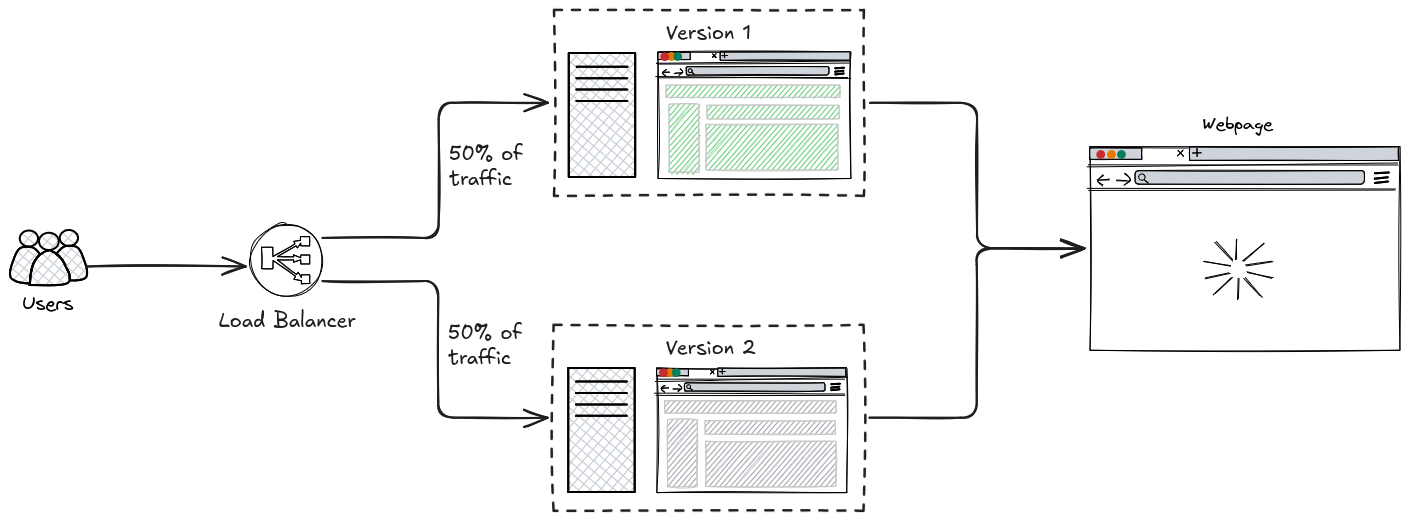
A/B testing and Canary Deployment allows you to route traffic between different versions of your application to compare performance, behavior, or user experience.
With Istio, you can control traffic without changing application code—just by configuring the service mesh.
Replicate this using this repo.
1kubectl apply -k kube/ab-testing/demo
Table of Contents
A/B Testing vs Canary Deployment
| Aspect | Canary Deployment | A/B Testing |
|---|---|---|
| Purpose | Safe rollout | Experimentation |
| Traffic split | Gradual (10% → 100%) | Fixed (often 50/50) |
| Decision basis | Errors, latency | User behavior, metrics |
| End goal | Replace old version | Pick best variant |
| Versions | Usually same feature | Different UX/features |
A/B Testing
Labels
Label your deployments properly.
 1apiVersion: apps/v1
 2kind: Deployment
 3metadata:
 4  labels:
 5    version: v1
 6  name: monitor-v1
 7  namespace: demo
 8spec:
 9  replicas: 1
10  selector:
11    matchLabels:
12      app: monitor
13      version: v1
14  template:
15    metadata:
16      labels:
17        app: monitor
18        version: v1
 1apiVersion: apps/v1
 2kind: Deployment
 3metadata:
 4  labels:
 5    version: v2
 6  name: monitor-v2
 7  namespace: demo
 8spec:
 9  replicas: 1
10  selector:
11    matchLabels:
12      app: monitor
13      version: v2
14  template:
15    metadata:
16      labels:
17        app: monitor
18        version: v2
Service
You can use one service like this.
 1apiVersion: v1
 2kind: Service
 3metadata:
 4  name: monitor
 5  namespace: demo
 6spec:
 7  ports:
 8  - name: http
 9    port: 8000
10    targetPort: 8000
11  selector:
12    app: monitor
Or split it using v1 and v2.
 1apiVersion: v1
 2kind: Service
 3metadata:
 4  name: monitor-v1
 5  namespace: demo
 6spec:
 7  ports:
 8  - name: http
 9    port: 8000
10    targetPort: 8000
11  selector:
12    app: monitor
13    version: v1
 1apiVersion: v1
 2kind: Service
 3metadata:
 4  name: monitor-v2
 5  namespace: demo
 6spec:
 7  ports:
 8  - name: http
 9    port: 8000
10    targetPort: 8000
11  selector:
12    app: monitor
13    version: v2
Either way would work but need to configure DestinationRule.
Destination Rule
This tells Istio about subsets (versions).
 1apiVersion: networking.istio.io/v1
 2kind: DestinationRule
 3metadata:
 4  name: monitor-destinationrule
 5  namespace: demo
 6spec:
 7  host: monitor
 8  subsets:
 9  - labels:
10      version: v1
11    name: v1
12  - labels:
13      version: v2
14    name: v2
Virtual Service
Route traffic between versions.
 1apiVersion: networking.istio.io/v1beta1
 2kind: VirtualService
 3metadata:
 4  name: route-ab-testing
 5  namespace: demo
 6spec:
 7  gateways:
 8  - demo-app-gateway
 9  hosts:
10  - '*'
11  http:
12  - match:
13    - uri:
14        prefix: /status
15    route:
16    - destination:
17        host: monitor
18        port:
19          number: 8000
20        subset: v1
21      weight: 50
22    - destination:
23        host: monitor
24        port:
25          number: 8000
26        subset: v2
27      weight: 50
Rollout Strategy
Unlike canary deployments, A/B testing keeps traffic split constant (e.g., 50/50) to compare user behavior between versions.
Roll-back Strategy
If something goes wrong, change the weight of version 2 to 0. This will route all traffic to version 1.
 1apiVersion: networking.istio.io/v1beta1
 2kind: VirtualService
 3metadata:
 4  name: route-ab-testing
 5  namespace: demo
 6spec:
 7  gateways:
 8  - demo-app-gateway
 9  hosts:
10  - '*'
11  http:
12  - match:
13    - uri:
14        prefix: /status
15    route:
16    - destination:
17        host: monitor
18        port:
19          number: 8000
20        subset: v1
21      weight: 100
22    - destination:
23        host: monitor
24        port:
25          number: 8000
26        subset: v2
27      weight: 0
Canary Deployment
You can use the same manifest discussed in A/B Testing. Just change the rollout Strategy.
Rollout Strategy
| Stage | v1 | v2 |
|---|---|---|
| Initial | 100% | 0% |
| Test | 90% | 10% |
| Expand | 70% | 30% |
| Scale | 50% | 50% |
| Final | 0% | 100% |
Observe Metrics
Use Istio tools:
- Kiali → traffic visualization
- Prometheus → metrics
- Grafana → dashboards
Key things to monitor:
- Error rates
- Latency
- Request volume
- User behavior