Kubernetes Monitoring & Logging

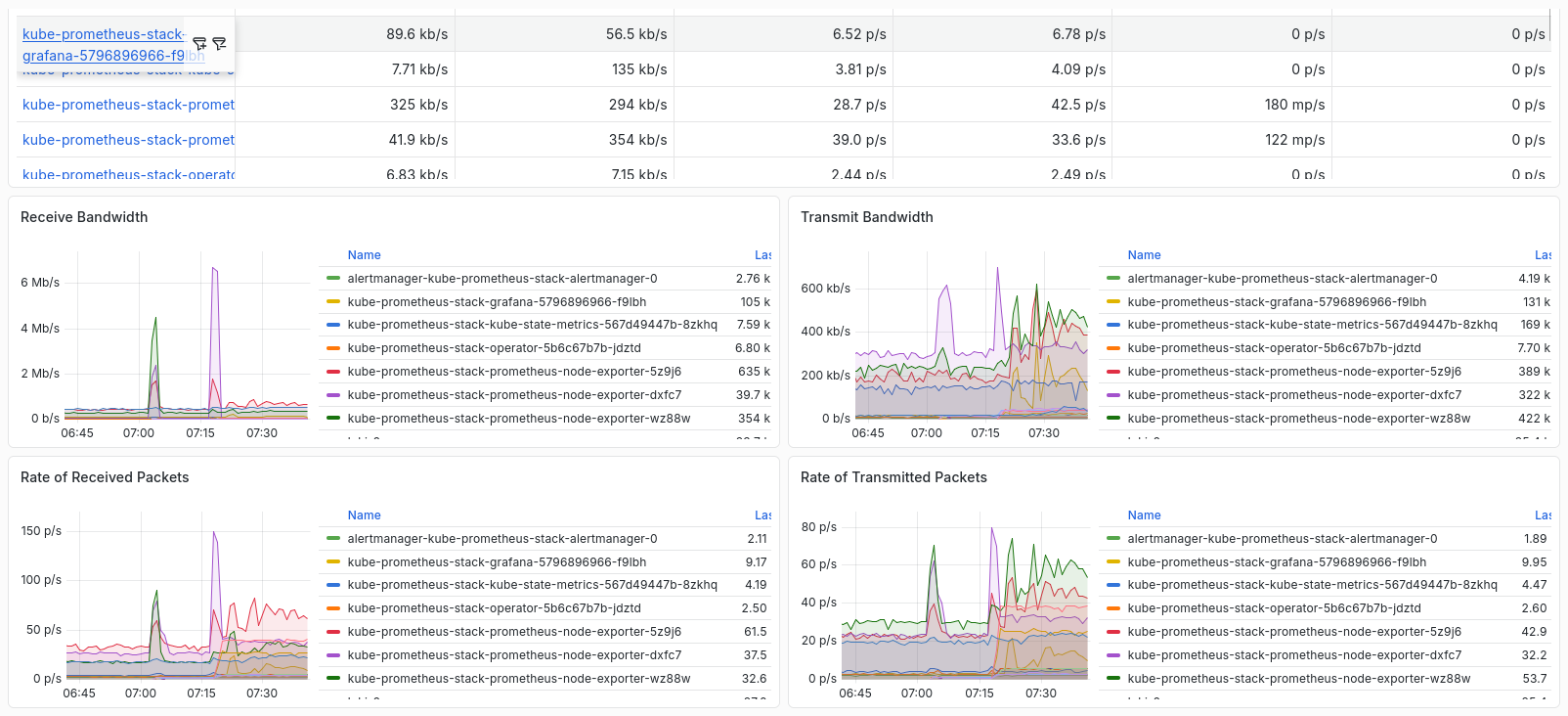
If you have used prometheus in your docker or podman environment then this is much easier to setup. Unlike in your docker/podman where you have to create the config and scrape config from scratch, in k8s some good helm repo are already available to use and do all that for you. Also Prometheus in Kubernetes has a dynamic service discovery, so any resources added to the cluster will autotmatically added and monitored.
For logging let’s integrate Loki, this is bundled with grafana.
I won’t go into much details about architecture, etc. It is better to deploy the monitoring and logging stack and you explore the dashboard.
Table of Contents
Deploy
Monitoring
Install via Helm.
This will install the default value of the helm chart.
- Prometheus
- Alertmanager
- Grafana
1kubectl create ns monitoring
2helm repo add prometheus-community https://prometheus-community.github.io/helm-charts
3helm repo update
4helm install kube-prometheus-stack prometheus-community/kube-prometheus-stack -n monitoring
To customized installation, extract helm values and edit to your liking.
1helm show values prometheus-community/kube-prometheus-stack > value.yaml
2helm install kube-prometheus-stack prometheus-community/kube-prometheus-stack -f value.yaml -n monitoring
This is a minimal manifest which enable Persisten Storage and add email alerting in alertmanager. There other options in routes availble, famous are slack and discord, please do check them.
value.yaml
 1alertmanager:
 2  enabled: true
 3  alertmanagerSpec:
 4    storage:
 5      volumeClaimTemplate:
 6        spec:
 7          storageClassName: rook-cephfs
 8          accessModes: ["ReadWriteOnce"]
 9          resources:
10            requests:
11              storage: 5Gi
12
13  config:
14    global:
15      resolve_timeout: 5m
16
17    route:
18      receiver: alert-emailer
19      group_wait: 30s
20      group_interval: 5m
21      repeat_interval: 12h
22      routes::
23        - receiver: alert-emailer
24          group_wait: 2m
25          continue: true
26
27    receivers:
28      - name: alert-emailer
29        email_configs:
30          - to: alerts@yourdomain.com
31            send_resolved: true
32            from: alerts@yourdomain.com
33            smarthost: mail.yourdomain.com:587
34            auth_username: alerts@yourdomain.com
35            auth_identity: alerts@yourdomain.com
36            auth_password: AveryStongPassword123!
37            require_tls: true
38
39prometheus:
40  enabled: true
41  prometheusSpec:
42    storageSpec:
43      volumeClaimTemplate:
44        spec:
45          storageClassName: rook-cephfs
46          accessModes: ["ReadWriteOnce"]
47          resources:
48            requests:
49              storage: 10Gi
50
51grafana:
52  enabled: true
53  persistence:
54    enabled: true
55    storageClassName: rook-cephfs
56    accessModes: ["ReadWriteOnce"]
57    size: 5Gi
1helm upgrade --install kube-prometheus-stack prometheus-community/kube-prometheus-stack -f value.yaml -n monitoring
If installation succeed.
 1NAME: kube-prometheus-stack
 2LAST DEPLOYED: Mon Mar 23 21:10:53 2026
 3NAMESPACE: monitoring
 4STATUS: deployed
 5REVISION: 1
 6TEST SUITE: None
 7NOTES:
 8kube-prometheus-stack has been installed. Check its status by running:
 9  kubectl --namespace monitoring get pods -l "release=kube-prometheus-stack"
10
11Get Grafana 'admin' user password by running:
12
13  kubectl --namespace monitoring get secrets kube-prometheus-stack-grafana -o jsonpath="{.data.admin-password}" | base64 -d ; echo
14
15Access Grafana local instance:
16
17  export POD_NAME=$(kubectl --namespace monitoring get pod -l "app.kubernetes.io/name=grafana,app.kubernetes.io/instance=kube-prometheus-stack" -oname)
18  kubectl --namespace monitoring port-forward $POD_NAME 3000
19
20Get your grafana admin user password by running:
21
22  kubectl get secret --namespace monitoring -l app.kubernetes.io/component=admin-secret -o jsonpath="{.items[0].data.admin-password}" | base64 --decode ; echo
23
24
25Visit https://github.com/prometheus-operator/kube-prometheus for instructions on how to create & configure Alertmanager and Prometheus instances using the Operator.
Get contents.
 1kubectl get pods -n monitoring
 2NAME                                                        READY   STATUS    RESTARTS   AGE
 3alertmanager-kube-prometheus-stack-alertmanager-0           2/2     Running   0          81s
 4kube-prometheus-stack-grafana-85cdd5d48d-5mdv9              3/3     Running   0          92s
 5kube-prometheus-stack-kube-state-metrics-567d49447b-g9l7x   1/1     Running   0          92s
 6kube-prometheus-stack-operator-5b6c67b7b-cbdkq              1/1     Running   0          92s
 7kube-prometheus-stack-prometheus-node-exporter-gxkbh        1/1     Running   0          92s
 8kube-prometheus-stack-prometheus-node-exporter-m7jms        1/1     Running   0          92s
 9kube-prometheus-stack-prometheus-node-exporter-ww2td        1/1     Running   0          92s
10prometheus-kube-prometheus-stack-prometheus-0               2/2     Running   0          81s
In production environment make sure to add Persistent Volume. If no PVC is defined, Prometheus data would be deleted if pod are restarted .
Logging
Usually Loki is deployed with Grafana, but for my dev environment I’ll be using the same namespace and reusing the Grafana pod deployed earlier.
Loki is more complicated to configure compared to prometheu stack, it will have to depend on what environment you are working on.
For production environment make sure you are using either High Availability Mode or Microservices Mode, make sure you have Object Storage available to use. Since I’m using a small cluster we’ll be using SingleBinary Mode.
Here’s a quck summary table comparing the modes.
| Deployment Mode | Scale | Storage Requirement | Environment |
|---|---|---|---|
| SingleBinary | Small, 1 pod | Local filesystem OK | Dev/test, small clusters |
| HA (High Availability) | Medium-large | Object storage preferred | Production, critical workloads |
| Microservices | Large, multi-component | Object storage required | Large enterprise, multi-tenant |
Export the loki chart values to inspect the deployment options.
1helm repo add grafana https://grafana.github.io/helm-charts
2helm repo update
3helm show values grafana/loki  > values.yaml
This is a minimal install using SingleBinary Mode.
value.yaml
 1deploymentMode: SingleBinary
 2
 3loki:
 4  auth_enabled: false
 5
 6  commonConfig:
 7    replication_factor: 1
 8
 9  storage:
10    type: filesystem
11
12  schemaConfig:
13    configs:
14      - from: 2024-01-01
15        store: tsdb
16        object_store: filesystem
17        schema: v13
18        index:
19          prefix: index_
20          period: 24h
21
22singleBinary:
23  replicas: 1
24
25  persistence:
26    enabled: true
27    storageClass: rook-cephfs
28    accessModes:
29      - ReadWriteMany
30    size: 10Gi
31
32# explicitly disable scalable components
33write:
34  replicas: 0
35read:
36  replicas: 0
37backend:
38  replicas: 0
Deploy.
1helm upgrade --install loki grafana/loki -n monitoring -f value.yaml
Expose Endpoint
Metallb
Using Metallb/Loadbalancer, edit service and change ClusterIP to LoadBalancer.
 1kubectl get svc -n  monitoring
 2NAME                                             TYPE        CLUSTER-IP      EXTERNAL-IP   PORT(S)                      AGE
 3alertmanager-operated                            ClusterIP   None            <none>        9093/TCP,9094/TCP,9094/UDP   5m27s
 4kube-prometheus-stack-alertmanager               ClusterIP   10.43.163.166   <none>        9093/TCP,8080/TCP            5m39s
 5kube-prometheus-stack-grafana                    ClusterIP   10.43.46.120    <none>        80/TCP                       5m39s
 6kube-prometheus-stack-kube-state-metrics         ClusterIP   10.43.224.131   <none>        8080/TCP                     5m39s
 7kube-prometheus-stack-operator                   ClusterIP   10.43.116.141   <none>        443/TCP                      5m39s
 8kube-prometheus-stack-prometheus                 ClusterIP   10.43.212.61    <none>        9090/TCP,8080/TCP            5m39s
 9kube-prometheus-stack-prometheus-node-exporter   ClusterIP   10.43.61.90     <none>        9100/TCP                     5m39s
10prometheus-operated                              ClusterIP   None            <none>        9090/TCP                     5m27s
 1# Grafana
 2kubectl edit svc kube-prometheus-stack-grafana -n monitoring
 3service/kube-prometheus-stack-grafana edited
 4
 5# Prometheus
 6kubectl edit svc kube-prometheus-stack-prometheus -n monitoring
 7service/kube-prometheus-stack-prometheus edited
 8
 9# Alermanager
10kubectl edit svc kube-prometheus-stack-alertmanager -n monitoring
11service/kube-prometheus-stack-alertmanager edited
Verify endpoints.
 1kubectl get svc -n monitoring
 2NAME                                             TYPE           CLUSTER-IP      EXTERNAL-IP       PORT(S)                         AGE
 3alertmanager-operated                            ClusterIP      None            <none>            9093/TCP,9094/TCP,9094/UDP      12m
 4kube-prometheus-stack-alertmanager               LoadBalancer   10.43.161.11    192.168.254.222   9093:30198/TCP,8080:31683/TCP   12m
 5kube-prometheus-stack-grafana                    LoadBalancer   10.43.74.225    192.168.254.220   80:32594/TCP                    12m
 6kube-prometheus-stack-kube-state-metrics         ClusterIP      10.43.209.174   <none>            8080/TCP                        12m
 7kube-prometheus-stack-operator                   ClusterIP      10.43.112.212   <none>            443/TCP                         12m
 8kube-prometheus-stack-prometheus                 LoadBalancer   10.43.30.133    192.168.254.221   9090:32616/TCP,8080:30470/TCP   12m
 9kube-prometheus-stack-prometheus-node-exporter   ClusterIP      10.43.52.148    <none>            9100/TCP                        12m
10prometheus-operated                              ClusterIP      None            <none>            9090/TCP                        12m
Loki does not have a UI, it is dependent with Grafana. Make sure to add Loki in sources when you access Grafana.
Ingress
Sample Ingress, this can also be enabled in the value.yaml file.
ingress-grafana.yaml
 1apiVersion: networking.k8s.io/v1
 2kind: Ingress
 3metadata:
 4  name: grafana
 5  annotations:
 6    cert-manager.io/cluster-issuer: "letsencrypt-prod"
 7spec:
 8  ingressClassName: nginx
 9  tls:
10  - hosts:
11    - grafana.yourdomain.com
12    secretName: grafana-tls
13  rules:
14  - host: grafana.yourdomain.com
15    http:
16      paths:
17      - pathType: Prefix
18        path: /
19        backend:
20          service:
21            name: kube-prometheus-stack-grafana
22            port:
23              number: 80
ingress-prometheus.yaml
 1apiVersion: networking.k8s.io/v1
 2kind: Ingress
 3metadata:
 4  name: prometheus-ingress
 5  annotations:
 6    cert-manager.io/cluster-issuer: "letsencrypt-prod"
 7spec:
 8  ingressClassName: nginx
 9  tls:
10  - hosts:
11    - prometheus.yourdomain.com
12    secretName: prometheus-tls
13  rules:
14  - host: prometheus.yourdomain.com
15    http:
16      paths:
17      - pathType: Prefix
18        path: /
19        backend:
20          service:
21            name: kube-prometheus-stack-prometheus
22            port:
23              number: 9090
ingress-alertmanager.yaml
 1apiVersion: networking.k8s.io/v1
 2kind: Ingress
 3metadata:
 4  name: alermanager-ingress
 5  annotations:
 6    cert-manager.io/cluster-issuer: "letsencrypt-prod"
 7spec:
 8  ingressClassName: nginx
 9  tls:
10  - hosts:
11    - alertmanager.yourdomain.com
12    secretName: alertmanager-tls
13  rules:
14  - host: alertmanager.yourdomain.com
15    http:
16      paths:
17      - pathType: Prefix
18        path: /
19        backend:
20          service:
21            name: kube-prometheus-stack-alertmanager
22            port:
23              number: 9093