Istio: Routing

Modern applications are no longer built as single, monolithic systems—they’re composed of many small, interconnected services. Managing how these services communicate can quickly become complex, especially as systems scale. This is where Istio comes in.
Istio acts as a powerful service mesh that sits between your services and handles three critical concerns: traffic management, security, and observability.
With Istio, you gain fine-grained control over how traffic flows between services—enabling advanced deployment strategies like A/B testing and canary releases with ease. At the same time, it strengthens service-to-service security and provides deep visibility into your system through metrics, logs, and tracing.
For this post lets do a practical example in using istio.
Repo: mcbtaguiad/istio-demo
Table of Contents
Install
istioctl
Check this link for different option to install istio. For this example we’ll be using istioctl.
Download the istio release. This will add istio binary to $HOME/istio-<version>/bin.
1curl -L https://istio.io/downloadIstio | sh -
2export PATH="$PATH:$HOME/istio-<version>/bin"
Profile
An Istio profile is essentially a predefined configuration that determines which components are installed and how they’re set up.
We need to set the profile when installing istio, the default profile is recommended for production deployment. Check this link if you are interested in reading more about istio profile.
Platform
The platform setting tells Istio what kind of Kubernetes environment it is running on.
Install
1istioctl install --set profile=default --set values.global.platform=k3s
Notice if you visit the platform link kubeadm is missing. Since this is the standard for kubernetes you don’t need to set platform.
1istioctl install --set profile=default
Verify contents.
 1kubectl get all -n istio-system
 2NAME                                       READY   STATUS    RESTARTS   AGE
 3pod/istio-ingressgateway-b7dbbb799-j9rsg   1/1     Running   0          38s
 4pod/istiod-78bf998bbf-s4dnw                1/1     Running   0          50s
 5
 6NAME                                  TYPE           CLUSTER-IP      EXTERNAL-IP       PORT(S)                                      AGE
 7service/istio-ingressgateway          LoadBalancer   10.43.114.134   192.168.254.223   15021:30646/TCP,80:31914/TCP,443:30599/TCP   38s
 8service/istiod                        ClusterIP      10.43.82.154    <none>            15010/TCP,15012/TCP,443/TCP,15014/TCP        50s
 9service/istiod-revision-tag-default   ClusterIP      10.43.162.58    <none>            15010/TCP,15012/TCP,443/TCP,15014/TCP        26s
10
11NAME                                   READY   UP-TO-DATE   AVAILABLE   AGE
12deployment.apps/istio-ingressgateway   1/1     1            1           38s
13deployment.apps/istiod                 1/1     1            1           51s
14
15NAME                                             DESIRED   CURRENT   READY   AGE
16replicaset.apps/istio-ingressgateway-b7dbbb799   1         1         1       38s
17replicaset.apps/istiod-78bf998bbf                1         1         1       51s
18
19NAME                                                       REFERENCE                         TARGETS       MINPODS   MAXPODS   REPLICAS   AGE
20horizontalpodautoscaler.autoscaling/istio-ingressgateway   Deployment/istio-ingressgateway   cpu: 3%/80%   1         5         1          38s
21horizontalpodautoscaler.autoscaling/istiod                 Deployment/istiod                 cpu: 0%/80%   1         5         1          51s
Istio Environment
Istio Sidecar
In order to take advantage of all of Istio’s features, pods in the mesh must be running an Istio sidecar proxy.
Before we deploy an application let’s enable istio-injection=enabled to the namespace demo.
1kubectl label namespace demo istio-injection=enabled
Restart pod if pod is already present.
Gateway
There is two approach to expose and route traffic using istio: the traditional Istio API and the newer Kubernetes Gateway API.
Istio API (Traditional Approach)
This relies on a shared ingress gateway deployed in the istio-system namespace. The LoadBalancer is reused across applications in the cluster.
Uses Istio-specific resources like:
- Gateway
- VirtualService
1kubectl get pods -n istio-system
2NAME                                   READY   STATUS    RESTARTS   AGE
3istio-ingressgateway-b7dbbb799-j9rsg   1/1     Running   0          6h27m
4istiod-78bf998bbf-s4dnw                1/1     Running   0          6h27m
Gateway API (Kubernetes-Native Approach)
In this approach a LoadBalancer is always deployed on all injected namespace. This is more declarative, Kubernetive-native and future-proof, so this will be the approach used in this example/demo.
Uses Istio-specific resources like:
- Gateway
- HTTPRoute
Install Gateway-api.
1kubectl get crd gateways.gateway.networking.k8s.io &> /dev/null || \
2{ kubectl kustomize "github.com/kubernetes-sigs/gateway-api/config/crd?ref=v1.4.0" | kubectl apply -f -; }
3
4customresourcedefinition.apiextensions.k8s.io/backendtlspolicies.gateway.networking.k8s.io created
5customresourcedefinition.apiextensions.k8s.io/gatewayclasses.gateway.networking.k8s.io created
6customresourcedefinition.apiextensions.k8s.io/gateways.gateway.networking.k8s.io created
7customresourcedefinition.apiextensions.k8s.io/grpcroutes.gateway.networking.k8s.io created
8customresourcedefinition.apiextensions.k8s.io/httproutes.gateway.networking.k8s.io created
9customresourcedefinition.apiextensions.k8s.io/referencegrants.gateway.networking.k8s.io created
Deploy
Create gateway in demo namespace.
Clone this repo mcbtaguiad/istio-demo.
1git clone https://github.com/mcbtaguiad/istio-demo.git
2cd istio-demo
3kubectl create -f routing/gateway-api/gateway.yaml -n demo
Verify.
 1kubectl get all -n demo
 2NAME                                        READY   STATUS    RESTARTS   AGE
 3pod/demo-app-gateway-istio-dd965bf4-htppk   1/1     Running   0          45s
 4
 5NAME                             TYPE           CLUSTER-IP      EXTERNAL-IP       PORT(S)                        AGE
 6service/demo-app-gateway-istio   LoadBalancer   10.43.150.164   192.168.254.224   15021:32268/TCP,80:30324/TCP   45s
 7
 8NAME                                     READY   UP-TO-DATE   AVAILABLE   AGE
 9deployment.apps/demo-app-gateway-istio   1/1     1            1           45s
10
11NAME                                              DESIRED   CURRENT   READY   AGE
12replicaset.apps/demo-app-gateway-istio-dd965bf4   1         1         1       45s
Application
Diagram
Honestly use the book example of istio.
This is a slight derivation of the book example, just need an excuse to uplift my boredom so I created this app-also to fully understand istio (smirk).
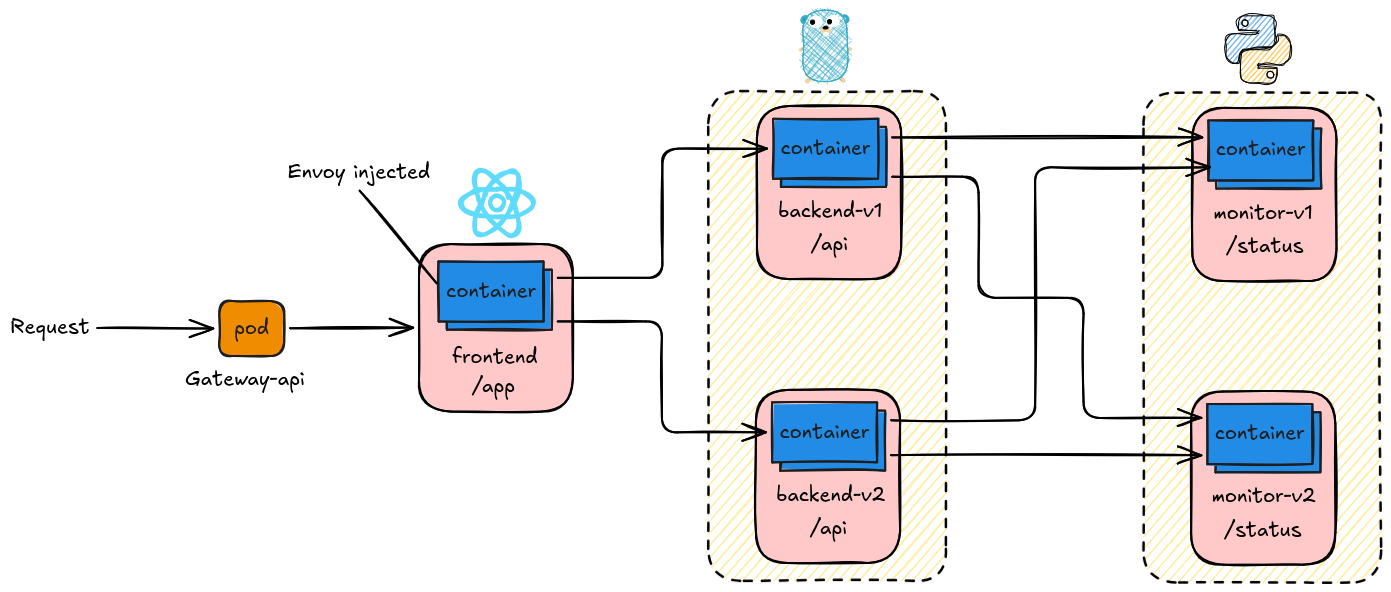
The diagram will make sense as we progress. Visit this diagram as we explore istio application.
Deploy Application
1kubectl create -k kube/demo/environments/demo
Verify and take notes of the content here specially the services.
 1kubectl get all -n demo
 2NAME                                         READY   STATUS    RESTARTS   AGE
 3pod/backend-v1-579f8fdc8b-mjm79              2/2     Running   0          4h12m
 4pod/backend-v2-7c6675d6b8-gbkkx              2/2     Running   0          4h12m
 5pod/demo-app-gateway-istio-6c4c964fb-svp6s   1/1     Running   0          9h
 6pod/frontend-6fc6b84f46-hc9g4                2/2     Running   0          3h54m
 7pod/monitor-v1-97778d5-ft2lq                 2/2     Running   0          4h12m
 8pod/monitor-v2-6f789fd44c-6hngx              2/2     Running   0          4h12m
 9pod/redis-79c7d6dd4-w8trn                    2/2     Running   0          4h12m
10
11NAME                             TYPE           CLUSTER-IP      EXTERNAL-IP       PORT(S)                        AGE
12service/backend                  ClusterIP      10.43.90.82     <none>            3000/TCP                       4h12m
13service/backend-v1               ClusterIP      10.43.240.7     <none>            3000/TCP                       4h12m
14service/backend-v2               ClusterIP      10.43.146.111   <none>            3000/TCP                       4h12m
15service/demo-app-gateway-istio   LoadBalancer   10.43.7.6       192.168.254.221   15021:30942/TCP,80:32687/TCP   9h
16service/frontend                 ClusterIP      10.43.130.214   <none>            80/TCP                         4h12m
17service/monitor                  ClusterIP      10.43.129.195   <none>            8000/TCP                       4h12m
18service/monitor-v1               ClusterIP      10.43.108.137   <none>            8000/TCP                       4h12m
19service/monitor-v2               ClusterIP      10.43.190.193   <none>            8000/TCP                       4h12m
20service/redis                    ClusterIP      10.43.125.209   <none>            6379/TCP                       4h12m
21
22NAME                                     READY   UP-TO-DATE   AVAILABLE   AGE
23deployment.apps/backend-v1               1/1     1            1           4h12m
24deployment.apps/backend-v2               1/1     1            1           4h12m
25deployment.apps/demo-app-gateway-istio   1/1     1            1           9h
26deployment.apps/frontend                 1/1     1            1           4h12m
27deployment.apps/monitor-v1               1/1     1            1           4h12m
28deployment.apps/monitor-v2               1/1     1            1           4h12m
29deployment.apps/redis                    1/1     1            1           4h12m
30
31NAME                                               DESIRED   CURRENT   READY   AGE
32replicaset.apps/backend-v1-579f8fdc8b              1         1         1       4h12m
33replicaset.apps/backend-v2-7c6675d6b8              1         1         1       4h12m
34replicaset.apps/demo-app-gateway-istio-6c4c964fb   1         1         1       9h
35replicaset.apps/frontend-6fc6b84f46                1         1         1       3h54m
36replicaset.apps/frontend-c7dbbbf6c                 0         0         0       4h12m
37replicaset.apps/monitor-v1-97778d5                 1         1         1       4h12m
38replicaset.apps/monitor-v2-6f789fd44c              1         1         1       4h12m
39replicaset.apps/redis-79c7d6dd4                    1         1         1       4h12m
Routing
Gateway
The key here is we want to control the traffic going to the application using istio, if you look at the diagram we have version 1 and version 2 on backend and monitor service. That’s were istio routing comes along, let’s demostrate that here.
Througout the routing example, make sure to always reference the gateway we created ealier.
1spec:
2  parentRefs:
3    - name: demo-app-gateway
Default Routing / Round Robin
In here we want to balance the route to both version 1 and version 2 on frontend and backend.
Create the HTTPRoute.
route-round-robin.yaml
 1apiVersion: gateway.networking.k8s.io/v1
 2kind: HTTPRoute
 3metadata:
 4  name: demo-app-rr
 5spec:
 6  parentRefs:
 7    - name: demo-app-gateway
 8  rules:
 9    # Backend API
10    - matches:
11        - path:
12            type: RegularExpression
13            value: /api/.*
14      backendRefs:
15        - name: backend
16          port: 3000
17
18    # Monitor /status
19    - matches:
20        - path:
21            type: PathPrefix
22            value: /status
23      backendRefs:
24        - name: monitor
25          port: 8000
26
27    # Frontend /app
28    - matches:
29        - path:
30            type: PathPrefix
31            value: /app
32      backendRefs:
33        - name: frontend
34          port: 80
1kubectl create -f routing/gateway-api/route-round-robin.yaml -n demo
This will use as the services bellow as backendRefs.
1backend                  ClusterIP      10.43.90.82     <none>            3000/TCP                       4h14m
2frontend                 ClusterIP      10.43.130.214   <none>            80/TCP                         4h14m
3monitor                  ClusterIP      10.43.129.195   <none>            8000/TCP                       4h14m
Analyze Istio configuration for issues. This will report any configuration problems.
1istioctl analyze -n demo
Verify using the gateway endpoint - check the IP on your gateway-api service.
1# app landing page
2http://192.168.254.221/app
3
4# monitor
5http://192.168.254.221/status
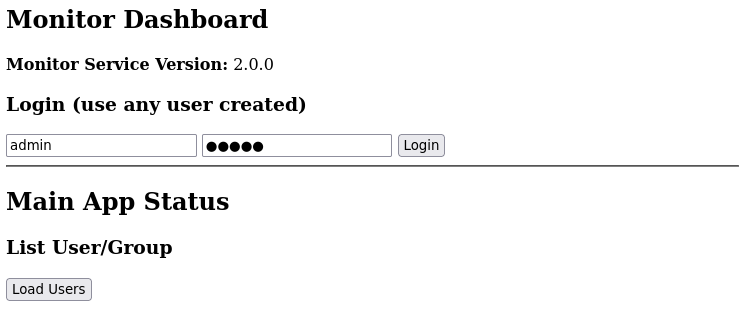
Cycle through /login, /register and /backend, you’ll notice the version is changing randomly.
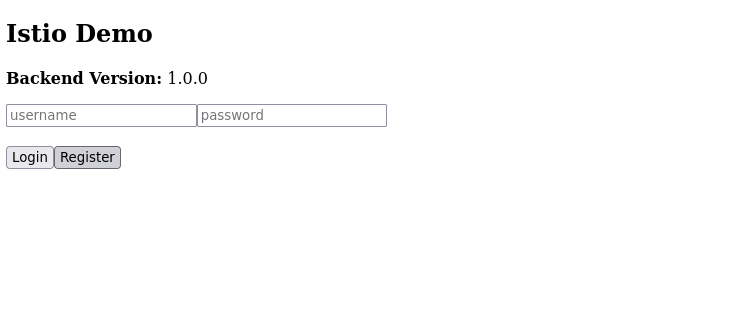
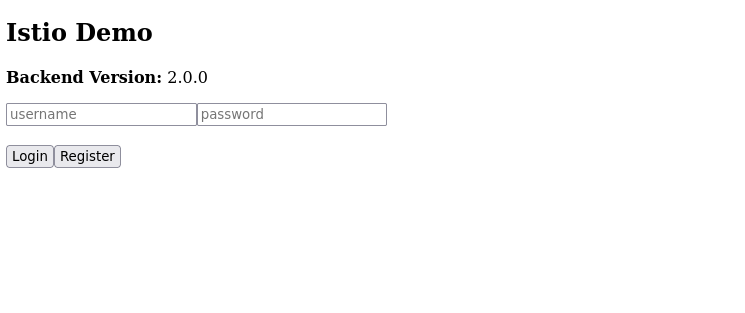
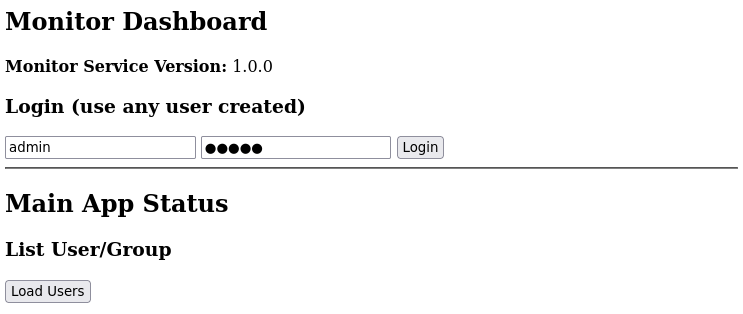
If you are curious about Path Matching, look at the table below.
| Match Type | Description | Example |
|---|---|---|
Exact |
Matches the path exactly | /login matches only /login |
Prefix |
Matches the path and any sub-paths | /app matches /app, /app/page1, /app/api |
RegularExpression |
Matches paths using a regex | /app/.* matches /app/page1 and /app/page2 |
Route to Specific Version
In here we route backend to version 2 and monitor to versin 1 exclusively.
route-to-specific-version.yaml
 1apiVersion: gateway.networking.k8s.io/v1
 2kind: HTTPRoute
 3metadata:
 4  name: demo-app-spec-ver
 5spec:
 6  parentRefs:
 7    - name: demo-app-gateway
 8  rules:
 9    #  Backend API
10    - matches:
11        - path:
12            type: RegularExpression
13            value: /api/.*
14      backendRefs:
15        - name: backend-v2
16          port: 3000
17
18    #  Monitor /status
19    - matches:
20        - path:
21            type: PathPrefix
22            value: /status
23      backendRefs:
24        - name: monitor-v1
25          port: 8000
26
27    # Frontend /app
28    - matches:
29        - path:
30            type: PathPrefix
31            value: /app
32      backendRefs:
33        - name: frontend
34          port: 80
1kubectl create -f routing/gateway-api/route-to-specific-version.yaml -n demo
Route Specific User
In this setup, the Go application authenticates users using JWT (JSON Web Tokens). After a successful login, user-specific information (e.g., username or role) is extracted from the JWT and injected into a custom HTTP header, such as:
1x-user: jonathan
Of course this will depend on how you create your application.
User jonathan will be routed to version 1 and all other users to version 2.
To make it easier to debug or demonstrate lets add a ResponseHeaderModifier.
1      filters:
2        - type: ResponseHeaderModifier
3          responseHeaderModifier:
4            add:
5              - name: x-version
6                value: "1.0.0"
route-to-user.yaml
 1apiVersion: gateway.networking.k8s.io/v1
 2kind: HTTPRoute
 3metadata:
 4  name: demo-app-route-user-specific
 5spec:
 6  parentRefs:
 7    - name: demo-app-gateway
 8  rules:
 9    #  Backend API
10    - matches:
11      - headers:
12        - name: x-user
13          type: Exact
14          value: "jonathan"
15        path:
16          type: RegularExpression
17          value: /api/.*
18      filters:
19        - type: ResponseHeaderModifier
20          responseHeaderModifier:
21            add:
22              - name: x-version
23                value: "1.0.0"
24      backendRefs:
25        - name: backend-v1
26          port: 3000
27
28    - matches:
29        - path:
30            type: RegularExpression
31            value: /api/.*
32      filters:
33        - type: ResponseHeaderModifier
34          responseHeaderModifier:
35            add:
36              - name: x-version
37                value: "2.0.0"
38      backendRefs:
39        - name: backend-v2
40          port: 3000
41
42
43    #  Monitor /status
44    - matches:
45        - path:
46            type: PathPrefix
47            value: /status
48      backendRefs:
49        - name: monitor
50          port: 8000
51
52    #  SPA catch-all
53    - matches:
54
55        - path:
56            type: PathPrefix
57            value: /app
58      backendRefs:
59        - name: frontend
60          port: 80
1kubectl create -f routing/gateway-api/route-to-user.yaml -n demo
Get user token. You’ll notice that request is always send through istio-envoy. User jonathan is routed to version 1.
 1curl -i -X POST http://192.168.254.221/api/login  -H "Content-Type: application/json"   -d '{"username":"jonathan","password":"123"}'
 2HTTP/1.1 200 OK
 3vary: Origin
 4date: Sat, 28 Mar 2026 10:20:22 GMT
 5content-length: 170
 6content-type: text/plain; charset=utf-8
 7x-envoy-upstream-service-time: 85
 8server: istio-envoy
 9x-version: 2.0.0
10
11curl -i http://192.168.254.221/api/users \
12  -H "Authorization: Bearer eyJhbGciOiJIUzI1NiIsInR5cCI6IkpXVCJ9.eyJleHAiOjE3NzQ3Nzk2MjIsImlzcyI6ImRlbW8tYXBwIiwidXNlcm5hbWUiOiJqb25hdGhhbiJ9.QRpu3WT3yHuMz5RwZmXsKNTfD2VtJf21XlZcD6Jg3ak" \
13  -H "x-user: jonathan"
14HTTP/1.1 200 OK
15vary: Origin
16date: Sat, 28 Mar 2026 10:20:57 GMT
17content-length: 477
18content-type: text/plain; charset=utf-8
19x-envoy-upstream-service-time: 9
20server: istio-envoy
21x-version: 1.0.0
22
23{"total":12,"users":[{"username":"3213","group":"alpha"},{"username":"user001","group":"alpha"},{"username":"user002","group":"beta"},{"username":"test","group":"alpha"},{"username":"admin","group":"alpha"},{"username":"user004","group":"beta"}
Inspect x-version: 1.0.0.
Test if other users are routed to version 2
 1curl -i -X POST http://192.168.254.221/api/login  -H "Content-Type: application/json"   -d '{"username":"user001","password":"123"}'
 2HTTP/1.1 200 OK
 3vary: Origin
 4date: Sat, 28 Mar 2026 10:29:55 GMT
 5content-length: 169
 6content-type: text/plain; charset=utf-8
 7x-envoy-upstream-service-time: 98
 8server: istio-envoy
 9x-version: 2.0.0
10
11{"token":"eyJhbGciOiJIUzI1NiIsInR5cCI6IkpXVCJ9.eyJleHAiOjE3NzQ3ODAxOTUsImlzcyI6ImRlbW8tYXBwIiwidXNlcm5hbWUiOiJ1c2VyMDAxIn0.OhnP-b6wFqJI1eUf0dyMhISoby49iPgY_Rv0Sy-XWTY"}
12
13curl -i http://192.168.254.221/api/users \
14  -H "Authorization: Bearer eyJhbGciOiJIUzI1NiIsInR5cCI6IkpXVCJ9.eyJleHAiOjE3NzQ3ODAxOTUsImlzcyI6ImRlbW8tYXBwIiwidXNlcm5hbWUiOiJ1c2VyMDAxIn0.OhnP-b6wFqJI1eUf0dyMhISoby49iPgY_Rv0Sy-XWTY" \
15  -H "x-user: user001"
16HTTP/1.1 200 OK
17vary: Origin
18date: Sat, 28 Mar 2026 10:30:43 GMT
19content-length: 477
20content-type: text/plain; charset=utf-8
21x-envoy-upstream-service-time: 11
22server: istio-envoy
23x-version: 2.0.0
24
25{"total":12,"users":[{"username":"3213","group":"alpha"},{"username":"user001","group":"alpha"},{"username":"user002","group":"beta"},{"username":"test","group":"alpha"},{"username":"admin","group":"alpha"},{"username":"user004","group":"beta"},{"username":"jonathan","group":"alpha"},{"username":"user005","group":"beta"},{"username":"123123","group":"beta"},{"username":"test001","group":"alpha"},{"username":"user003","group":"beta"},{"username":"jonthan","group":"beta"}]}
This verifies that user jonathan is routed to version 1 and other users are routed to version 2.
Deployment/Testing Strategies
With this we can build testing/deployment strategies like A/B, Canary and Blue/Green. I will discuss this on a separate post.