Cilium Network Policy: Kubernetes NetworkPolicy

When people first start working with Cilium policies, the easiest way to understand them is to group them into two simple ideas:
- Who can talk to what?
- What they’re allowed to do once connected?
That mental model maps directly to how Cilium builds policy enforcement—from basic workload isolation all the way up to application-aware HTTP filtering.
If you already think in terms of namespace rules and Layer 7 rules like HTTP GET/POST like we did in Istio, you’re already on the right track. Cilium simply expands that model into something much more powerful and much more granular.
Table of Contents
Kubernetes NetworkPolicy
This is the standard Kubernetes-native policy object. That means you can write standard Kubernetes NetworkPolicy objects and still have them enforced by Cilium, without changing the API.
It provides basic network controls such as:
- ingress and egress rules
- pod selectors
- namespace selectors
- port restrictions
This is useful for simple traffic control such as allowing one namespace to reach another or limiting traffic to specific ports.
However, native Kubernetes NetworkPolicy is limited to Layer 3 and Layer 4. It does not understand application-layer protocols like HTTP, DNS, or gRPC, and it does not support Cilium-specific features like FQDN filtering or deny rules.
Example
Let’s use the echo pod in this post.
Policy
This example allows only pods in the universe namespace to access pods labeled app=echo in the echo namespace on TCP port 80.
allow-universe-to-echo.yaml
 1apiVersion: networking.k8s.io/v1
 2kind: NetworkPolicy
 3metadata:
 4  name: allow-universe-to-echo
 5  namespace: echo
 6spec:
 7  podSelector:
 8    matchLabels:
 9      app: echo
10
11  policyTypes:
12    - Ingress
13
14  ingress:
15    - from:
16        - namespaceSelector:
17            matchLabels:
18              kubernetes.io/metadata.name: universe
19      ports:
20        - protocol: TCP
21          port: 80
Apply policy in echo namespace.
1kubectl apply -f allow-universe-to-echo.yaml
App
And deploy curl app in both universe and galaxy namespace.
1kubectl run curl \
2  --image=curlimages/curl:latest \
3  --restart=Never \
4  --labels="app=curl" \
5  -n universe \
6  --command -- sleep infinity
1kubectl run curl \
2  --image=curlimages/curl:latest \
3  --restart=Never \
4  --labels="app=curl" \
5  -n galaxy \
6  --command -- sleep infinity
Verify
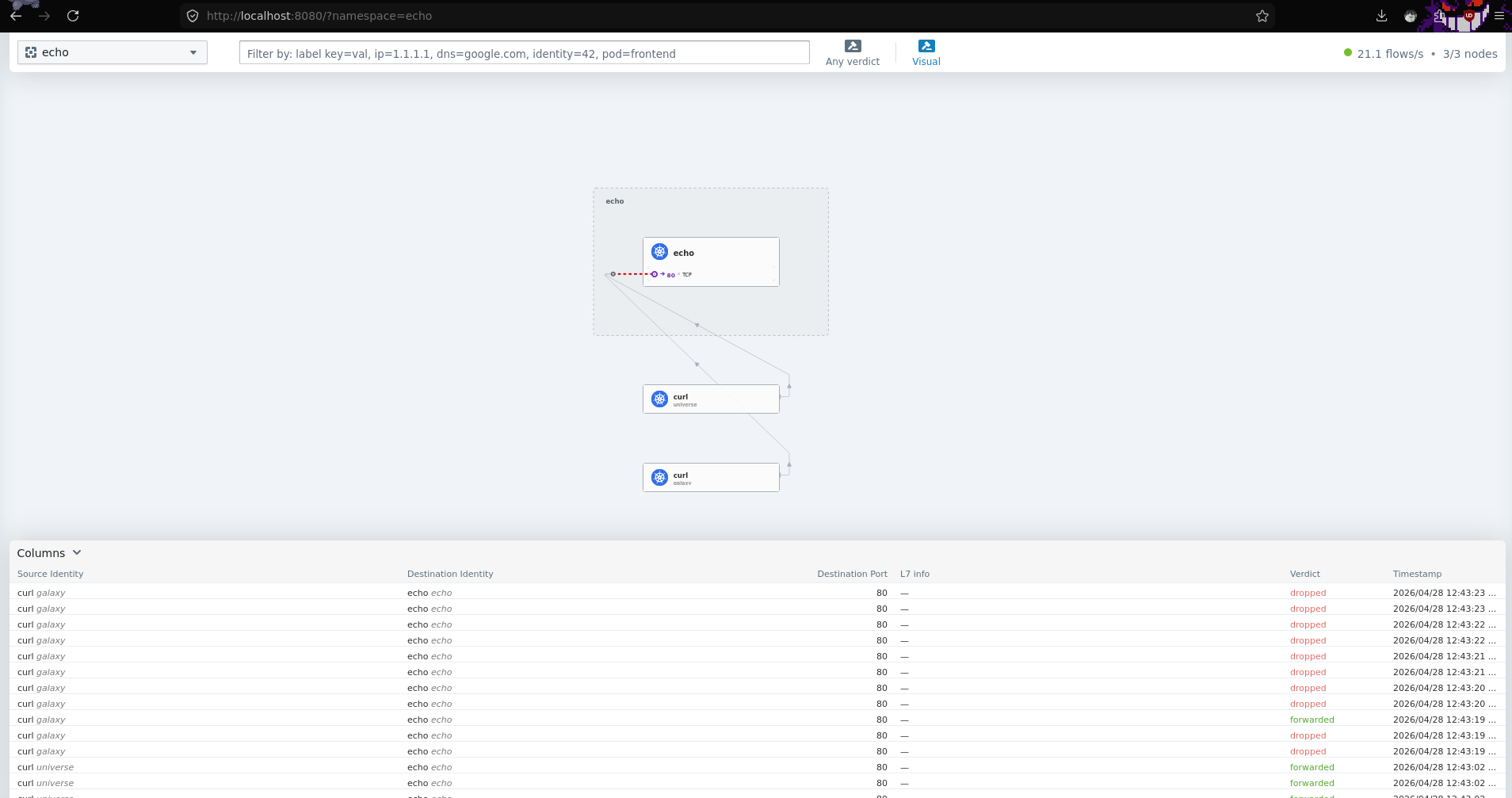
Verify, notice that curl pod in galaxy namespace cannot reach echo pod in echo namespace.
1kubectl exec -it curl -n universe -- sh
2~ $ curl -m 5 -s -o /dev/null -w "%{http_code}\n" echo.echo.svc.cluster.local
3200
4
5kubectl exec -it curl -n galaxy -- sh
6~ $ curl -m 5 -s -o /dev/null -w "%{http_code}\n" echo.echo.svc.cluster.local
7000
Hubble
We can also confirm this in Cilium using hubble.
 1kubectl exec -it cilium-k6cb4 -n kube-system -- hubble observe
 2Apr 27 11:26:11.993: universe/curl:33156 (ID:93339) -> echo/echo-5dc8fd6498-kfvj6:80 (ID:71969) policy-verdict:none TRAFFIC_DIRECTION_UNKNOWN ALLOWED (TCP Flags: SYN)
 3Apr 27 11:26:11.993: universe/curl:33156 (ID:93339) -> echo/echo-5dc8fd6498-kfvj6:80 (ID:71969) to-endpoint FORWARDED (TCP Flags: SYN)
 4Apr 27 11:26:11.993: universe/curl:33156 (ID:93339) <- echo/echo-5dc8fd6498-kfvj6:80 (ID:71969) to-endpoint FORWARDED (TCP Flags: SYN, ACK)
 5Apr 27 11:26:11.993: universe/curl:33156 (ID:93339) -> echo/echo-5dc8fd6498-kfvj6:80 (ID:71969) to-endpoint FORWARDED (TCP Flags: ACK)
 6Apr 27 11:26:11.993: universe/curl:33156 (ID:93339) -> echo/echo-5dc8fd6498-kfvj6:80 (ID:71969) to-endpoint FORWARDED (TCP Flags: ACK, PSH)
 7Apr 27 11:26:11.993: universe/curl:33156 (ID:93339) <- echo/echo-5dc8fd6498-kfvj6:80 (ID:71969) to-endpoint FORWARDED (TCP Flags: ACK, PSH)
 8Apr 27 11:26:11.994: universe/curl:33156 (ID:93339) -> echo/echo-5dc8fd6498-kfvj6:80 (ID:71969) to-endpoint FORWARDED (TCP Flags: ACK, FIN)
 9Apr 27 11:26:11.994: universe/curl:33156 (ID:93339) <- echo/echo-5dc8fd6498-kfvj6:80 (ID:71969) to-endpoint FORWARDED (TCP Flags: ACK, FIN)
10Apr 27 11:26:11.995: universe/curl:33156 (ID:93339) -> echo/echo-5dc8fd6498-kfvj6:80 (ID:71969) to-endpoint FORWARDED (TCP Flags: ACK)
1kubectl exec -it cilium-k6cb4 -n kube-system -- hubble observe
2Apr 27 11:27:13.848: galaxy/curl:55360 (ID:102210) <> echo/echo-5dc8fd6498-kfvj6:80 (ID:71969) policy-verdict:none TRAFFIC_DIRECTION_UNKNOWN DENIED (TCP Flags: SYN)
3Apr 27 11:27:13.848: galaxy/curl:55360 (ID:102210) <> echo/echo-5dc8fd6498-kfvj6:80 (ID:71969) Policy denied DROPPED (TCP Flags: SYN)
Notice the ID tag on each pod, to make debugging and observability easier we can extract it using command below.
1kubectl get cep curl -n universe -o jsonpath='{.status.identity.id}'
293339
3
4kubectl get cep curl -n galaxy -o jsonpath='{.status.identity.id}'
5102210
Now we can use hubble like this.
1kubectl exec -it cilium-k6cb4 -n kube-system -- hubble observe 93339
2kubectl exec -it cilium-k6cb4 -n kube-system -- hubble observe 102210
UI
You can also observe this in the Hubble UI. Port-forward the service or attach it to an IP pool.
1kubectl port-forward svc/hubble-ui 8080:80 -n kube-system